
You know what’s annoying?
Manually uploading videos.
Every. Single. Time.
You film something. Export it. Open YouTube. Fill out the title. Set the privacy. Click upload. Wait. Repeat.
It’s a bottleneck. And for anyone uploading regularly, it’s a real time-suck.
So I automated it using Make.com.
And it changed everything.
Now, I simply drop a file into a folder on Google Drive, and it ends up on YouTube, ready to go.
No manual steps. No extra clicks. No forgetting what got uploaded and what didn’t.
And I’m gonna show you exactly how it works.
Even better, I’ll give you the exact scenario blueprint I use so you can download it and set it up in your own Make.com account.
More on that later.
What This Automation Does
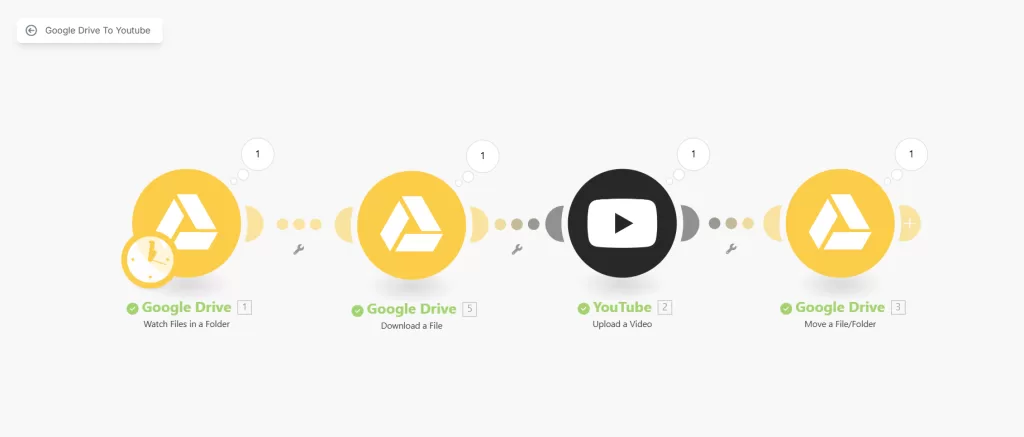
The automation watches a specific folder in Google Drive.
You add a video file.
It grabs that file, uploads it straight to YouTube as an unlisted video, and then moves it to a “done” folder.
That’s it.
No notifications. No login. No wasted time.
Who It’s For
If you’re a content creator, this is a no-brainer.
You make the content. You drop the file. Done.
If you’re a coach or course creator, it keeps your pipeline flowing. Record once. Drop. Repeat.
If your editor or VA handles your uploads, this saves them (and you) time.
You don’t need to micromanage. No need to check if it’s published.
If you batch content ahead of time, it’s plug-and-go.
No stress during launch week.
Why This Is a Game-Changer
It saves you hours.
You don’t have to touch YouTube every time you’ve got a video ready.
No more late-night uploads.
No more “did I already post this?” moments.
It scales with you. If you do one video a week or thirty, it doesn’t care. It just runs.
It makes you look like a machine, consistent, efficient, on-brand.
Customizations and Upgrades
This is just the base.
You could add automatic descriptions using metadata or ai modules.
You could pair it with another automation to send a tweet or an email when something gets published.
The point is, it’s flexible.
This is just one lane on a much bigger highway.
How to Set It Up
I’ve packaged the exact Make.com scenario I use into a downloadable blueprint.
All you need to do is download it, import it into your Make.com account, and connect your Google Drive and YouTube accounts.
No need to build it from scratch. It’s plug-and-play.
And yes, the blueprint link is right here below:
Import it. Connect it. And you’re live.
This setup saved me hours.
It’s not just about saving time, though. It’s about creating smoother systems.
Removing friction. And making content delivery automatic.
If you upload to YouTube regularly, this is a cheat code.
And now, you’ve got it too.
So go ahead. Download it. Use it. Share it.