Posting on Instagram every day?
It’s like doing laundry, nobody loves it, but it piles up fast.
You open Canva. Make something pretty. Download it. Then what?
Open Instagram. Upload. Write a caption (ugh). Find hashtags. Post.
Now imagine doing that for 30 days straight.
Feels like you’re doing admin work for a brand you barely have time to grow.
So I built a shortcut. A cheat code. An automation that takes your Canva design and fires it straight to your Instagram caption and all.
Zero hands involved.
Built it on Make.com, and yeah, you can use it too. I’ll drop the blueprint at the end.
Why Posting Manually Sucks the Life Out of You
Here’s the problem.
Creating is fun… until it turns into a checklist.
You spend your energy designing. Then burn more downloading, uploading, copy-pasting, caption writing, and remembering what hashtags are even trending.
Batch-creating designs in Canva for 30 or 90 days? Smart move.
Still posting them one by one? That’s like meal prepping for the week… and still cooking every night.
We’ve all been there. Time to escape.
The Automation Blueprint That Fixes It
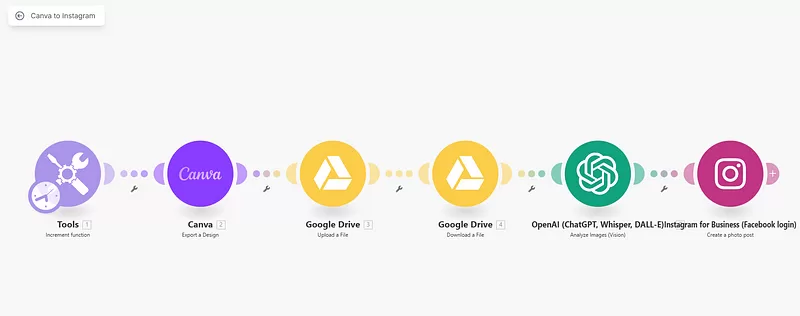
Built on Make.com, and it does all this:
Pulls your Canva design
You tell it which design to grab. It gets the PNG. Like a loyal butler with WiFi.
Uploads it to Google Drive
This is your temp vault. It parks the file here while prepping the next step.
Retrieves it like a pro
Dusts it off, formats it, hands it over to the brainy part.
Feeds it to GPT-4o
This is where the magic happens. AI looks at your image and whips up a caption with hashtags. It’s like your own social media copywriter minus the invoice.
Posts it to Instagram
Image + caption goes live on your business account. No thumbs needed.
It’s five steps. But to you, it’s one click.
And Yes, It Can Post Automatically Every Day
This is the real kicker.
You bulk-create content in Canva 30, 60, 90 posts in one shot using their bulk-create tool.
Then let this automation run once a day, twice a day, or whenever you want.
While you’re asleep, busy, or bingeing Netflix, it’s posting like clockwork.
Your account stays active. You stay chill.
Why This Automation Wins
Look, time saved is great.
But what this really gives you is leverage.
You work once. And it works every day.
- No missed days
- No “what should I post?” panic
- No late-night caption-writing regret
- No burnout pretending you’re a one-person media agency
You become consistent without thinking about it.
And that’s what separates people who grow from people who quit.
Want It? Here’s How to Use It
Simple steps. No code. No drama.
1. Download the blueprint file: I’m not keeping it hostage. It’s yours. Click Here.
2. Import into Make.com: Log in, and drag the file in. That’s it.
3. Connect the dots: Canva, Google Drive, Instagram, OpenAI plug in your accounts. Just once.
4. Drop your Canva Design ID: This tells the automation what to post. You can swap IDs anytime.
5. Run it or schedule it: Once a day? Twice? Mondays only? It’s your world.
What You Need
To make this work, you’ll need:
- Make.com account (obviously)
- Canva account with your designs (use bulk-create!)
- Google Drive account (for the file relay)
- Instagram Business account (not personal Meta rules)
- OpenAI API (GPT-4o for captions)
This isn’t a nice-to-have.
It’s a straight-up productivity power move.
One automation replaces five boring tasks.
You stop wasting energy on routine and start focusing on what actually grows your brand.
If you’ve got Canva content sitting there waiting, this automation will wake it up and send it live. One post at a time. On schedule. No burnout.
Download the scenario. Set it up in 10 minutes. Save hours.
More automations like this are coming, so if you’re done being your own unpaid intern, stick around.