Author: Ash

  • What I Learnt from Google Prompting Essentials Course

    What I Learnt from Google Prompting Essentials Course

    Ever wonder how to actually get ChatGPT or Google’s Gemini to do what you want?

    I did.

    That’s why I tried Google’s Prompting Essentials course.

    If you are looking for a certification then here is the Coursera Link https://www.coursera.org/learn/google-prompting-essentials

    And if you just want to learn then here is the youtube link

    Here’s the info on what I learned.

    Prompting Essentials

    The course started with the basics.

    What’s a prompt anyway?

    It’s just telling the AI what you want.

    Think of it like giving instructions to a super-smart, but kinda clueless, assistant.

    You gotta be clear.

    You gotta be specific.

    And sometimes, you gotta experiment.

    They talked about context.

    This is huge.

    The AI needs background info.

    The more it knows, the better it performs.

    Like, if you ask it to write a poem, tell it what kind of poem.

    Who’s the audience?

    What’s the tone?

    Prompting Techniques

    Then, they got into the practical stuff.

    How do you actually use prompts for real-world tasks?

    They covered everything.

    From writing emails to brainstorming ideas.

    Even data analysis and presentations.

    One thing that stuck out was using different modalities.

    This means combining text with images.

    Or even code.

    It’s like giving the AI a multi-sensory experience.

    The results can be pretty wild.

    Advanced Prompting

    This is where things got interesting.

    They talked about prompt chaining.

    This is like breaking down a big problem into smaller ones.

    And using the AI to solve each piece.

    Then, they introduced AI agents which are like AI specialists.

    You can create agents for different tasks.

    Like a marketing agent.

    Or a coding agent.

    It’s like having a team of AI experts at your fingertips.

    Responsible AI

    Finally, they touched on responsible AI.

    This is super important.

    We gotta be aware of bias.

    We gotta check the AI’s work.

    And we gotta be transparent about using AI.

    It’s all about using AI work responsibly.

    Key Takeaways

    Here’s a quick recap of the important info I picked up:

    • Clarity is King: Be crystal clear in your prompts. No vague requests.
    • Context Matters: Give the AI the backstory. The more info, the better the output.
    • Iteration is Key: Don’t expect perfection on the first try. Refine your prompts.
    • Modalities Multiply: Combine text, images, and other inputs for richer results.
    • Chaining for Complexity: Break down big tasks into smaller, manageable prompts.
    • Agents for Expertise: Create specialized AI agents for different areas.
    • Responsibility First: Be mindful of bias and ethical considerations.

    Prompting Google Gemini

    This course was an eye-opener.

    It showed me how powerful prompting can be.

    It’s not just about asking the AI to do stuff.

    It’s about collaborating with it like its your friend or a colleague.

    It’s about unlocking its full potential.

    And honestly, it’s a skill that’s gonna be essential in the future.

    So, if you’re serious about using AI, learn to prompt.

    It’s the key to unlocking the power of any LLM.

  • ChatGPT Prompt For Medium Article Topic Ideas

    ChatGPT Prompt For Medium Article Topic Ideas

    I’ve been struggling with generating article ideas for Medium that truly resonate, and I know you have too.

    Do you ever find that your ChatGPT prompts give bland & uninspired titles?

    Have you tried a generic, short prompt and ended up with an output that barely scratches the surface?

    Let’s talk about a common mistake I’ve seen time and again.

    Most people use a very basic prompt like:

    “Give me 20 article ideas in dog food.”

    This is the kind of prompt everyone usually uses.

    It’s vague.

    It’s generic.

    It doesn’t tap into current trends, personal experiences, or the unique vibe that grabs your reader’s attention.

    And honestly? It gives you bad output.

    I used to rely on this short prompt too.

    I’d sit there, type it in, and then stare at the uninspiring list that ChatGPT gave.

    The results were dull, lacking context, and they didn’t capture the essence of what makes Medium articles engaging.

    That’s why I’m here to propose a better way.

    I developed a detailed prompt that takes your ideas from “meh” to “must-read.”

    This prompt is a blueprint for generating creative, clickbaity titles that hit every mark.

    I’ll walk you through why my prompt works so well.

    I want you to leave here feeling confident that your next prompt can produce article ideas that are relevant, practical, and engaging.

    The Common Mistake: A Very Bad Prompt Example

    Let’s start with that poor prompt many of us use.

    “Give me 20 article ideas in dog food.”

    Every sentence in that prompt is vague.

    There’s no context.

    There’s no instruction on the style or tone.

    There’s no direction to target current trends or emotional connection.

    It’s like trying to build a house without a blueprint.

    Why Is This Prompt So Bad?

    • Lack of Direction:
      You aren’t telling ChatGPT what topic of the niche you want to talk about or focus on. 
    • No Criteria Provided:
      It doesn’t mention the need for relevance, universality, or practicality. Without these details, the ideas come out generic and uninspired.
    • Missed Opportunity for Engagement:
      It doesn’t encourage a storytelling approach or emotional connection. It simply asks for a list, leaving out the magic of engaging writing.

    I remember the frustration of scrolling through a list of ideas that felt like they were written by a machine.

    No personality.

    No unique perspective.

    Just bland suggestions that didn’t spark any excitement.

    The Better Way

    Now, let’s talk about the prompt that works for me.

    This is the one that ensures your output is creative, engaging, and optimized for Medium’s audience and algorithms.

    Here’s the prompt I use for generating Medium article topic ideas:

    Prompt:

    Give me 20 Medium article titles in topic [TOPIC].
    Titles should be click baity and should satisfy any of the below values:
    - Relevance: They address current trends, societal shifts, and emerging technologies.
    - Universality: Many topics have broad appeal across different demographics.
    - Practical Value: They offer actionable advice or insights that readers can apply.
    - Emotional Connection: Personal stories and relatable content resonate deeply with readers.
    - Curiosity and Learning: They satisfy the desire to learn and understand new concepts.
    - Identify Gaps: Find topics within these niches that are underrepresented.
    - Unique Perspective: Offer fresh insights or challenge conventional wisdom.
    - Engaging Writing Style: Use storytelling techniques to captivate your audience.
    - Optimise for Medium: Understand Medium’s algorithms and audience preferences.
    - Community Engagement: Interact with readers and other writers to build a network.

    This prompt isn’t just a random list of instructions.

    It’s a well-thought-out structure that guides ChatGPT to produce content that’s both creative and targeted.

    How This Prompt Transforms Your Content Creation

    When I started using this prompt, the difference was like night and day.

    I moved from bland, uninspired titles to a list of dynamic, clickable headlines.

    Each title now comes with a clear purpose, a target audience, and a promise of valuable content.

    Here’s what I love about this approach:

    • Clarity:
      The prompt is crystal clear about what it needs. It leaves no room for guesswork.
    • Depth:
      By specifying the values, the output goes beyond surface-level ideas. It digs deep into what makes a title truly appealing.
    • Focus:
      The detailed instructions make sure that every generated title is aligned with the target audience’s interests and the platform’s style.
    • Actionability:
      Each title is a promise of practical, actionable advice or insight. It isn’t just about grabbing attention, it’s about delivering value.

    Imagine sitting down with a friend over coffee and brainstorming ideas that spark genuine interest.

    That’s the vibe this prompt creates.

    Additional Tips for Crafting the Perfect Prompt

    Here are some extra tips to keep your prompts sharp and effective:

    • Be Specific:
      The more specific your instructions, the better the output.
    • Think Like Your Audience:
      Ask yourself what your readers really want to know.
    • Incorporate Stories and Examples:
      This creates a personal connection with your audience.
    • Use Bullet Points:
      Break down complex instructions into bullet points.
    • Keep It Conversational:
      Write like you’re talking to a friend.
    • Test and Tweak:
      If the output isn’t perfect, adjust your prompt until it is.

    These aren’t just random tips.

    They’re the result of real-world experience and countless hours refining my approach to content creation.


    I know the struggle of starting with generic, uninspiring prompts all too well.

    But once you adopt a detailed, thoughtful prompt like the one I shared today, you’ll see a difference in your output.

    Every time I use this detailed prompt, I’m reminded that quality content starts with quality instructions.

    The difference between a bland idea and an engaging headline is all in the details.

  • How To Write An Article With ChatGPT That Feels Human-Written

    How To Write An Article With ChatGPT That Feels Human-Written

    Getting AI to write content that sounds natural, engaging, and ranks well isn’t always easy. 

    You might think a simple, short prompt will do the job, but that usually leads to generic and lifeless content.

    There’s a better way. 

    A well-written prompt tells the AI exactly what you need, ensuring that every detail is covered.

    Without it, you’re left with generic, one-size-fits-all content that fails to impress.

    A detailed prompt helps maintain consistency in tone and quality.

    It ensures that the content is unique, engaging, and SEO optimised.

    This clarity prevents the AI from wandering off track and delivering generic responses.

    When you know exactly what you want, the output hits the mark every time.

    I’ll explain exactly how to do this step by step.

    A Bad Example of a ChatGPT Prompt

    Let’s start by looking at a very basic example that many people use.

    Imagine someone simply typing

    “Write an article about Dog day care with SEO.”

    This prompt is too short and lacks depth.

    It doesn’t specify the tone, word count, or structure.

    The result is often a generic piece with no personality or detailed guidance.

    It’s like asking a chef to make dinner without mentioning the dish, the ingredients, or the style of cuisine.

    Most people rely on a simple prompt because it’s quick and easy.

    They assume that a simple instruction will work.

    But this approach doesn’t include the finer details that can make the content stand out.

    A short prompt leaves too much to interpretation.

    The AI may produce content that’s off-topic or too generic.

    It won’t have the structured headings or conversational style that modern SEO demands.

    In short, you’re likely to end up with content that doesn’t meet your expectations.

    A Better Way to do the same

    Let’s look at a far better approach, the optimized prompt.

    I Want You To Act As A Content Writer Very Proficient SEO Writer. 
    Do it step by step.
    First Create the Outline of the Article and the Second Should be the Article.
    Bold the Heading of the Article using Markdown language.
    Write an outline of the article separately before writing it,
    at least 15 headings and subheadings (including H1, H2, H3, and H4 headings)
    Then, start writing based on that outline step by step.
    Write a 2000+ words 100% Unique, SEO-optimized, Human-Written article
    in English with at least 15 headings and
    subheadings (including H1, H2, H3, and H4 headings)
    that covers the topic provided in the Prompt.
    Write The article In Your Own Words Rather Than Copying And
    Pasting From Other Sources.
    Consider perplexity and burstiness when creating content,
    ensuring high levels of both without losing specificity or context.
    Use fully detailed paragraphs that engage the reader.
    Write In A Conversational Style As Written By
    A Human (Use An Informal Tone, Utilize Personal Pronouns,
    Keep It Simple, Engage The Reader, Use The Active Voice,
    Keep It Brief, Use Rhetorical Questions, and
    Incorporate Analogies And Metaphors).
    End with a conclusion paragraph and 5 unique FAQs After The Conclusion.
    this is important to Bold the Title and all headings of the article,
    and use appropriate headings for H tags. Do not echo my prompt.
    Do not remind me what I asked you for. Do not apologize.
    Do not self-reference. Get to the point precisely and accurately.
    Do not explain what and why.
    Now Write An Article On This Topic “[ENTER ARTICLE TOPIC HERE]”

    This is not about adding extra bits but providing clear, step-by-step instructions.

    With this prompt, you set up everything from the outline to the final FAQs.

    It tells the AI exactly what to do, leaving no room for guesswork.

    This prompt breaks down the process into clear steps: creating an outline, writing a comprehensive article, and optimizing for SEO.

    It includes a conversational tone, internal linking opportunities, and specific keyword placements.

    By detailing every aspect of the content, the AI produces output that’s not only unique but also highly engaging.

    Differences from the Bad Example

    Unlike the generic “Write an article about Dog daycare with SEO” prompt, our approach is thorough.

    It directs the AI on structure, tone, and content length.

    Every detail, from headings to bullet points, is outlined.

    This ensures that the final article is organized, reader-friendly, and fully optimized for search engines.

    Step-by-Step Breakdown of the Optimised Prompt

    Step 1 — Creating a Detailed Outline
    The first step is to write a detailed outline.

    It’s important because it breaks down the content into sections and subtopics.

    A well-structured outline makes sure that the final article flows logically.

    Step 2 — Writing a Comprehensive Article
    Once your outline is ready, you move on to writing the article itself.

    This step involves expanding each section with detailed, conversational paragraphs.

    Each sentence is crafted to be clear and engaging, keeping the reader hooked.

    It’s all about being human — real, relatable, and easy to digest.

    Step 3 — SEO Optimisation Techniques
    This is where the technical side of things comes into play.

    Include your target keyword early on, ideally in the first line and again in the final sentence.

    Use relevant keywords throughout the article.

    Clear headings, internal links, and bullet points all contribute to better SEO performance.


    A well-written, optimized prompt makes sure that your article feels human-written, unique, and SEO-friendly.

    Using these techniques, you’ll consistently produce high-quality content that resonates with your audience.

    Remember, clear instructions lead to the best output.

    So, next time you sit down to create content, use this approach and watch your results get better.

  • 5 Things You Should Remember To Succeed As A YouTuber

    5 Things You Should Remember To Succeed As A YouTuber


    YouTube can be fun and exciting. 

    And, it can also feel stressful. 

    Many new creators hope to get rich quickly. That idea can cause burnout and sadness. 

    It is better to enjoy the journey.

    As YouTuber Peter McKinnon says, “Create videos you love, and the audience will come.” 

    Here are the 5 things you should remember to succeed as a YouTuber.

    1. YouTube Is Not Your Main Job

    YouTube should not replace a steady job right away. YouTube income can change each month. Ads, views, and sponsors can go up or down.

    Do this:

    • Keep a day job or another income source
    • Set a small budget for your channel
    • Spend time testing new ideas

    2. Think of YouTube as a Tier 3 Job

    Treat YouTube like a fun project. You can do it for passion. Money might come later.

    Why Tier 3?

    • It is not your top focus
    • It stays enjoyable and less stressful
    • It allows you to be creative

    Casey Neistat said, “You have to love the process.” If you enjoy the process, you will keep going.

    3. Choose a Topic and Plan for 100 Hours

    Write a list of all your interests. Combine a few ideas to find a cool niche. 

    It can be silly or odd. The internet loves strange things!

    Ask yourself “Can I talk about this for 100 hours?” You want enough content for at least four years. 

    If you plan two videos a week, you might make 100 hours of talk time over many months.

    Do this:

    • Brainstorm 10 favorite topics
    • Mix ideas to find something unique
    • Check if others cover this niche
    • See if you can add a personal twist

    4. Practice and Script Your Videos

    Talking to a camera is hard at first. Write a simple script. Practice speaking before you film. Aim for a clear voice and a calm pace.

    Implementation Tips:

    • Outline key points
    • Read your script aloud
    • Record test videos
    • Watch them to spot mistakes

    5. Branding and Marketing

    Branding sets your channel apart. 

    Choose colors and fonts you like. Keep a simple style that viewers will remember. 

    If you are not good at design, ask a friend or hire help.

    Marketing brings people to your channel. Today’s algorithm rewards watch time and user engagement. Subscriber count is less important. People must want to watch more videos.

    Ways to Market Your Channel:

    • Answer a Question — Example: “How to fix a leaky faucet?”
    • Tell a Story — Example: “My wild road trip across Canada.”
    • Sell a Product — Example: “Reviewing new tech gear.”

    Most gaming channels do all three. They show how to play (answer a question), share game stories, and promote items.


    YouTube can be a great hobby or side project. 

    It should not be your main job in the beginning. 

    Pick a topic you love enough to discuss for many hours. Then plan, script, and practice. 

    Your branding and marketing will set you apart.

    Follow these tips and enjoy the creative process. 

    You might earn money over time. More importantly, you will build a channel you feel proud of. 

    Good luck on your YouTube journey!

  • How to Start and Grow Your YouTube Channel in 10 Simple Steps

    How to Start and Grow Your YouTube Channel in 10 Simple Steps

    Do you dream of having a fun and successful YouTube channel?

    You can start today.

    I will give you ten simple and tested steps to help you shine.

    Follow these steps, and you will see real growth. You will gain viewers who want to watch more of your videos.

    1. Create a Fresh Start

    Open a new email account. Then create a brand-new YouTube channel.

    This clean slate helps you focus on one goal. You can leave old distractions behind.

    Do this:

    • Pick a strong channel name
    • Remember it should match your channel’s theme

    2. Pick a Clear Niche

    Choose a topic with a steady audience. It should be big enough to have fans, but not huge. You do not want to get lost in a very crowded area.

    3. Add a Creative Twist

    Find a unique angle. People like fresh ideas. Silly or unusual elements stand out.

    4. Design Your Channel Theme

    Choose colors and fonts that match your style.

    Create a thumbnail template. Then stick with it.

    This makes your channel easy to recognize.

    Do this:

    • Use the same color palette
    • Pick one or two main fonts
    • Track which design leads to more clicks

    5. Write and Film Your Ideas

    Plan your videos.

    Write a simple script with key talking points. Make sure you stay on topic. Speak clearly and with energy.

    Do this:

    • Jot down main ideas on a note
    • Practice speaking before you record
    • Film in a bright, quiet space

    6. Edit with Care

    Cut out the extra words and long pauses. Remove “um” or “uh” moments.

    Add quick cuts to keep attention. You do not need fancy transitions.

    Pro Tip:
    Aim for videos under ten minutes. Under five minutes is great for new channels.

    7. Upload and Optimize

    Add a custom thumbnail. Write a clear video title. Make sure your description has keywords about your niche.

    Turn on auto-generated captions, then fix mistakes.

    Schedule your video so people know when to expect it.

    Do this:

    • Use a bright or bold thumbnail
    • Add clear tags related to your niche
    • Correct the captions for clarity

    8. Share with Your Niche

    When your video goes live, find forums, subreddits, or Facebook groups that match your topic.

    Join groups that interest you. Share your video there, but do not spam. Stay friendly and helpful.

    Example:
    A small cooking channel posted links in a food group. They added cooking tips in comments. People felt helped, not spammed.

    9. Repeat on a Set Schedule

    Post at least two videos each week.

    Stick to the same days if possible. Viewers like knowing when to check back. Keep showing up, even if views are small at first.

    Do this:

    • Mark your calendar for upload days
    • Set reminders to film and edit
    • Track each video’s performance

    10. Stay Humble and Engaged

    Thank your viewers in the comments.

    Ask them what they want next. Respond kindly and honestly.

    Show you value their support.


      If you follow these ten steps, you can grow a solid channel in a few months. You may see a few thousand subscribers who love your style.

      Over time, you can add partner ads, Patreon, or sponsors.

      You might not become super famous right away. Yet, you can reach a point where your channel pays your bills.

      Keep learning. Keep posting. Stay grateful.

      Good luck!

    1. How I Changed the Way I Learn

      How I Changed the Way I Learn

      Simple tips to learn faster & remember more 


      Learning was hard for me. 

      I used to study for hours. 

      But when it came to tests, I forgot everything. Sound familiar? 

      I learned that my old study habits were wrong.

      Here’s what helped me:

      What Doesn’t Work

      • Highlighting and rereading didn’t help me remember.
      • I felt like I knew stuff, but I didn’t.
      • Just recognizing terms isn’t the same as understanding.

      What Works Better

      I started using new strategies that made learning easier. Here are the best ones:

      Active Learning

      • Take notes in your own words.
      • Make mind maps to connect ideas.
      • Ask “how” and “why” questions to dig deeper.

      Self-Testing

      • Quiz yourself to see what you know.
      • Use flashcards or create practice tests.
      • Even wrong answers help strengthen your memory.

      Real-Life Connections

      • Use what you learn in real situations.
      • Teach the material to someone else.
      • Apply knowledge to solve problems.

      The Next Step: Overlearning

      Overlearning is practicing until it feels automatic. 

      It’s like playing a song on an instrument until it’s perfect. 

      This helps you recall information under pressure.

      Mistakes Are OK

      I learned that mistakes aren’t failures. 

      They help me see where I can improve. 

      Reviewing errors is like finding clues to do better next time.


      Learning is a journey, not a race. 

      When I stopped my old learning methods and started using these methods, everything changed. 

      Now, learning feels fun and exciting. You can try these tips too and see the difference!

    2. How To Use Boredom, Frustration, and Impatience

      How To Use Boredom, Frustration, and Impatience

      Turning negative emotions into positivity

      We all feel bored, frustrated, or impatient sometimes. 

      But I learned they can help us grow. Let me share how.

      Boredom: A Call for Meaning

      Boredom is not about being lazy. 

      It’s your brain saying, “This isn’t fun!” 

      It wants something meaningful. Here’s how to deal with it:

      • Pause and think: What excites me?
      • Try new hobbies: Painting, reading, or learning a skill.
      • Find meaning: Turn boring tasks into steps toward a goal.

      Frustration: A Tool for Growth

      Frustration feels tough, but it’s like exercise for your brain. 

      It pushes you to think harder and keep trying. Handle frustration by:

      • Reframing it: Instead of “I can’t do this,” I say, “How can I solve this?”
      • Breaking tasks down: Focus on small steps.
      • Learning lessons: Frustration helps me become stronger and smarter.

      Frustration teaches us to overcome challenges.

      Impatience: A Signal of Excitement

      Impatience often comes from waiting for something good. 

      It’s linked to hope. Manage impatience by:

      • Practicing gratitude: Think about what I already have.
      • Staying mindful: Focus on the present moment.
      • Enjoying anticipation: Plan fun events and savor the wait.

      Impatience reminds us to appreciate now and the future.


      These emotions aren’t enemies. 

      Boredom shows what matters. 

      Frustration builds resilience. 

      Impatience teaches gratitude.

      Next time you feel these emotions, don’t fight them. 

      Listen to what they’re telling you. You might discover something amazing.

    3. Are You Stuck in a Motivation Loop?

      Are You Stuck in a Motivation Loop?

      From Inspiration to Action

      Whenever life gets challenging I feel demotivated. 

      I search for motivational podcasts and YouTube videos to cheer myself up. 

      These videos and podcasts make me feel better by giving me hope. 

      But the effect is usually temporary and goes away after some time.

      Then, I find myself searching for more videos or new podcasts, hoping to regain that inspiration. 

      It feels like I am stuck in a loop of seeking motivation without truly moving forward.

      I realized that just feeling motivated is not enough. If I do not take real action, I keep going in circles. 

      Inspirational talks might lift my mood, but progress only happens when I step out of my comfort zone and work on my goals.

      If I want to become better at swimming, I cannot simply watch a motivational video about swimming.

      I actually have to practice every day. Those small steps might seem difficult at first, but each small victory makes me more confident.

      Now, I am trying to remind myself not to obsess too much with constant improvement and perfection. 

      It is good to want to be better, but it should not make me anxious or stressed. 

      Instead, I focus on celebrating small victories. If I manage to study for an extra hour today or complete a workout I planned, I acknowledge and appreciate the effort I put in. 

      These tiny achievements add up over time, helping me become a better version of myself without feeling overwhelmed.

      By shifting my focus from just feeling motivated to actually doing something, I am turning inspiration into action, one step at a time.

      Key Takeaways

      • Motivational podcasts and YouTube videos cheer me up
      • But it’s temporary and fades away
      • I find myself in a loop
      • Taking action helps rather than just feeling better with no action
      • Take small steps and celebrate small victories
      • Dont obsess with improvement and perfection
    4. The Joy of Missing Out

      The Joy of Missing Out

      Everyone around me tells me that I must always be busy. 

      They say people should always work hard, move fast, and never stop. 

      This is called “hustle culture.” 

      It makes me think that we are not good enough if we are not always doing something. 

      But like many people out there I am also tired of this way of life. 

      I want to slow down. I want to enjoy each moment, big or small. 

      This is where I found about the “Joy of Missing Out” online while reading something.

      Also called JOMO, it means feeling happy when we do not do everything that comes our way feeling like it’s the end of the world. 

      Instead of feeling bad about not doing everything, I learned to feel calm and thankful for the peaceful time. 

      When we miss out, we have more time to rest. 

      I can read a book, take a walk, or spend time with my family. My husky named “Moon” loves to play with me. 

      I noticed I can think more clearly and feel happier. 

      I do not have to be busy to have a good life.

      Hustle culture tells us we must always work. If we are not working, we are lazy. 

      But that is not true. 

      Rest is very important. 

      When we slow down we become kinder to ourselves. 

      We learn that it is okay to do less.

      The Joy of Missing Out also made me realize that it is ok to say “no” sometimes.

      We do not have to do all things at once. 

      We can choose what matters most and sometimes it’s just taking a break.

      So take a break and say no when you want to feel happier and at peace, and sometimes take a step away from the busy world.

    5. 10 Chrome Extensions I Use As A Content Creator

      10 Chrome Extensions I Use As A Content Creator

      Boost Your Productivity with These 10 Chrome Extensions

      I do almost everything when it comes to content creation.

      Whether it’s about writing articles or scripts, editing audio or videos, designing graphics, or managing social media.

      I use Chrome browser as my main web browser and here are my top 10 Chrome extensions that help me throughout every day.

      Save to Notion

      Link: https://chromewebstore.google.com/detail/save-to-notion/ldmmifpegigmeammaeckplhnjbbpccmm

      This extension helps me to save web articles, emails, tweets, YouTube videos, LinkedIn posts, cooking recipes, and more to read them later in Notion.

      It helps me to create a database of content which I can use later for inspiration.

      Detailed SEO

      Link: https://chromewebstore.google.com/detail/detailed-seo-extension/pfjdepjjfjjahkjfpkcgfmfhmnakjfba

      If you write blog articles like me then this extension is a life saver.

      Detailed SEO gives a quick summary of all major SEO tasks needed for on-page SEO and shows if anything is missing or if there are any mistakes.

      vidIQ Vision for YouTube

      Link: https://chromewebstore.google.com/detail/vidiq-vision-for-youtube/pachckjkecffpdphbpmfolblodfkgbhl

      VidIQ gives suggestions for the optimization of YouTube videos that can help to improve your videos’ performance & subscriber count. 

      These features include video tags, competition analysis, and much more.

      They now also have an AI chatbot that analyses your channel and video data and suggests what next you should create that may bring more watchers and subscribers

      Save to Pinterest

      Link: https://chromewebstore.google.com/detail/save-to-pinterest/gpdjojdkbbmdfjfahjcgigfpmkopogic

      Like notion, I use Pinterest for my idea database but restricted to images only. I have many idea boards inside my Pinterest account and whenever I find an image online. 

      I save these images for later and I use this extension to save the image in respective idea boards.

      AIPRM for ChatGPT

      Link:https://chromewebstore.google.com/detail/aiprm-for-chatgpt/ojnbohmppadfgpejeebfnmnknjdlckgj

      This is your cheat code for ChatGPT. 

      They have thousands of pre-made prompts organized in respective sections to quickly use and benefit from. If it’s about writing, SEO, social media, or even image creation, they have it all.

      Grammarly

      Link: https://chromewebstore.google.com/detail/grammarly-ai-writing-and/kbfnbcaeplbcioakkpcpgfkobkghlhen

      Grammarly is amazing if you write articles or ebooks. It gives real-time suggestions on how to improve the sentence grammatically. It also helps to correct spelling mistakes. 

      The paid version has tons of other features but the free one is also very good to begin with.

      Word Counter Plus

      Link: https://chromewebstore.google.com/detail/word-counter-plus/fpjegfbcdijjfkceenlfoehpcakfgldj

      When writing articles, especially for medium, there are limitations sometimes in the length of the article on certain publications. 

      I found this extension that quickly gives me a word count based on the selected text.

      WhatFont

      Link:https://chromewebstore.google.com/detail/whatfont/jabopobgcpjmedljpbcaablpmlmfcogm

      Whatfont is the easiest way to identify fonts on web pages. 

      If you see a website with a fancy font and if you are curious to know which font they have used then click on this extension and then hover over the text. And if you click the text then it will give a detailed pop-up.

      GoFullPage

      Link: https://chromewebstore.google.com/detail/gofullpage-full-page-scre/fdpohaocaechififmbbbbbknoalclacl

      This extension helps me to take full-screen screenshots of any web page or pdf. 

      It auto-scrolls, takes snapshots, stitches the images, and gives back a single image.

      ColorZilla

      Link:https://chromewebstore.google.com/detail/colorzilla/bhlhnicpbhignbdhedgjhgdocnmhomnp

      Similar to whatfont, if you get curious about any particular color used on a website or want to pick the color of an image then this extension does that.

      Just click the extension and you will get a color picker, hover over the color or image and it gives you the color in hex and RGB format


      There you have it, my top 10 list of Chrome extensions.

      I would love to know if you have found any other ones which is worth sharing with everyone.

    6. 5 Things You Should Definitely Invest Your Time Into

      5 Things You Should Definitely Invest Your Time Into

      Sometimes when I am not doing anything productive, I wonder what I should do with my free time.

      I tried a few things and enjoyed it.

      Here are the five important things I feel you should spend time on.

      Reading Books

        Books open doors to new worlds.

        When you read, you sometimes learn new things and storybooks are fun.

        Reading can help you reduce stress.

        Try reading a little every day.

        Playing Sports and Exercising

          Moving your body is important.

          Playing some sport or going to a gym keeps you healthy and strong.

          Light exercise makes me feel happy and full of energy.

          Find a sport or activity you enjoy and do it often.

          Learning New Skills

            Learning new things is exciting sometimes.

            You could learn to play a musical instrument, draw sketches, cook some delicious food, or even code.

            New skills make life interesting and can help you in the future, maybe it can make you money as well.

            Pick something you like and give it a try.

            Spending Time with Family and Friends

              Family and friends are special (only the good ones).

              Spending time with them makes you feel loved and happy.

              Make sure to have fun together often.

              Helping Others

                Helping other people is a great way to use your time.

                You can help a colleague at work, volunteer to clean the park or donate stuff to those in need.

                When you help others, You also feel good inside.


                Try to read, stay active, learn new things, spend time with loved ones, and help others.

                These activities are fun and important.

                Start today, and see how much you can grow!

              1. 10 Creative Ways To Use ChatGPT Search The Web Feature

                10 Creative Ways To Use ChatGPT Search The Web Feature

                With example prompts and outputs

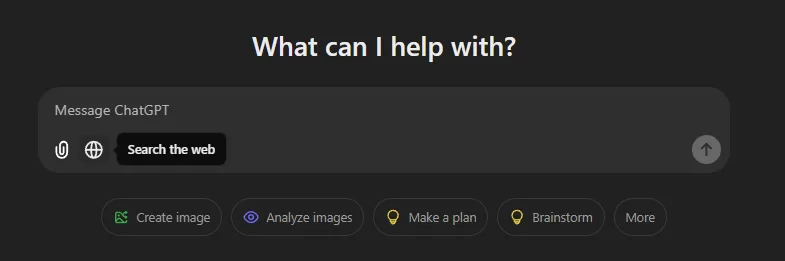
                Did you know you can use the “search the web” feature of ChatGPT for many tasks other than your basic web search?

                For those who don’t know, ChatGPT’s new “search the web” feature provides real-time information. 

                As of writing this post, it’s only available for paid members who are using ChatGPT 4o and 4o-mini.

                Screenshot captured by Author

                Here are some creative ways to use this feature:

                1. Stay Updated on Current Events

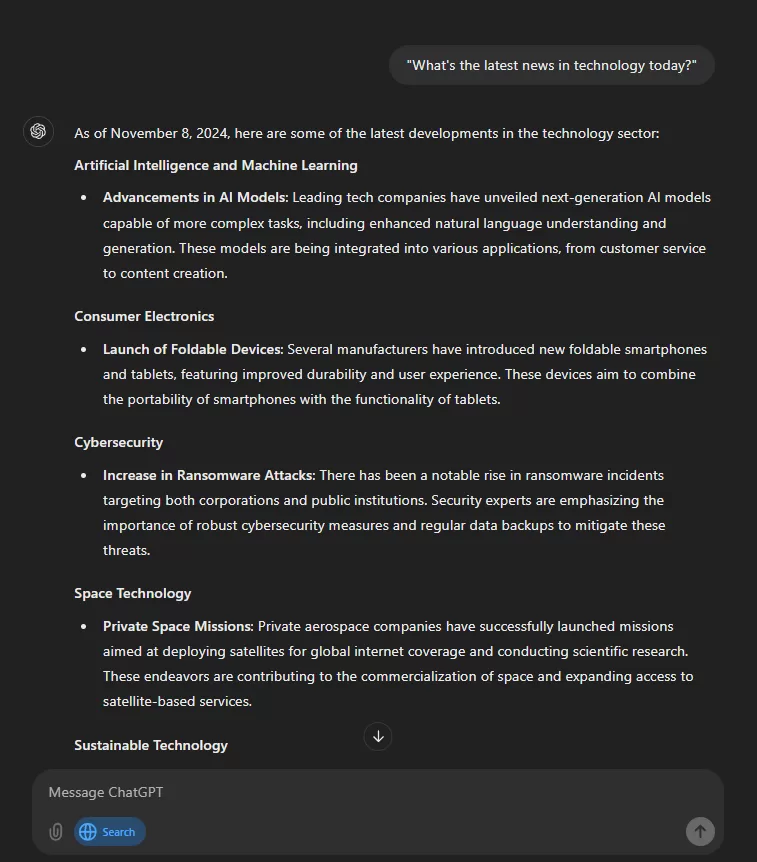
                If you are interested in the latest news and events and don’t have time for searching and finding the best ones this is for you.

                Now using the search web feature in ChatGPT you can receive summaries of the latest news, sports scores, and stock market updates anytime. 

                Example:  — “What’s the latest news in technology today?

                Screenshot captured by Author

                2. Plan Travel Itineraries

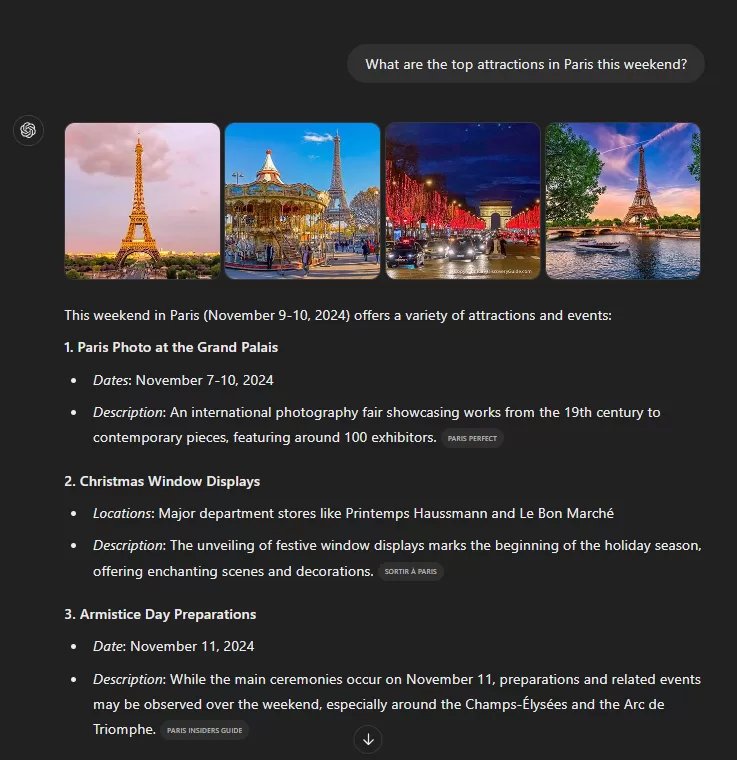
                Do you like to plan your travel for the best time and budget management? Then you will find this itinerary planning feature very helpful.

                Now you can get up-to-date information on travel destinations, including weather forecasts, local events, and the best places to shop and eat. 

                Example: — “What are the top attractions in Paris this weekend?

                Screenshot captured by Author

                3. Discover New Recipes

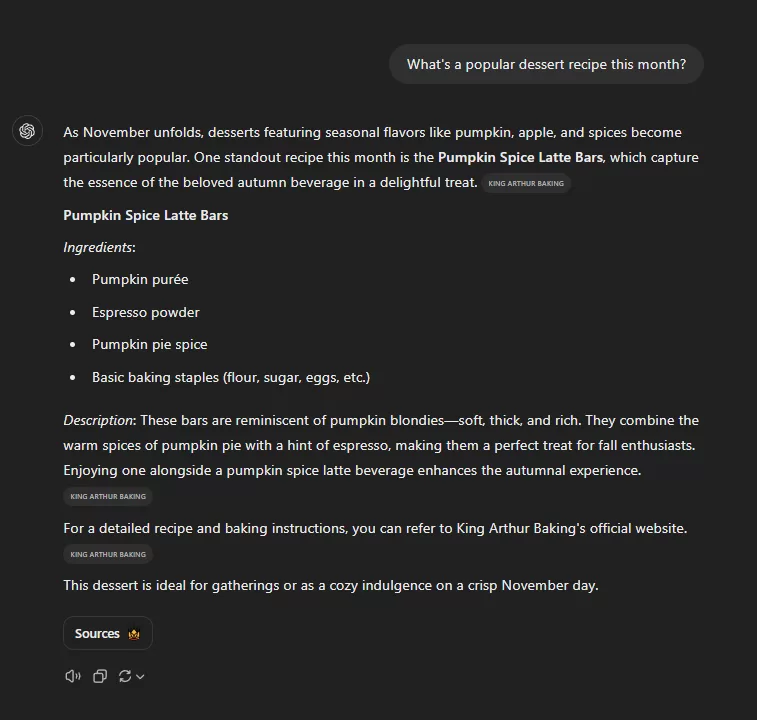
                If you love trying new food and also love to cook this one is great.

                You can use “search the web” in ChatGPT to find trending recipes or cooking tips based on dates or location.

                Example: —  “What’s a popular dessert recipe this month?

                Screenshot captured by Author

                4. Monitor Market Trends

                If you like to read about or keep yourself updated on a particular field of knowledge then this feature is for you.

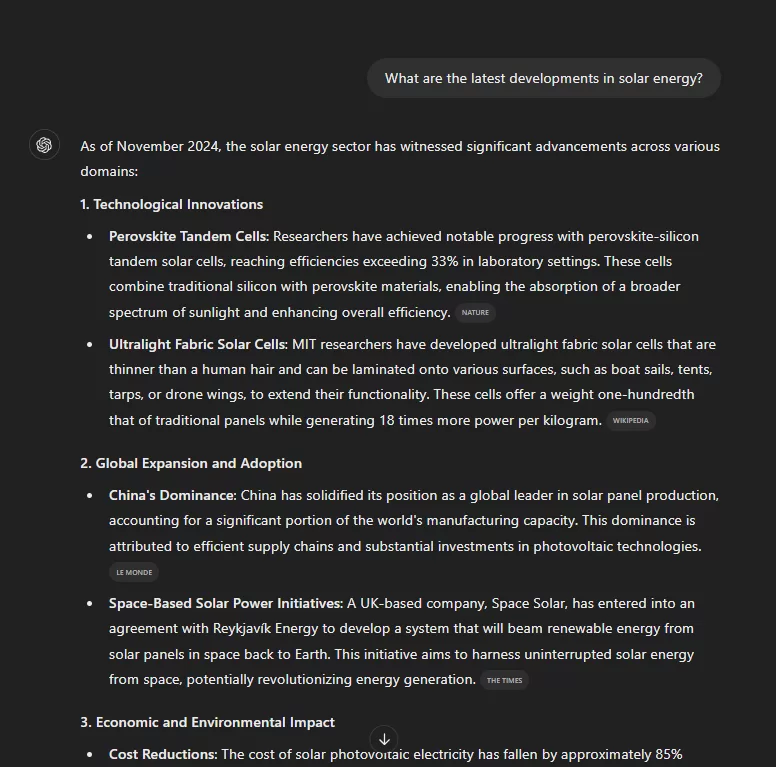
                Now you can keep track of any industry trends using the search web feature.

                Example: —  “What are the latest developments in solar energy?

                Screenshot captured by Author

                5. Access Real-Time Data

                Want to know if it will rain today?

                Or want to know the latest score but cannot watch a live sports match?

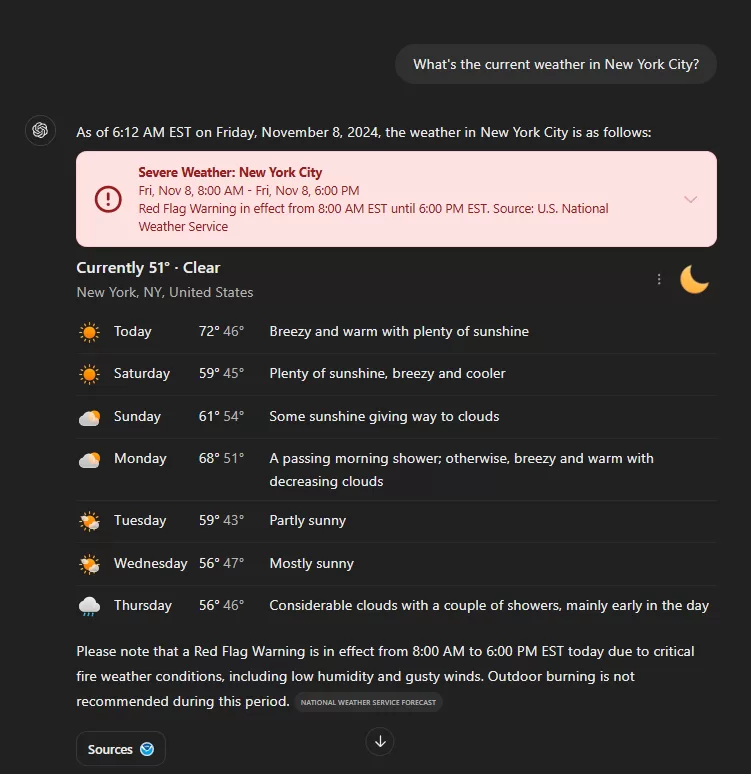
                Now you can get real-time data such as weather updates, stock prices, or sports scores. 

                Example: — “What’s the current weather in New York City?

                Screenshot captured by Author

                6. Find Local Events

                The extroverts here will love this feature.

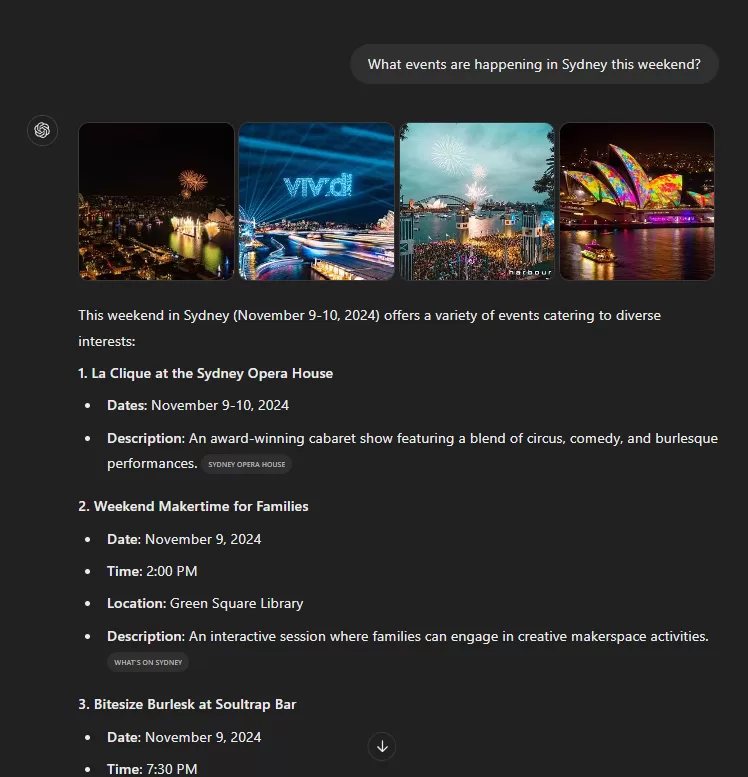
                Now you can discover events happening in your area and it will also give you direct links to websites where you can know more details and book tickets.

                Example: —  “What events are happening in Sydney this weekend?

                Screenshot captured by Author

                7. Compare Products

                Looking to buy a new product? Want to know its Pros and Cons?

                Or maybe you would like to compare a few products to decide the best among them.

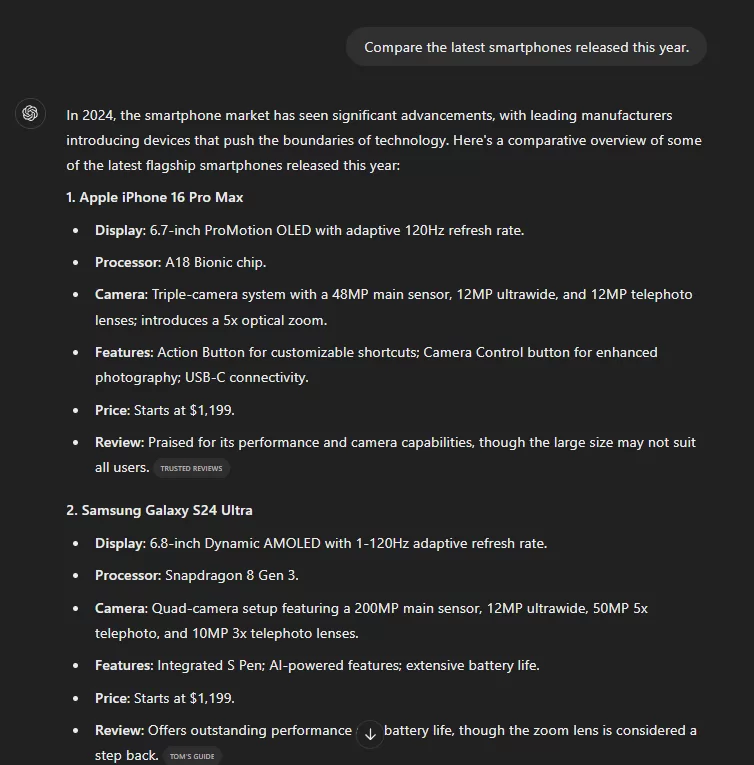
                Now you can use the search web feature to compare products or services.

                Example: —  “Compare the latest smartphones released this year.

                Screenshot captured by Author

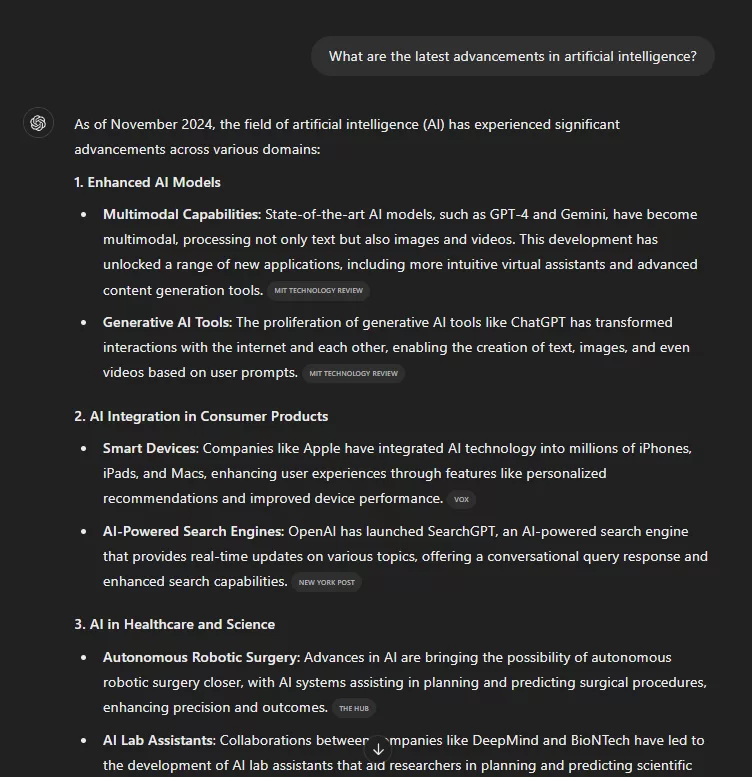
                8. Learn About Emerging Technologies

                If you like to stay updated in the emerging technology sector this one is for you.

                Using the “Search the Web” feature now you can stay informed about new technologies.

                Example: — “What are the latest advancements in artificial intelligence?

                Screenshot captured by Author

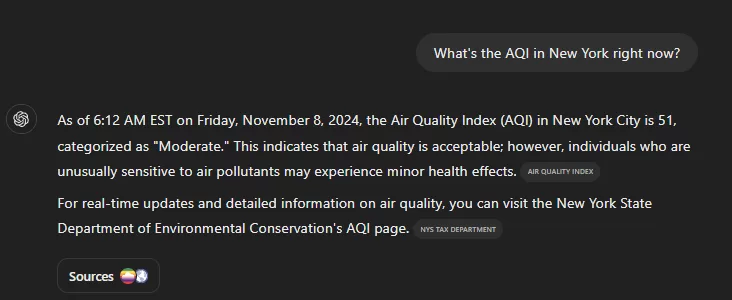
                9. Get Air Quality Updates

                This is another cool usage of location and time-aware search results from ChatGPT.

                Now you can check the air quality index of any location. Use this to know about the pollution levels.

                Example: — “What’s the AQI in New York right now?

                Screenshot captured by Author

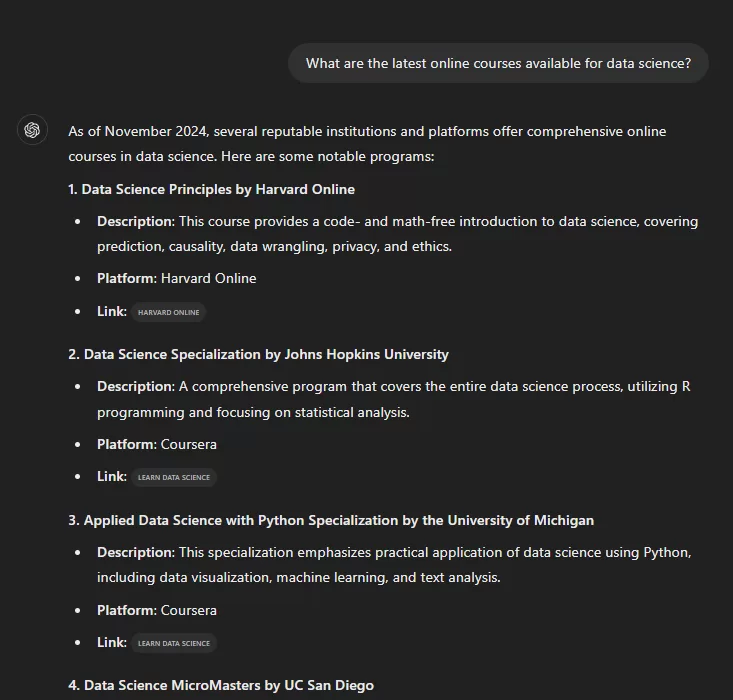
                10. Explore Educational Resources

                If you like to learn by watching courses on a topic then this will help you a lot.

                You can use the search feature to find recent articles or courses on topics of interest.

                Example: — “What are the latest online courses available for data science?

                Screenshot captured by Author

                By using ChatGPT’s web search feature, you can access the latest and relevant information in so many different ways.

                If you also found a few new and different uses of real-time search then please let me know in the comments.