Your weekly AI briefing covering the biggest developments, breakthrough research, and industry shifts
Look, I spent way too much time reading ai news this week so you don’t have to.
Here’s what actually matters in AI right now.
The Money Game Just Got Crazy

Three companies basically printed money this week while everyone else watched from the sidelines.
Anthropic Just Became Worth More Than Most Countries
Anthropic raised 13 billion dollars.
Not million. Billion. With a B.
Their valuation hit 183 billion, which is more than the GDP of most nations (looking at you, Finland).
Here’s the kicker: their revenue went from 1 billion to 5 billion in one year.
Claude Code alone made them 500 million.
That’s like selling a really expensive subscription service except the service is a robot that writes code better than most programmers.
Their enterprise customers spending over 100K grew seven times.
Usage jumped 10x in three months even though they had to limit how much people could use it.
When you have to tell customers “slow down, you’re using too much of our product” you know you’ve got something.
OpenAI Decided to Buy Everything
OpenAI dropped 1.1 billion on a company called Statsig.
Most people never heard of Statsig but OpenAI thought they were worth more than some small countries.
They also expanded their employee stock sale to 10.3 billion dollars.
At a 500 billion valuation.
For context, that’s worth more than Tesla was worth a few years ago.
Oh, and they’re building a datacenter in India that uses more power than some cities.
Mistral Said “Europe Can Play Too”
The French AI company Mistral raised 2 billion euros.
Now they’re worth 14 billion.
Turns out you don’t need to be in Silicon Valley to print money with AI.
Who knew?
The Tech That Actually Matters

Three breakthroughs happened that will change how we interact with computers forever.
Your Brain Can Now Control Robots Without Surgery
UCLA engineers figured out how to read your mind.
Well, not exactly your mind, but close enough.
They put a regular EEG cap on paralyzed people.
Added some AI magic.
Now people can control robot arms just by thinking about it.
No brain surgery required.
People moved objects 4x faster than without it.
This isn’t some lab demo that never works in real life.
This is actually happening right now.
Microsoft Broke Up With OpenAI
Remember when Microsoft and OpenAI were best friends?
That’s over.
Microsoft built their own AI models called MAI.
No more depending on OpenAI for everything.
OpenAI loses access to Microsoft’s millions of users.
Microsoft loses first dibs on OpenAI’s new stuff.
It’s like watching a tech divorce happen in real time.
Except both sides are worth hundreds of billions so they’ll probably be fine.
Someone Finally Beat Nvidia at Their Own Game
Cerebras trained a massive AI model in 14 days.
For context, that usually takes months.
They did it with their own chips, not Nvidia’s.
This is like beating Apple at making phones or Google at search.
It actually happened.
The AI world just got a lot more competitive.
AI Is Actually Saving Lives Now

While everyone argues about chatbots, AI quietly started solving real problems.
We Might Actually Beat the Flu
MIT built an AI called VaxSeer.
It predicts which flu vaccines will actually work.
Beat the World Health Organization’s picks 15 out of 20 times.
The WHO has been doing this for decades with teams of experts.
A computer program beat them.
Another team made flu vaccines 50x more effective using AI.
That’s not a typo. Fifty times.
Heart Problems Don’t Stand a Chance
Someone built an AI stethoscope.
It catches heart failure 2.3x better than regular doctors.
This isn’t replacing doctors.
It’s making them superhuman.
The Future Is Getting Weird
Caltech improved quantum memory by 30x using AI.
South Korea found new materials to clean up nuclear waste.
OpenAI redesigned proteins that might help us live longer.
We’re not just making better chatbots anymore.
We’re literally reshaping reality.
The Rules Changed This Week

Governments decided they’re tired of AI companies doing whatever they want.
Europe Said “Show Us Everything”
The EU told AI companies they have to share their training data.
And their technical documentation.
Basically, no more secret sauce.
This is like forcing Coca-Cola to publish their recipe.
Except the recipe is worth hundreds of billions.
The Copyright Wars Began
Everyone’s suing everyone.
The New York Times is suing OpenAI.
Other companies are jumping in.
The basic question: can you train AI on someone else’s content without paying?
The answer will reshape the entire industry.
Anthropic Drew a Line in the Sand
Anthropic became the first major US AI company to stop selling to Chinese firms.
That’s not a business decision.
That’s a geopolitical statement.
Vector Databases Got Exposed
DeepMind published research showing vector databases aren’t as good as everyone thought.
The entire vector database industry panicked.
Billions in valuations went poof overnight.
Turns out most of these companies were just repackaging free software and calling it revolutionary.
Who could have seen that coming? (Everyone, apparently.)
New Tools That Actually Work
For once, AI companies released stuff that normal people can actually use.
Google Made Testing AI Models Bearable
Google released something called Stax.
It’s for testing how good your AI is without wanting to throw your computer out the window.
If you’ve ever tried to figure out if your AI is getting better or worse, you know this is a big deal.
Figma Lets You Design Apps by Talking
You can now describe an app and Figma will design it for you.
Complete with working buttons and everything.
This is like having a designer who works at the speed of thought and never complains about revisions.
Amazon Made Shopping Even More Dangerous
Amazon’s new Lens Live lets you point your camera at anything and buy it instantly.
Your wallet is officially doomed.
Point at a lamp, it’s in your cart.
Point at a chair, it’s in your cart.
Point at your neighbor’s car… okay, that one probably won’t work.
The Creative Revolution

AI tools got so good that creative professionals are either thrilled or terrified.
ByteDance Wants to Replace Your Creative Team
Their new USO model generates images and videos based on style and subject.
Show it a photo and say “make this look like a painting” and it does.
Tencent Turns Photos Into 3D Worlds
Upload a photo.
Get back a 3D world you can walk around in.
No 3D modeling skills required.
This used to take teams of people months to do.
Now it takes minutes.
Everyone’s Building AI Workflows
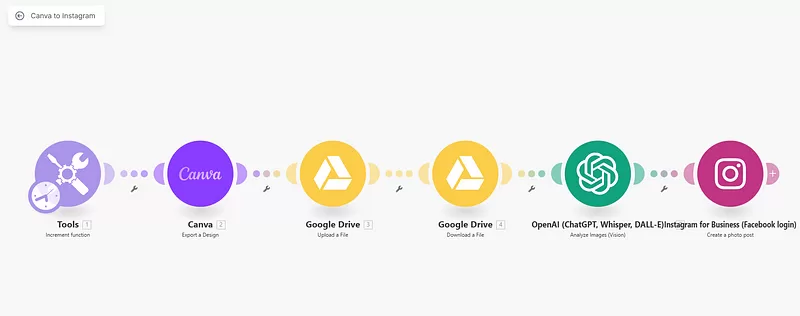
People are connecting AI tools together like digital Lego blocks.
One person automated their entire video creation process.
Saves 35 hours a week.
That’s almost a full-time job they just got back.
What The Numbers Tell Us

The data reveals what’s really happening beneath all the hype.
Most Companies Are Already Using AI
72% of companies worldwide use AI in at least one function.
That’s up from 55% last year.
This isn’t some future thing anymore.
It’s happening right now.
Salesforce Fired 45% of Their Support Team
They replaced them with AI agents.
Not laid off. Replaced.
The agents handle customer conversations better than humans did.
This is what “AI will augment humans” looks like in practice.
AI Is Changing How We Talk
Studies show AI buzzwords are creeping into normal conversation.
Words like “delve” and “meticulous” are showing up more in podcasts.
AI isn’t just changing technology.
It’s changing language itself.
That’s either fascinating or terrifying depending on how you look at it.
What’s Coming Next

Five trends that will shape the next phase of AI development.
The Memory Problem Gets Solved
AI models are hitting a wall called the “memory wall.”
Think of it like trying to think really hard but your brain keeps forgetting what you were thinking about.
Whoever solves this first wins everything.
Hybrid Systems Take Over
Pure AI solutions don’t work as well as AI mixed with other approaches.
It’s like realizing you need both a hammer and a screwdriver to build a house.
The companies figuring this out are eating everyone else’s lunch.
Brain Interfaces Go Mainstream
UCLA’s breakthrough isn’t a one-off.
Non-invasive brain control is about to become a real product category.
Your thoughts controlling devices without surgery is coming faster than you think.
AI Scientists Become Normal
AI isn’t just making better chatbots.
It’s becoming a research tool that accelerates human discovery.
The next Einstein might be a human-AI team.
Regulations Actually Matter
Europe’s transparency requirements aren’t just bureaucracy.
They’re forcing AI companies to build better, more debuggable systems.
Regulations might actually make AI better, not worse.
Here’s What Actually Happened
This week wasn’t about making AI chatbots slightly better.
It was about AI growing up.
We saw non-invasive brain interfaces work in real people.
We saw AI discover new materials and improve vaccines.
We saw 14-day model training times that used to take months.
While everyone argues about whether AI will take jobs, AI is quietly solving problems we’ve had for decades.
The companies winning aren’t the ones with the biggest models.
They’re the ones building AI that actually works for real problems.
The next phase is about making it useful.
And that’s already happening.