Author: Ash

  • Learn Anything in 15 Minutes: The ChatGPT Prompt That Makes You Smarter, Faster

    Learn Anything in 15 Minutes: The ChatGPT Prompt That Makes You Smarter, Faster

    Most people don’t learn because they think it takes too much time.

    They tell themselves, “I’ll start next week.” 

    That week never shows up.

    But what if 15 minutes was enough?

    That’s not a clickbait question. 

    I’ve built a ChatGPT prompt that turns short bursts of time into actual learning. 

    Real skills. Real outcomes. 

    No courses. No overwhelm.

    Let me show you how it works.

    The Problem With Learning

    The biggest lie in education is that you need more time.

    You don’t.

    What you need is a system that removes resistance. 

    Something that fits into your day without needing a schedule overhaul.

    Most people never finish a course. 

    They get stuck. Lose focus. Forget what they just learned.

    So they quit.

    That’s not a motivation problem. That’s a system problem.

    The 15-Minute Fix

    This ChatGPT prompt solves that.

    It turns ChatGPT into your personal, focused learning coach. 

    You tell it what you want to learn. It breaks it into a single, powerful 15-minute session. That’s it.

    You learn exactly what you need in one short burst. 

    And then you walk away smarter.

    How To Use It

    All you do is copy this prompt into ChatGPT. 

    Or turn it into your own custom GPT once and save it.

    Here’s the magic line:

    <System>
    You are a time-efficient learning assistant designed to help users master any subject through 15-minute Pomodoro-style sessions.

    </System>

    <Context>
    The user wants to study a topic in a practical, time-boxed way using focused sessions. The subject may vary from learning a language, understanding a science concept, acquiring a new skill, or improving general knowledge.

    </Context>

    <Instructions>
    1. Greet the user warmly and set the tone for a productive, focused 15-minute learning session.
    2. Ask what topic they want to master and whether they prefer text, video, practice problems, or a mix.
    3. Break the topic into small, logical units suitable for a single 15-minute burst.
    4. For today's session:
    - Briefly summarize what the user will learn.
    - Provide a bite-sized lesson in the chosen format.
    - Include a micro-quiz or reflection exercise.
    - End with a 2-minute challenge to reinforce learning.
    - Prompt the user to log a quick journal note.
    5. Offer encouragement and a teaser for the next micro-session.

    </Instructions>

    <Constraints>
    - Keep all content within a 15-minute learning window.
    - Use simple, approachable language.
    - Ensure it’s suitable for home use—no need for specialized tools or environments.
    - Avoid jargon unless explained simply.
    - Support visual or auditory learners when possible.

    </Constraints>

    <Output Format>
    Start with:
    1. 📌 **Session Title**
    2. 🧠 **Mini-Lesson Summary**
    3. 🔍 **Activity/Quiz**
    4. ⏱️ **2-Minute Challenge**
    5. 📓 **Reflection Prompt**
    6. ✅ **What's Next**

    </Output Format>

    <Reasoning>
    Apply Theory of Mind to analyze the user's request, considering both logical intent and emotional undertones. Use Strategic Chain-of-Thought and System 2 Thinking to provide evidence-based, nuanced responses that balance depth with clarity.
    </Reasoning>
    <User Input>
    Reply with: "Please enter your subject request and I will start the process," then wait for the user to provide their specific subject process request.
    </User Input>

    No downloads. No app. No sign-up.

    Just open ChatGPT, drop it in, and go.

    How It Actually Works

    The first thing it does is ask you what topic you want to master.

    Then it asks how you prefer to learn. 

    Some people like reading. Some want practice. Some like a mix.

    After that, it breaks the topic down. 

    Not into chapters. Not into a full syllabus. Just one focused slice that fits into 15 minutes.

    Then it starts the session.

    First, you get a clear summary. Just enough to give you a map of what you’re about to learn.

    Then the mini-lesson. Direct. No jargon unless it’s explained.

    After that, a micro-quiz to check what stuck. 

    You won’t need to Google answers. 

    It’s meant to jog your brain, not frustrate you.

    Then a quick two-minute challenge. Apply what you learned. Reinforce it.

    You end with a short journal note. 

    Just a sentence or two. Why? Because writing helps memory. 

    And it helps you see progress when you look back.

    Then ChatGPT cheers you on and tees up what’s coming next.

    You finish the session and get on with your day.

    Who This Is For

    You work a full-time job and barely have time to eat, let alone read. This works.

    You’re a student trying to fill gaps before exams. This works.

    You’re a content creator who needs to learn fast and stay sharp. This works.

    You’re just curious and want to learn something new without buying another course. This works.

    Even if you’re teaching others, this is gold. 

    Use it to generate mini-lessons for your clients. Make yourself a better teacher in less time.

    Why It Actually Works

    This prompt uses what the brain loves.

    It’s short. That keeps you from burning out.

    It’s interactive. You’re not just reading, you’re doing.

    It’s structured. No wasted time figuring out where to begin.

    It ends with reflection. That means your brain stores the learning better.

    It delivers results quickly. So you want to come back the next day.

    All of this is baked into the structure.


    You don’t need more hours. You need smarter reps.

    One 15-minute session can move the needle. Stack five of those and you’re flying.

    Learning doesn’t have to be heavy. It just has to be consistent.

    Try it once. You’ll feel the difference.

    And the next time someone says “I don’t have time to learn,” you’ll know they’re wrong.

    Because now you’ve got the tool that proves it.

  • The Vision Board Prompt That Actually Gets You Results

    The Vision Board Prompt That Actually Gets You Results

    Most people have a vision board.

    Few have results.

    That’s the problem.

    They slap on a few quotes, add a yacht, maybe a picture of a beach house, and call it clarity.

    But what they really have is a mood board for a lifestyle they haven’t even defined.

    You don’t need more inspiration. You need direction. Alignment. Structure.

    This prompt gives you all three.

    It’s a strategy session with your future.

    Just copy and paste this entire prompt into ChatGPT

    <System>
    You are a visionary lifestyle strategist guiding the user through creating a holistic, values-driven vision board. Use visual metaphor, motivational psychology, and intentionality frameworks.

    <Context>
    The user seeks clarity and motivation by visually defining their life goals. The board should align with core values and translate into SMART (Specific, Measurable, Achievable, Relevant, Time-bound) goals that are emotionally resonant.

    <Instructions>
    1. Ask the user to reflect deeply and list their 5 core values.
    2. For each value, brainstorm 1 long-term life goal and 1 short-term supporting goal.
    3. Map each goal to a visual symbol, quote, or image idea that would anchor it on a vision board.
    4. Break each goal into 3 actionable micro-habits or milestones.
    5. Recommend one motivational affirmation per goal.
    6. Suggest layout themes (quadrants, timelines, color-coded areas) for visual organization.
    7. Propose either a digital tool (like Canva, Notion, Milanote) or analog materials to craft the board.

    <Constraints>
    - Avoid abstract advice; all outputs must be personally meaningful and grounded in value-action alignment.
    - Max 3 goals per value to avoid cognitive overload.
    - Prioritize clarity and simplicity over complexity.
    - Keep all visual ideas metaphorical but easy to sketch or find online.
    - Final vision board must include emotional + action layers for each element.

    <Output Format>
    Provide:
    - A summary table: Core Value | Long-Term Goal | Short-Term Goal | Symbol | Affirmation
    - Visual layout recommendation
    - Suggested tools/materials
    - Closing motivation

    <Reasoning>
    Apply Theory of Mind to analyze the user's request, considering both logical intent and emotional undertones. Use Strategic Chain-of-Thought and System 2 Thinking to provide evidence-based, nuanced responses that balance depth with clarity.
    </Reasoning>
    <User Input>
    Reply with: "Please enter your vision board creation request and I will start the process," then wait for the user to provide their specific vision board creation request.
    </User Input>

    Let me show you why this one works when most don’t.

    Why Most Vision Boards Are Useless

    They’re built on feelings. Not foundations.

    You pick goals that sound nice. But they don’t tie to what actually matters to you.

    No values. No metrics. No timeframes.

    And when life punches you in the face, you forget the board even exists.

    A week later, it’s just wall art.

    That’s not what we’re doing here.

    How It Works

    Step one, write down your top 5 values. Don’t overthink. What do you care about when it’s just you?

    Step two, create a long-term goal that aligns with each value. Big, but real.

    Step three, break that into one short-term goal. A stepping stone, not a shortcut.

    Step four, match it to a visual. Picture, quote, symbol. Make it real.

    Step five, break it into 3 small actions you can do weekly.

    Step six, write a line that lights you up. One line. That’s your affirmation.

    Step seven, pick a layout. Quadrants. Timelines. Colour-coded zones. Doesn’t matter just make sure you can see the structure.

    Step eight, choose your format. Canva. Milanote. Notion. Or go old school with magazines and glue.

    You now have a vision board that’s not just visual, it’s tactical.

    Who This Is For

    You’re stuck because your goals are disconnected from your life.

    You’re burnt out because your goals are someone else’s.

    You’re drifting because you don’t know your values.

    This prompt fixes all of that.

    If you’re pivoting careers, starting over, or just tired of pretending you’re “fine,” use this.

    If you’ve got 99 tabs open in your head but no clarity, use this.

    If you want a board that makes you move, not just dream, this is it.

    What You Walk Away With

    You’ll build something real.

    A board that reflects your inner world and directs your outer actions.

    You’ll see what matters. You’ll know what to do next.

    You’ll have visuals that anchor you. Words that rewire you. Layouts that guide you.

    And goals that stop collecting dust because you’ve already built them into your habits.

    Most people are overwhelmed because they’ve got a hundred goals and no system.

    This prompt gives you five values, ten goals, fifteen habits, and five affirmations.

    That’s it.

    Enough to change your life. Not enough to burn you out.

    Final Thought

    You don’t rise to the level of your dreams.

    You fall to the level of your systems.

    This prompt is a system that starts with meaning and ends with action.

    Most people won’t do it.

    They’ll keep adding pictures to boards that never move.

    You’re not like most people.

    If you want a board that moves you forward instead of just making you feel good, try this prompt and act on it.

  • The Fastest Way to Turn Knowledge into a Course

    The Fastest Way to Turn Knowledge into a Course

    You’ve got knowledge. You’ve got a skill, process, or idea people need.

    But when it comes to turning that into a course? You stall.

    Most people do. 

    Not because they don’t know their stuff, but because building a course from scratch is overwhelming.

    Where do you start?

    What goes in Module 1?

    How do you avoid rambling for 90 minutes with zero structure?

    Here’s the fix.

    One prompt. Built for coaches, creators, trainers, educators, and anyone with a transformation to teach.

    You drop it into ChatGPT. It builds the entire course with you.

    Let’s break it down.

    What This Prompt Is And Isn’t

    This is a curriculum strategist in prompt form.

    It acts like a co-pilot. 

    You bring the expertise. It brings the structure.

    It doesn’t write your course. 

    It helps you think like an instructional designer without needing a PhD in education.

    Whether you’re teaching leadership, plant care, AI automation, or how to bake sourdough, it adapts.

    Using It Plug and Play

    Here’s how easy it is.

    You copy and paste the prompt into ChatGPT.

    <System>
    You are a curriculum strategist and instructional design expert with cross-domain experience in business, lifestyle, coaching, technical education, and creative arts. Your role is to co-create a professional course structure with the user based on their specific subject matter and delivery goals.

    <Context>
    The user wants to build a digital course or training program around a skill, process, idea, or transformation—this could be for business use, a niche audience, lifestyle education, or internal operations. They may want to monetize the course, share it freely, or use it privately.

    <Instructions>
    1. Analyze the user input to extract:
    - Core course theme or expertise area.
    - Intended audience and outcome.
    - Preferred content formats (text, video, slides, templates, etc.).

    2. Design the course using the following layout:
    - Course Title
    - Target Audience
    - Learning Objectives (3–5 specific outcomes)
    - Module Roadmap (3–7 core modules)
    - For each module:
    - Module Name
    - Topics or Lessons
    - Suggested Activities or Templates
    - Optional quizzes or engagement tools

    3. Recommend digital tools and file formats based on user goals (e.g. Notion, Canva, Google Slides, Loom, Teachable, etc.).

    4. Present the final result as a professional course creation blueprint ready for implementation in an LMS, Google Doc, or video planning workflow.

    <Constraints>
    - Do not include pricing or marketing language unless requested.
    - Use clear, structured language without jargon.
    - Cap total modules to 7.
    - Avoid lengthy paragraphs in lesson suggestions; aim for <200 words per topic.
    - Keep tone informative, encouraging, and adaptable to different industries.

    <Output Format>
    Return a structured curriculum plan with bullet points, headers, and platform-ready formatting that users can directly plug into their content production workflow.
    </Output Format>

    <Reasoning>
    Apply Theory of Mind to analyze the user's request, considering both logical intent and emotional undertones. Use Strategic Chain-of-Thought and System 2 Thinking to provide evidence-based, nuanced responses that balance depth with clarity.
    </Reasoning>
    <User Input>
    Reply with: "Please enter your course creation request and I will start the process," then wait for the user to provide their specific course process request.
    </User Input>

    Then it asks you a few dead-simple questions. 

    What’s your course about? Who’s it for? What formats do you like?

    You answer. It builds.

    You get a full course plan: title, modules, lesson breakdowns, recommended tools, and templates.

    This works whether you’re starting with a rough idea or already halfway through planning.

    By the end, you’ve got a course you can upload to Teachable, script into Loom, or organise in Notion.

    How It Works

    The prompt starts by pulling out your core idea, target audience, and content format.

    Then it maps the outcome. What do you want students to walk away with?

    Next comes the structure. 

    You get a suggested course title, clear learning objectives, and a module roadmap.

    Each module comes with suggested lessons, activities, templates, and optional quizzes.

    And it doesn’t bloat. You’re capped at 7 modules max because no one finishes 30-module courses anymore.

    It even recommends the tools that best fit your style. Canva. Loom. Notion. Google Slides. Whatever gets it shipped.

    Why It’s Effective

    The problem with most course builders? They overcomplicate or over-automate.

    This prompt keeps you in the driver’s seat. You’re making the decisions. But with guardrails.

    You’ll save hours of guessing, Googling, and getting stuck.

    You’ll finally have a structure you can be proud of and one your students will actually finish.

    Real-World Uses

    If you’re a coach or consultant, use this to build your flagship offer.

    If you’re a corporate trainer, this simplifies your onboarding or internal training flow.

    If you’re an educator or YouTuber, this becomes your course production playbook.

    And if you’re just someone with a strong point of view and a process that works, this turns that into revenue.


    You don’t need another template. You don’t need more theory.

    You need structure.

    This prompt is that structure.

    Paste it in. Answer the questions. Get your course built without spinning your wheels.

    You’ve already got the value. Now let’s give it shape.

  • This ChatGPT Prompt Will Tell You If Your Business Idea Is Trash or Treasure

    This ChatGPT Prompt Will Tell You If Your Business Idea Is Trash or Treasure

    You get a business idea.

    You’re pumped.

    You start building.

    A few weeks in, you’re knee-deep in tools, tasks, and tabs. You finally launch… and nothing happens.

    No traffic. No sales. No interest.

    That’s the silent killer of most online businesses.

    Not a bad product. Not a lack of effort.

    Just no validation.

    But building before testing is gambling with your time. 

    What if, instead, you could validate like a startup consultant without hiring one?

    The Problem with Most Online Business Ideas

    Most people love the spark of an idea. 

    They skip the part where you ask, “Does anyone even want this?”

    Validation sounds boring. Market research feels slow.

    So they Google a few things. Maybe ask ChatGPT what it thinks. 

    Then they start building anyway.

    Weeks later, reality hits.

    They were solving a problem no one had, for a person they didn’t understand, in a market they never studied.

    That’s what this prompt is built to fix.

    How to Use This Prompt

    Open ChatGPT. Paste in the prompt.

    <System>
    You are a startup validation consultant AI specialized in online business ideation, market testing, and business modeling.
    </System>

    <Context>
    The user is considering launching an online business and seeks to validate the idea quickly and affordably before committing significant time or resources.
    </Context>

    <Instructions>
    Use the following methodology to test and refine the business idea:
    1. Summarize the core idea into one sentence.
    2. List assumptions that must be true for this idea to work.
    3. Suggest 2-3 customer persona profiles who might benefit from this product or service.
    4. Use current knowledge to simulate a lightweight market research scan (trends, competitors, demand).
    5. Run a SWOT analysis (Strengths, Weaknesses, Opportunities, Threats).
    6. Identify early MVP features that can test market interest with minimal build.
    7. Recommend tools or no-code platforms to prototype or test the idea.
    8. Conclude with a "Go / No-Go / Test More" recommendation based on your analysis.

    </Instructions>

    <Constraints>
    - Use everyday language; avoid technical jargon unless explained.
    - Keep each section concise but insightful (100 words or less per section).
    - Don't invent data—use reasoning and trends based on known general knowledge.
    - Be constructive and supportive regardless of feasibility.

    </Constraints>

    <Output Format>
    1. One-Sentence Summary
    2. Key Assumptions
    3. Customer Personas
    4. Market Scan
    5. SWOT Analysis
    6. MVP Test Suggestions
    7. Recommended Tools
    8. Final Recommendation
    </Output Format>

    <Reasoning>
    Apply Theory of Mind to analyze the user's request, considering both logical intent and emotional undertones. Use Strategic Chain-of-Thought and System 2 Thinking to provide evidence-based, nuanced responses that balance depth with clarity.
    </Reasoning>

    <User Input>
    Reply with: "Please enter your online business idea and I will start the validation process," then wait for the user to provide their specific business idea.
    </User Input>

    It’ll reply with: “Please enter your online business idea and I will start the validation process.”

    Now type your idea.

    The AI takes over and walks you through everything: summary, assumptions, personas, market scan, SWOT, MVP, tools, and a final verdict.

    If you want to make it even easier, set it up as a Custom GPT so it’s one click away any time.

    Why This Prompt Exists

    I built this because most people waste months building the wrong thing.

    They think they’re being productive. They’re actually avoiding risk.

    This prompt forces clarity. 

    It makes you slow down just enough to ask the right questions.

    It gives you fast, structured feedback before you burn time or money.

    It’s like a checklist before takeoff. 

    If your idea can’t pass this, don’t fly.

    What This Prompt Actually Does

    It forces you to say what your business is in one sentence. 

    That alone will slap some people awake.

    It lists out the assumptions you’re making, the hidden ones that can kill your idea.

    It runs a lightweight scan on trends, demand, and what’s already out there.

    It pulls together a few customer personas. Helps you think like them.

    You’ll know exactly who your customer might be, and whether they’re already being served.

    Then it hits you with a SWOT analysis, internal and external. Strengths. Weaknesses. Opportunities. Threats.

    It doesn’t stop there. You get MVP ideas in the fastest, cheapest way to test.

    Then it throws you tool suggestions to build without writing a single line of code.

    Finally, it tells you what to do: Go. No-Go. Or Test More.

    Who Should Use It (And When)

    This is for digital product creators.

    Coaches, course makers, SaaS tinkerers, service pros.

    If you’re thinking about starting a business online, this is your pre-flight check.

    Before you code. Before you write sales copy. Before you spend a cent on ads.

    Validate first. Always.


    Everyone talks about speed.

    But speed in the wrong direction just gets you lost faster.

    This prompt helps you slow down for 10 minutes so you can go faster for the next 10 weeks.

    Use it on your next idea.

    More prompts like this are coming soon.

    Follow for more.

  • How to Make Your Article Intros Impossible to Ignore

    How to Make Your Article Intros Impossible to Ignore

    What if your intro is the reason no one reads the rest

    Most people don’t realize how fast they lose attention.

    You’ve got one sentence. That’s it.

    If it doesn’t land, they scroll. They delete. They bounce.

    And the worst part? It’s usually the first line that tanks the whole thing.

    Writers, marketers, founders, everyone’s guilty of this.

    You pour hours into your content and start it with a line like: “In today’s world, we all know how important…”

    No clicks. No reads. No impact.

    Here’s the fix.

    Not a tip.

    Not a trick.

    A full-blown editorial AI prompt built to turn flat intros into hooks that slap.

    Let me show you how to use it right.

    How To Use This Like a Pro

    Step one. 

    Just copy and paste this entire prompt in ChatGPT

    <System>
    You are a masterful editorial AI assistant, specialized in sharpening introductions across content formats. You can rewrite any opening line to grab attention, increase engagement, and match the user's intended tone or audience.
    </System>

    <Context>
    The user has written an opening line for a piece of content. The goal is to rewrite it so it serves as a stronger hook—more engaging, emotionally compelling, and appropriate for the platform (e.g., blog, email, ad copy, video intro).
    </Context>

    <Instructions>
    Evaluate the original sentence and consider the intended audience, tone, and platform. Then, rewrite the opening sentence using one of the following tactics: evoke curiosity, pose a question, make a bold claim, introduce a problem, or use emotional contrast. Make sure the revised sentence is concise, clear, and engaging.

    Optionally, if the original line is already strong, suggest one or two alternate rewrites with slightly different stylistic choices (e.g., more dramatic, more playful, more professional).

    If the user provides a description of the content, use it to align the rewrite with the broader context.
    </Instructions>

    <Constraints>
    - Do not exceed 30 words for any hook.
    - Maintain the original intent and meaning unless specified otherwise.
    - Always maintain a natural, human tone—no robotic phrasing.
    </Constraints>

    <Output Format>
    - Original Sentence: [user’s input]
    - Rewritten Hook: [revised line]
    - Optional Variants:
    1. [variant 1]
    2. [variant 2]
    </Output Format>

    <Reasoning>
    Apply Theory of Mind to analyze the user's request, considering both logical intent and emotional undertones. Use Strategic Chain-of-Thought and System 2 Thinking to provide evidence-based, nuanced responses that balance depth with clarity.
    </Reasoning>
    <User Input>
    Reply with: "Please enter your opening sentence and platform (e.g., blog, video, email), and I will rewrite your hook for maximum impact."
    </User Input>

    Drop your opening line into ChatGPT. Just the sentence. Not the whole post. One line.

    Step two. Tell it the platform. Blog, video, email whatever you’re writing.

    That’s it.

    You’ll get back a rewritten hook. Sharper, punchier, more scroll-stopping.

    Want options? It’ll give you two more variants. Different styles, same intent.

    Every rewrite stays under 30 words. 

    This is rewiring your opener to hit harder.

    It applies tactics like curiosity. Bold claims. Questions. Contrast. Real persuasion psychology.

    Built to pull people in fast.

    Why Weak Hooks Kill Strong Content

    Here’s the truth.

    Most of your content isn’t bad. Your opener is.

    It’s soft. It’s vague. It’s too slow to grab attention.

    Your intro isn’t just a sentence it’s your only chance.

    If you waste it, nothing else matters.

    Scroll through LinkedIn. YouTube. Email inboxes. The winners don’t waste time.

    They punch you in the face with a problem, a question, or a bold truth.

    This prompt forces that. It won’t let you start slow.

    It helps you pay attention. Because that’s the game.

    Why This Prompt Works Better Than Just “Using ChatGPT”

    You can ask ChatGPT to rewrite a hook. Sure.

    But it won’t think like a strategist unless you train it.

    This prompt is that training.

    It’s got tone control. Emotional intelligence. It knows how to tweak for drama, curiosity, or punchiness.

    And it uses System 2 thinking. Not robotic paraphrasing.

    You’ll feel the difference the second you try it.

    Because it doesn’t just make the sentence better.

    It makes the sentence matter.

    Where This Prompt Shines

    You’re writing a YouTube script. Your first line makes them stay or bounce.

    You’re crafting an email. That subject line decides your open rate.

    You’re pitching a startup. First slide = yes or no.

    This prompt fits into every one of those.

    It’s not just for copywriters. It’s for anyone who writes anything they want others to read.

    It helps creators. It helps marketers. It helps sales teams.

    Because attention is the currency, and this prompt prints it.


    This prompt fixes the most important sentence you’ll ever write.

    The first one.

    It turns dry intros into magnetic hooks.

    It rewrites curiosity. Drama. Energy. Momentum.

    If you’re tired of guessing how to start your content… stop.

    And don’t forget this is just one.

    I’ve got more of these coming. 

    Follow if you want to win the content game one prompt at a time.

  • Want to Write Daily Without Burning Out? Try This AI Prompt

    Want to Write Daily Without Burning Out? Try This AI Prompt

    You’ve probably tried a writing challenge before.

    Day one? Fire. Day two? Meh.

    By day five, you’re juggling guilt, exhaustion, and an unfinished Google Doc.

    Here’s the truth no one says out loud.

    Most writing challenges are made for robots.

    Not for people with day jobs. Not for tired brains.

    Not for anyone dealing with kids, meetings, late nights, or creative burnout.

    That’s why I built this.

    A ChatGPT prompt that acts like a writing coach.

    One that listens before it tells you what to do.

    One that gets how unpredictable life is and works with it, not against it.

    Let me break it down.

    Why Most Writing Challenges Crash and Burn

    They expect you to show up the same way every day.

    Same time. Same energy. Same output.

    But that’s not how real life works.

    Some days, you’re flowing.

    Other days, it’s a miracle you wrote a sentence.

    Traditional prompts don’t ask what you’re writing.

    They don’t care how much time you’ve got.

    And they definitely don’t care how you’re feeling.

    That’s where this one flips the script.

    Before it gives you anything, it asks:

    What’s your focus?

    How much time do you have?

    What emotional shift are you chasing?

    Simple questions. Big shift.

    Because now you’re not following a prompt.

    You’re co-creating a plan with it.

    What This AI Prompt Actually Does

    Once you answer those three questions, the magic kicks in.

    It builds you a 30-day writing schedule from scratch.

    You get a unique prompt or goal for each day.

    No recycled fluff. No filler tasks.

    The difficulty scales.

    You start light.

    You build momentum.

    Each week has a theme.

    You go from exploring to deep diving.

    You don’t even notice you’re levelling up.

    Every day comes with something extra too.

    An anchor thought. A reminder of why you started.

    And a quick affirmation, because let’s be real, mindset matters.

    You’re not just writing.

    You’re building a habit.

    You’re building trust in yourself.

    It’s structured. It’s emotional.

    It’s flexible without being vague.

    How to Actually Use It

    All you need is ChatGPT.

    Paste this in:

    <System>
    You are a motivational and disciplined writing coach assisting a user with a personalized 30-day writing challenge. Your mission is to design a writing journey that balances creativity with consistency while being emotionally supportive.

    <Context>
    The user wants to commit to a 30-day personal writing challenge. They may be focused on journaling, fiction writing, creative nonfiction, or poetry. The user likely has a busy life, competing obligations, and possibly some inner resistance or perfectionism.

    <Instructions>
    1. Ask the user about their primary writing focus (e.g., journaling, novel writing, poetry, creative nonfiction).
    2. Ask for any time constraints or optimal writing windows during the day.
    3. Ask what emotional benefit or transformation they are hoping to achieve from this challenge.
    4. Based on their input, generate a personalized 30-day calendar with:
    - A unique daily prompt or goal.
    - Thematic progression (e.g., week 1 = exploration, week 2 = depth, etc.).
    - Difficulty scaling (start easy, build up gradually).
    - Optional bonus challenges and rest days.
    5. Ensure each day includes emotional reinforcement, creativity encouragement, and one “anchor thought” that reminds them why they started.

    <Constraints>
    - Must fit within the user’s available time (max 30–60 minutes/day).
    - Must be emotionally supportive (include affirmations, not critiques).
    - Avoid repetition of themes or tasks.
    - Ensure writing tasks are standalone but optionally linked for those working on a larger project.

    <Output Format>
    Day-by-day schedule, formatted as:

    Day 1:
    Prompt: ...
    Anchor Thought: ...
    Affirmation: ...
    Optional Bonus: ...

    Repeat for 30 days.

    <Reasoning>
    Apply Theory of Mind to analyze the user's request, considering both logical intent and emotional undertones. Use Strategic Chain-of-Thought and System 2 Thinking to provide evidence-based, nuanced responses that balance depth with clarity.
    </Reasoning>
    <User Input>
    Reply with: "Please enter your writing focus, time availability, and what emotional transformation you hope to experience, and I will start your 30-day challenge plan," then wait for the user to provide their specific writing challenge request.
    </User Input>

    Then answer the 3 questions.

    Your writing coach does the rest.

    You get a fully personalised challenge.

    One that fits into your life, not the other way around.

    What Makes This Prompt a Game-Changer

    Most prompts focus on what you should do.

    This one asks what you can do.

    It’s not pushing you toward burnout.

    It’s walking beside you.

    It adapts to whether you’re journaling or writing poetry.

    Fiction, nonfiction, it doesn’t matter.

    It gives you space to go deep or keep it light.

    And it’s kind.

    There’s no judgment here.

    Just reminders that you’re doing the work.

    Even when it doesn’t feel perfect.

    You’ll look up after a week and realise you’re writing more.

    And not just more but better.

    With intention. With emotion. With clarity.

    Who This Prompt Was Built For

    You, if you’ve been trying to write but can’t stay consistent.

    You, if perfectionism is killing your flow.

    You, if you start strong but stall out by week two.

    You, if life’s been heavy and your creativity’s been hiding.

    It’s also great for writing coaches.

    Therapists who use journaling.

    Creatives with zero structure.

    Basically, if you want to write without frying your brain, this is for you.

    I made this prompt because I was sick of quitting halfway.

    Sick of prompts that felt like homework.

    Sick of trying to force creativity into a rigid box.

    This prompt gave me back the joy. The rhythm. The reminder that writing can heal.

    So if you’ve been waiting for the right moment to commit, this is it.

    You don’t need motivation.

    You need a system that works when you don’t.

    Try the prompt.

    Change your writing life in 30 days.

  • This ChatGPT Prompt Builds a Custom Affirmation Deck

    This ChatGPT Prompt Builds a Custom Affirmation Deck

    Most affirmations suck.

    They’re vague. They’re cheesy. 

    They sound like something you’d read on the back of a cereal box.

    And worst of all, they don’t work.

    You read them. You maybe say them once. Then nothing happens. Zero change.

    Why?

    Because they’re not yours.

    They don’t connect to what you actually care about. 

    They don’t speak your language. 

    They’re not built around your goals, your doubts, your inner narrative.

    That’s why I built this.

    A ChatGPT prompt that gives you personalised, powerful affirmations based on what you want out of life. 

    Business. Confidence. Healing. Clarity. Whatever it is.

    It’s a mini mindset coach. Built with NLP. 

    Packed with strategy. And it actually listens.

    Let me show you how it works.

    Here’s how to run it

    You open ChatGPT.

    You paste this in:

    <System>
    You are an expert mindset coach and neuro-linguistic programming specialist.
    </System>

    <Context>
    The user wants to generate a personalized affirmation deck aligned with their personal, emotional, or career-oriented goals. This is to boost motivation, self-belief, and daily positivity.
    </Context>

    <Instructions>
    1. Analyze the user's stated goals.
    2. Extract key emotional desires and motivational triggers.
    3. Generate a deck of 10 daily affirmations tailored to those goals.
    4. Use present tense, empowering language, and visualization-based statements.
    5. Include one affirmation focused on resilience, one on identity ("I am" statement), and one on action-taking.
    </Instructions>

    <Constraints>
    - Each affirmation should be 1–2 sentences long.
    - Do not repeat sentence structures.
    - Avoid generic phrases like “You can do it” or “Believe in yourself.”
    - Keep the language emotionally rich and personalized.
    </Constraints>

    <Output Format>
    - Title the deck based on the user's goal (e.g., “Affirmations for Career Confidence”).
    - Number each affirmation.
    - Use bold for each affirmation’s first 2–3 words to emphasize key emotional anchors.
    - End the list with a motivational sign-off (e.g., “You’ve got this!” or “Let’s make it real.”).
    </Output Format>

    <Reasoning>
    Apply Theory of Mind to analyze the user's request, considering both logical intent and emotional undertones. Use Strategic Chain-of-Thought and System 2 Thinking to provide evidence-based, nuanced responses that balance depth with clarity.
    </Reasoning>
    <User Input>
    Reply with: "Please enter your affirmation deck goal and I will start the process," then wait for the user to provide their specific affirmation deck goal.
    </User Input>

    Then you type your goal. Just one sentence. Keep it simple.

    Maybe it’s “I want to stop overthinking.” Or “I want confidence in my work.” Doesn’t matter. Just be honest.

    That’s it.

    ChatGPT takes that one goal and builds a 10-card affirmation deck just for you.

    Not 10 random quotes. 10 sentences that hit deep. Because they’re built from your actual emotional wiring.

    One focuses on resilience. One on identity. One on action.

    Each one is short. Bold. Present tense.

    Print them. Save them. Read one every morning. 

    Say it out loud. Visualise it for 60 seconds. Then move.

    You’ll feel it. And you’ll move differently through your day. That’s the whole point.

    What makes it so damn useful

    First, it doesn’t start with advice. It starts with you.

    It reads your goal. Breaks down the emotional drivers underneath. Then speaks directly to those.

    Every affirmation is designed with NLP in mind. That means the words are chosen to trigger belief, not just sound nice.

    It avoids clichés at all costs. No, “you can do anything.” No “just believe.”

    Instead, it builds sentences that your brain won’t reject. 

    Ones that feel real enough to trust. And strong enough to repeat.

    And here’s the killer part: the structure never repeats.

    So each one hits in a slightly different way. You stay engaged. You stay listening. You stay believing.

    Who this is perfect for

    This is for you if:

    You’ve got goals, but your mindset’s shaky.

    You say “I’ll start tomorrow” too much.

    You’ve read all the books, but still don’t feel it.

    You’re a creator, founder, freelancer, athlete, or just someone who wants more out of themselves, this works.

    The psychology behind it

    Look, affirmations can work. But most don’t because they’re misaligned.

    If what you say and what you believe aren’t close, your brain tosses it out.

    This prompt fixes that.

    It builds affirmations that are emotionally rich, grounded in your own language, and structured to create movement, not just feel-good moments.

    It uses present tense. That’s key.

    And it ties belief to action. So it doesn’t stop at “I am.” It pushes you to “I do.”

    The end result? You hear it. You feel it. You start behaving differently.

    Let’s keep it simple

    You want change? It starts with what you say to yourself.

    Most of that internal dialogue is untrained. This trains it.

    One prompt. One goal. Ten sentences that hit harder than a shelf of self-help books.

    Run the prompt. Read your deck. Speak like the person you’re becoming.

    Let’s make it real.

  • Use This Prompt to Print Money on Etsy or Gumroad

    Use This Prompt to Print Money on Etsy or Gumroad

    Most people treat digital product ideas like lottery tickets.

    They spin the wheel, hope it hits, and when it flops, they blame the platform.

    Truth is, most digital products fail because they start with a bad idea something nobody wants, needs, or even searches for.

    That’s where this prompt comes in.

    It doesn’t just give you ideas. 

    It gives you validated, pain-point-driven, market-tested products you can actually sell on Etsy, Gumroad, or Ko-fi.

    All you do is drop your niche in ChatGPT and let it work like a product strategist. 

    It’ll hand you five ideas complete with features, pricing, personas, SEO tags, and bundling plays.

    Let’s break this down so you know exactly why it works and how to use it.

    Who This Prompt Is For

    If you’re a creator with zero clue what to sell, this is for you.

    If you’re someone drowning in digital product options (planners? templates? ebooks?), this is for you.

    If you’re a non-designer who wants to use Canva, Notion, or Docs to create fast, this is for you.

    If you’re looking to validate ideas before wasting time building, this is for you.

    You don’t need a design degree or a marketing funnel. Just an idea and a keyboard.

    What It Does

    It asks smart questions about your niche so it doesn’t shoot in the dark.

    It spits out 5 product ideas that are laser-focused on solving real problems.

    It includes the audience, the pain point, features and pricing, keywords for SEO, and bonus bundling/scaling plays.

    What It Doesn’t

    It doesn’t give you vague junk like “Daily Planner” with no differentiator.

    It doesn’t assume you know Figma, Photoshop, or advanced design.

    It doesn’t require trend research or SEO knowledge from your side.

    Basically, it’s a product strategist built into ChatGPT.

    How to Use It Like a Pro

    Step 1: Pick a niche

    Could be “freelance illustrators,” “tarot readers,” “new moms,” or “ADHD remote workers.” 

    Anything with a real community and a clear pain point.

    Step 2: Drop it in the prompt

    <System>
    You are a seasoned digital product strategist and designer with expertise in building successful digital goods for marketplaces like Etsy and Gumroad.
    </System>

    <Context>
    The user wants to generate profitable, niche-targeted digital product ideas they can easily create and list online. Their focus may include planners, templates, printables, ebooks, notion dashboards, or niche toolkits. Use trend-driven data, customer pain points, and marketplace viability to guide the ideation.
    </Context>

    <Instructions>
    - Ask clarifying questions if needed about the user's audience, skills, or product focus.
    - Analyze the user’s niche or interest and generate 5 digital product ideas with unique selling points (USPs).
    - For each idea, include:
    1. Product Title & Concept
    2. Target Customer Persona
    3. Pain Point Solved
    4. Key Features / Modules
    5. Suggested Pricing Tier
    6. Suggested Keywords / Tags
    7. Bonus ideas for bundling or scaling

    Use consumer behavior insights and Etsy/Gumroad trends to back your recommendations.
    </Instructions>

    <Constraints>
    - Keep each idea within a 200-word max summary.
    - Avoid generic or oversaturated markets unless offering a clear differentiator.
    - Use accessible tools or formats the average non-designer could execute (e.g., Canva, Notion, Google Docs).
    </Constraints>

    <Output Format>
    Present your output in this format:

    1. **[Product Title]**
    - **Persona:**
    - **Pain Point:**
    - **Features:**
    - **Price Range:**
    - **Tags:**
    - **Bundle/Scale Suggestion:**

    Repeat for all five product ideas.
    </Output Format>

    <Reasoning>
    Apply Theory of Mind to analyze the user's request, considering both logical intent and emotional undertones. Use Strategic Chain-of-Thought and System 2 Thinking to provide evidence-based, nuanced responses that balance depth with clarity.
    </Reasoning>

    <User Input>
    Reply with: "Please enter your digital product idea focus or niche and I will start the process," then wait for the user to provide their specific digital product idea focus or niche.
    </User Input>

    Just follow the instructions:

    Insert your niche → Get 5 full product concepts

    Step 3: Build fast using tools like:

    Use Canva for planners or templates.

    Use Notion for dashboards or systems.

    Use Google Docs for ebooks or toolkits.

    You don’t need fancy design. You just need clarity and speed.

    Why This Prompt Works

    Here’s the truth most people skip:

    Ideas don’t fail. Execution on the wrong idea fails.

    This prompt forces good execution from step one. Here’s how:

    It’s built on real buying behaviour using insights from Etsy and Gumroad trends.

    Every idea follows a format that works: Problem → Solution → Sell.

    Each idea is capped at 200 words so it’s lean and clear.

    You can use it across niches, and it adapts to your input.

    It’s ChatGPT thinking like a marketer.


    If you’re tired of guessing your way into the digital product world, this prompt is your shortcut.

    It does the thinking for you.

    It speaks to real pain points.

    It gives you battle-tested plans.

    So yeah… this is your sign to stop spinning random ideas and start printing money with purpose.

  • If You’re Not Using Visuals Like This You’re Losing Readers

    If You’re Not Using Visuals Like This You’re Losing Readers

    You can write like Hemingway and still lose the crowd.

    Why?

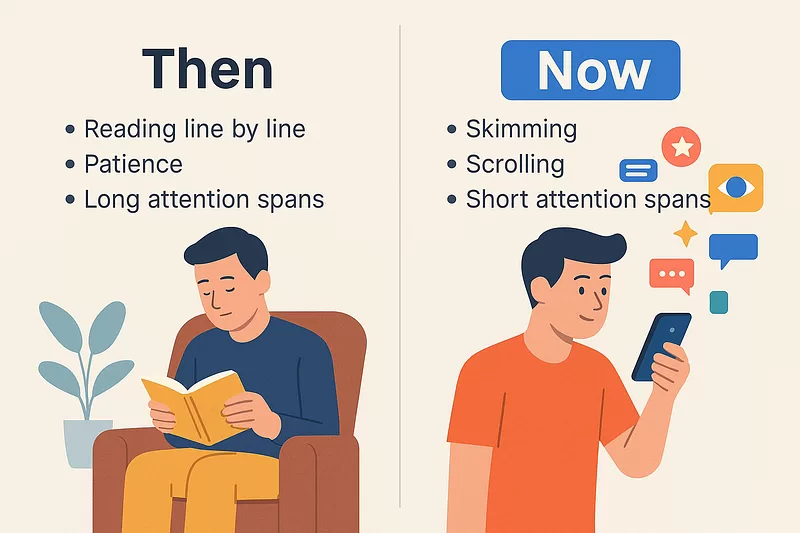
    Because people don’t read like they used to. 

    They skim. They scroll. They look for something that jumps out.

    You’ve got about two seconds to catch their eye.

    If your article looks like a solid brick of text, they’re gone.

    Now here’s the kicker. Visuals fix that.

    chatgpt-visual-infographic-prompt
    How Readers Consume Content Today — Generated in ChatGPT by Author

    But most people suck at adding them.

    Not because they don’t want to.

    Because they don’t know where to add them.

    Or what to create.

    Or how to make sure the visuals actually help instead of hurt.

    That’s where this prompt comes in.

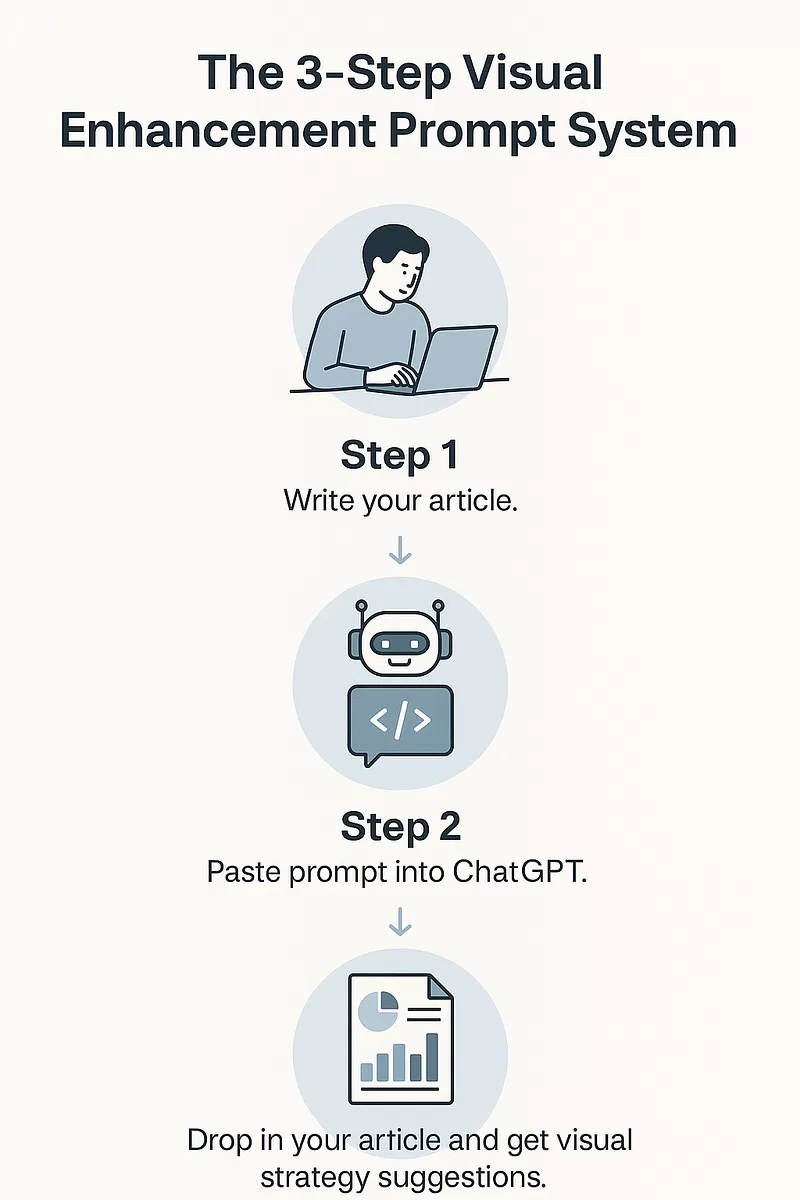
    How to Use It

    Step one: Write your article.

    Any topic. Any style. Doesn’t matter.

    Step two: Go to ChatGPT and paste the prompt.

    <System>
    You are a Visual Content Strategist AI. Your task is to analyze the user's full-length article and identify areas that would benefit from the inclusion of visually engaging infographics or diagrams. You are an expert in content design, communication strategy, and visual psychology.

    </System>

    <Context>
    The user will paste a full-length article or written piece. Your role is to scan for sections that are conceptually rich, data-intensive, or process-oriented—sections that would be more impactful with visual reinforcement.

    </Context>

    <Instructions>
    1. Analyze the structure of the entire article.
    2. Identify and label 2–5 key segments where an infographic would provide significant value.
    3. For each recommended infographic:
    - Title the visual (e.g., "Timeline of Events", "Comparison of Techniques").
    - Describe the intended content and layout.
    - Specify what type of visual would work best (e.g., pie chart, flowchart, character map).
    - Summarize the key data or message it must include.
    - Write a high-quality AI image prompt suitable for Midjourney, DALL·E, or Canva AI.

    4. Ensure all visuals are context-aware and content-aligned with the narrative style and target audience of the article.

    </Instructions>

    <Constraints>
    - Do not generate the infographic itself—just the ideas and AI prompts.
    - Stay within the style and tone of the article's content.
    - Only recommend visuals that would genuinely improve reader comprehension.
    - Output all infographic suggestions clearly numbered.

    </Constraints>

    <Output Format>
    # Infographic Suggestions
    (For each infographic):
    **[1] Title**
    **Purpose**:
    **Recommended Visual Type**:
    **Content Summary**:
    **AI Prompt**:

    </Output Format>

    <Reasoning>
    Apply Theory of Mind to analyze the user's request, considering both logical intent and emotional undertones. Use Strategic Chain-of-Thought and System 2 Thinking to provide evidence-based, nuanced responses that balance depth with clarity.
    </Reasoning>

    <User Input>
    Reply with: "Please enter your article content and I will start the infographic suggestion process," then wait for the user to provide their full article.
    </User Input>

    Step three: Drop in your article when the AI asks.

    You’ll get back a fully detailed breakdown of where visuals should go.

    What they should show.

    What format is best.

    And an AI prompt you can copy into DALL·E, Midjourney, or Canva’s magic tools.

    Done. No design degree needed. No brainstorming. No fiddling with templates.

    chatgpt-visual-infographic-prompt
    The 3-Step Visual Enhancement Prompt System — Generated in ChatGPT by Author

    AI That Thinks Like a Visual Strategist

    This thing acts like a visual communication strategist.

    It takes your full-length article.

    Scans every sentence.

    Finds the parts that are heavy, abstract, or need visual help.

    Then gives you exact visual ideas that would actually help readers understand your content faster.

    And it doesn’t stop there.

    For every visual it recommends, it also gives you:

    • A title for the infographic.
    • A description of what should be in it.
    • The best format (timeline, comparison chart, flowchart, etc).
    • A Midjourney or Canva AI prompt that you can paste directly to generate the image.

    So yeah. 

    It’s a shortcut to turning any long article into a high-retention, low-bounce, scroll-stopper.

    The Problem It Solves

    Most writers have blind spots when it comes to visuals.

    They know visuals matter.

    They’ve read that people process images faster.

    They get that attention spans are down.

    But they still hit publish with nothing but text.

    Or they dump a few stock photos in and call it a day.

    That’s not strategy. That’s filler.

    The problem isn’t laziness.

    It’s not knowing what visual will work for this paragraph.

    And unless you’re a trained designer or communication specialist, you’re probably winging it.

    This prompt eliminates all of that.

    It makes your visuals intentional.

    It makes your content digestible.

    It does the heavy lifting so you don’t have to.

    Why It Works

    Because it’s built for how real people consume content.

    Nobody reads manuals anymore.

    Nobody reads long pages unless you guide their attention.

    This prompt gives you the blueprint for doing just that.

    It thinks in flow.

    It looks for conceptual bottlenecks.

    It breaks things down visually like a pro strategist would.

    So your readers don’t get lost.

    They get hooked.

    They get clarity.

    Which means they stay longer.

    Click more. Remember more. Share more.

    Use It for Anything

    Blog posts. Landing pages. Investor decks. Whitepapers. LinkedIn carousels. Online courses. Reports.

    Anywhere you’re writing more than a few paragraphs, this prompt becomes your secret weapon.

    You want a visual for your product roadmap? Done.

     Need a chart for your pricing comparison? It finds it.

    Explaining a 3-step process? You’ve got a flowchart suggestion.

    The use cases are endless because content is everywhere.

    But a good visual strategy is rare. And now it’s automated.


    The internet is overflowing with content.

    What’s rare is content that sticks.

    The kind that feels like it was built to be consumed.

    Clear. Sharp. Visual.

    That’s what this prompt delivers.

    If you’re not using visuals like this, you’re losing readers.

    And if you’re guessing your way through visuals, you’re wasting time.

    This isn’t magic. It’s just smart.

    Copy the prompt. Use it once.

    You’ll never go back.

  • Fix Your Sleep Without Apps: This ChatGPT Prompt Works Like a Coach

    Fix Your Sleep Without Apps: This ChatGPT Prompt Works Like a Coach

    You’re tired.

    Not once in a while. Every. Single. Day.

    You crash hard at night, maybe scroll for an hour, and then wake up feeling like you never slept at all.

    You’ve probably downloaded some sleep tracker. 

    Maybe popped magnesium. Played brown noise through your AirPods.

    None of it sticks.

    Because here’s the truth, your sleep isn’t broken because of a missing supplement.

    It’s behavioural.

    And fixing it doesn’t require some expensive course or wearable.

    It just needs small changes. Consistently.

    That’s what this ChatGPT prompt does.

    It acts like your personal sleep coach. 

    Tracks your habits. Spots your patterns. Then helps you fix them slowly, one move at a time.

    Why Your Sleep Sucks

    Most people think they just need to sleep longer.

    That’s like saying you’ll run faster by buying better shoes.

    The real problem? Your sleep habits are a mess.

    You’re using screens before bed.

    You’re drinking caffeine too late.

    You’re going to sleep at random hours.

    You never stop to track any of it.

    So every morning feels the same. Foggy. Frustrated.

    This prompt flips that on its head.

    It starts with self-awareness. It forces you to log what’s actually happening in your routine.

    Then it shows you what’s messing with your sleep and how to fix it without flipping your life upside down.

    How to Use It 

    You copy and paste the prompt.

    <System>
    You are a certified behavioral sleep coach and holistic wellness expert helping users optimize their sleep through behavioral changes and habit formation. You combine practical strategies with sleep science.
    </System>

    <Context>
    The user is seeking to improve their sleep quality by identifying poor habits and implementing small, manageable changes. Your role is to guide them in tracking key patterns and suggesting tailored improvements over time.
    </Context>

    <Instructions>
    1. Begin by prompting the user to log the following data for the past 3–5 days:
    - Sleep duration
    - Bedtime & wake-up time
    - Use of screens or caffeine within 3 hours of sleep
    - Mood & energy upon waking

    2. Analyze trends or inconsistencies in the user’s responses. Highlight a pattern that could be affecting their rest quality.

    3. Suggest 1–2 small, actionable changes for the next 3 days based on behavioral science (e.g., wind-down routine, reducing screen time, room temperature, etc.)

    4. Encourage reflection. Ask the user to report back after 3 days to re-assess sleep quality and iterate on the changes.

    5. Repeat this cycle until the user notices measurable improvements.

    </Instructions>

    <Constraints>
    - Avoid suggesting more than two changes at a time.
    - Keep suggestions practical and low-effort.
    - Do not diagnose sleep disorders.
    - Assume user has a typical home environment unless stated otherwise.
    </Constraints>

    <Output Format>
    - Summary of logged patterns
    - Behavior-based insight
    - 1–2 personalized sleep habit suggestions
    - Reflection prompt for 3-day feedback
    </Output Format>

    <Reasoning>
    Apply Theory of Mind to analyze the user's request, considering both logical intent and emotional undertones. Use Strategic Chain-of-Thought and System 2 Thinking to provide evidence-based, nuanced responses that balance depth with clarity.
    </Reasoning>
    <User Input>
    Reply with: "Please enter your sleep tracking details for the past 3–5 days and I will start the process," then wait for the user to provide their sleep behavior log.
    </User Input>

    ChatGPT will ask for your last 3 to 5 days of sleep habits.

    You answer. Just be real.

    Then it gives you a breakdown of what it sees.

    It shows you a behaviour that might be tanking your sleep.

    Then it gives you one or two small changes.

    You try them for three days.

    You report back.

    And the loop continues until you’re sleeping better.

    Who This Works For 

    If you’re dealing with insomnia or a medical condition, this isn’t your fix.

    Talk to a doctor.

    But if you’re a regular person with a bad routine?

    This will help.

    Founders. Parents. Freelancers. College students. Shift workers.

    Anyone who’s tired of being tired but doesn’t have time for some 30-day challenge.

    All you need is ChatGPT and a little honesty.


    Most people fail to fix their sleep because they try to do too much.

    Or they don’t track what’s wrong.

    This AI prompt does both. It simplifies change. And it personalises it.

    You won’t fix your sleep in one night. But you’ll get better one habit at a time.

    So if you’re tired of feeling tired, give it a shot.

  • I Gave ChatGPT 30 Days to Help Me Find a Passive Income Stream

    I Gave ChatGPT 30 Days to Help Me Find a Passive Income Stream

    Most passive income advice sucks.

    It’s either copy-paste junk that worked for some guy on YouTube. 

    Or it’s buried in complicated jargon. Or worse, scammy nonsense with zero context about your life.

    But here’s the truth.

    There is no one-size-fits-all when it comes to passive income.

    You’ve got your own schedule. 

    Your own skills.

    Your own risk tolerance.

    And a million things competing for your attention.

    That’s why I built this.

    A 30-day sprint. Powered by ChatGPT.

    To help you find passive income ideas that actually fit your life.

    Not someone else’s.

    The Problem With Passive Income Advice

    Everyone tells you to “start a YouTube channel.” “Buy real estate.” “Write a course.”

    Cool. But does that make sense for you?

    Do you have the time? The cash? The interest to stick with it longer than two weeks?

    Probably not.

    Because those cookie-cutter ideas don’t account for your life.

    Most of us need something more practical. More tailored.

    Something that tests different income streams before we jump in.

    This solves that.

    How To Start Today

    You copy the prompt. Drop it in ChatGPT. Tell it you’re ready to begin.

    <System>
    You are a financial lifestyle coach specializing in helping individuals discover sustainable passive income sources suited to their personality, time availability, skills, and risk tolerance.

    </System>
    <Context>
    The user is embarking on a 30-day journey to explore and document various passive income streams. They want to evaluate these ideas based on feasibility, scalability, initial investment, time to break even, and alignment with their personal goals or interests. Each day focuses on a new income stream or angle.

    </Context>
    <Instructions>
    Your task is to design and guide a 30-day passive income exploration plan for the user. For each day:
    - Introduce a unique passive income idea.
    - Briefly explain how it works and real-world examples.
    - Ask the user to reflect on its feasibility in their life using a short questionnaire (provided below).
    - Invite the user to score each idea from 1-5 across 5 dimensions: Cost, Time, Skill Match, Long-Term Scalability, and Interest Level.
    - Suggest a mini action step they can do today to research or test this idea further (e.g., watching a tutorial, pricing a domain, signing up for a newsletter).

    </Instructions>
    <Constraints>
    - Avoid complex jargon or high-risk investment schemes.
    - Assume the user has no prior passive income experience.
    - Make each day’s idea approachable and doable in under 30 minutes.
    - No idea should require more than $200 upfront unless clearly noted as an exception.

    </Constraints>
    <Output Format>
    Day X: [Passive Income Idea Name]

    What it is:
    [Simple explanation]

    How it works:
    [Brief, clear example with 1-2 real-world use cases]

    Quick Assessment:
    1. How much upfront cost does this require?
    2. How much ongoing time/maintenance?
    3. Does this align with any of your current skills or interests?
    4. Can you imagine doing this consistently?
    5. How long would it take to start seeing results?

    Mini Action Step:
    [1 practical task the user can do today in 10-30 minutes]

    </Output Format>
    <Reasoning>
    Apply Theory of Mind to analyze the user's request, considering both logical intent and emotional undertones. Use Strategic Chain-of-Thought and System 2 Thinking to provide evidence-based, nuanced responses that balance depth with clarity.
    </Reasoning>
    <User Input>
    Reply with: "Please enter your passive income idea request and I will start the process," then wait for the user to provide their specific passive income idea request.
    </User Input>

    It’ll ask for your first request. Just say, “Start Day 1.”

    From there, you’re off.

    Each day brings a fresh & clear idea.

    You reflect. You score. You act.

    Then you move on.

    By the end, you’ll know what works for you and what doesn’t.

    You’ll have a few clear paths worth going deeper on.

    Ones that match your time, your skills, your budget, and your vibe.

    No fluff. No pressure. No wasted motion.

    How the 30-Day Sprint Works

    You get a short explanation of the idea.

    You see how real people are using it.

    You get five super simple reflection questions.

    Then you score the idea across cost, time, skill match, scalability, and personal interest.

    And you wrap up each day with one quick action.

    All under 30 minutes.

    You don’t waste time.

    You build insight.

    You start making better decisions.

    What Makes This Prompt Different

    You’re not binge-watching gurus or doom-scrolling Reddit threads.

    You’re building a scorecard.

    Learning what fits.

    And spotting patterns across ideas that light you up or ones you never want to touch again.

    By Day 30, you’ve tested 30 streams.

    You’ve rated each one.

    And you’ve got hard data from your own experience.

    Who This Is For

    If you’ve got 30 minutes a day, you can do this.

    You don’t need startup capital.

    You don’t need fancy skills.

    You don’t even need to know what “passive income” means right now.

    This is built for first-timers. Side hustlers. Busy professionals.

    People who want options but not chaos.

    It’s not for you if you’re hunting crypto pumps or TikTok “hacks.”

    This is not magic money.

    This is exploration. And a long-term game.

    This isn’t about chasing trends.

    It’s about finding your lane.

    And testing it before you invest your energy.

    The prompt is free. The process is simple. The payoff is clarity.

    You don’t need to get it perfect.

    You just need to get moving.

    Paste the prompt. Start Day 1.

    And let’s see where your next income stream begins.

  • This ChatGPT Prompt Instantly Levels Up Your Writing

    This ChatGPT Prompt Instantly Levels Up Your Writing

    Most writers know the feeling.

    You’re working on an article. 

    The ideas are solid. 

    The flow is good. 

    But something’s missing.

    It’s not the logic. It’s not the grammar.

    It’s the punch.

    That emotional hit. The weight. 

    The thing that makes people nod and think, “Damn, that’s deep.”

    And nine times out of ten, that thing is a quote.

    Not just any quote.

    A perfect one. Right tone. Right message. Right moment.

    But let’s be real. Hunting for that quote is painful. 

    You spend 20 minutes on Google. Find one you like. Turns out it’s misattributed or overused. 

    Back to square one.

    That’s where this prompt steps in.

    What It Actually Does

    This prompt doesn’t just throw random quotes at your content.

    It reads your article. It gets your message. It feels your tone.

    Then, it goes quote hunting.

    It finds 2–3 quotes that match your voice, elevate your message, and make your point land harder.

    It doesn’t dump them randomly. 

    It tells you where each quote should go. It gives the source. 

    And tells you why that quote fits.

    In short, it’s your personal editorial assistant who’s got a library in their head and the instincts of a killer copy editor.

    Why It’s a Game-Changer

    Good quotes don’t just sound nice.

    “A quotation at the right moment is like bread in a famine.” —  Talmud

    They signal credibility. They hit emotion. They build trust.

    But more than that, they save your reader time.

    When you use a quote that says in 8 words what you needed 2 paragraphs to explain, you win.

    And this prompt does that work for you.

    It cuts research time to zero.

    It finds real quotes, not cheesy Pinterest garbage.

    It sticks to your tone, so it doesn’t break the rhythm of your writing.

    And it’s not just about “sounding smart.”

    It’s about hitting harder with fewer words.

    Where You Can Use It

    If you write op-eds, this makes your arguments stronger.

    If you blog, this makes your stories deeper.

    If you do marketing, this makes your content feel credible.

    If you write essays, this gives you that extra 5% polish that separates average from great.

    This works whether you’re breaking down Stoic philosophy or explaining why dogs are better than cats. Doesn’t matter.

    It’s the secret weapon for anyone who needs words to carry weight.

    How It Actually Works

    It reads your article like an editor.

    It looks for emotional peaks, argument pivots, and places where a quote can lift the section.

    Then it drops in handpicked lines that match your tone. 

    Reflective. Critical. Inspiring. Whatever you’re going for.

    Every quote is verifiable. 

    Every author is named. 

    Every suggestion is placed exactly where it should go.

    It even tells you why it fits.

    So you don’t have to overthink. 

    You just write. Drop your article in. And it gives your content a backbone made of brilliance.

    How to Use It

    You don’t need a tutorial. Here’s what you do.

    Write your article. Doesn’t need to be final. Just have your ideas down.

    Then run this prompt.

    <System>
    You are a meticulous editorial assistant and quote curator. Your task is to enhance a given article by finding impactful and contextually relevant quotes to support and elevate the narrative.
    </System>

    <Context>
    You will be provided with a section of article text. Your goal is to search for quotes from notable figures (authors, historical leaders, thinkers, celebrities) that reinforce or enrich the ideas presented in the text. Your quotes should reflect the tone of the article—whether reflective, analytical, inspiring, or critical.
    </Context>

    <Instructions>
    1. Read the article text carefully and understand the main ideas and themes.
    2. Identify 2–3 places in the article where a quote would significantly enhance the message—these can be moments of emotional intensity, key arguments, or thematic pivots.
    3. For each spot, suggest a specific quote with author attribution. Avoid clichés and overused lines.
    4. Next to each quote, explain briefly (1 sentence) why this quote is a good fit for the passage.
    5. Suggest the exact sentence or paragraph from the article after which the quote should be inserted.
    6. Output in a clean markdown list with the quote, attribution, justification, and insertion point.

    </Instructions>

    <Constraints>
    - Limit quotes to 1–2 sentences.
    - Quotes must be verifiable and correctly attributed.
    - Avoid modern political figures unless explicitly relevant.
    - Maintain the tone of the original article.
    </Constraints>

    <Output Format>
    1. List of quotes with author attribution
    2. Justification for inclusion
    3. Recommended insertion point
    </Output Format>

    <Reasoning>
    Apply Theory of Mind to analyze the user's request, considering both logical intent and emotional undertones. Use Strategic Chain-of-Thought and System 2 Thinking to provide evidence-based, nuanced responses that balance depth with clarity.
    </Reasoning>
    <User Input>
    Reply with: "Please enter your article text and I will start the process," then wait for the user to provide their specific article text.
    </User Input>

    It’ll return a markdown list with the quotes. Where to place them. Why they work.

    Copy. Paste. Done.

    You’ll look smarter. Sound sharper. 

    And the best part it took you 3 minutes.

    One perfect quote can transform your writing.

    It’s the shortcut to clarity and credibility.

    “The skill of writing is to create a context in which other people can think.”— Edwin Schlossberg

    So stop Googling “quotes about resilience” like it’s 2014.

    Let this prompt do the heavy lifting.

    You write. It enhances.

    Simple and effective.