
Manual lead gen is dead.
Not because it doesn’t work.
But because it’s slower than a dial-up modem and about as fun as doing your taxes.
I don’t have time for that.
So I automated it.
And I’m about to show you how you can do the same thing, zero code, and yes, you’ll get the actual Make.com blueprint to download and plug straight into your account.
The Problem with Manual Lead Gen
Here’s the deal.
You want to find local businesses to pitch, like “marketing agencies in New York City,” so you jump into Google.
Then the clicking begins.
Click. Website. Scroll. Contact page. No email. Back. Repeat.
That’s hours of your life you’ll never get back.
Most people tap out after five leads and call it “market research”.
Now try doing that for 100 leads every week.
No thanks. I’d rather clean my inbox.
Why Automate Lead Gen?
Sure, you could hire a VA.
Or you could sacrifice your Sunday and call it “hustle”.
Or you can do what I did: set up an automation that does all the grunt work while I enjoy a cold brew and pretend I’m being productive.
Make.com is the secret sauce here.
It hits Google Maps, finds businesses, scrapes websites, grabs emails, and drops them into a sheet like a well-trained digital butler.
And it doesn’t ask for sick leave.
What This Automation Actually Does
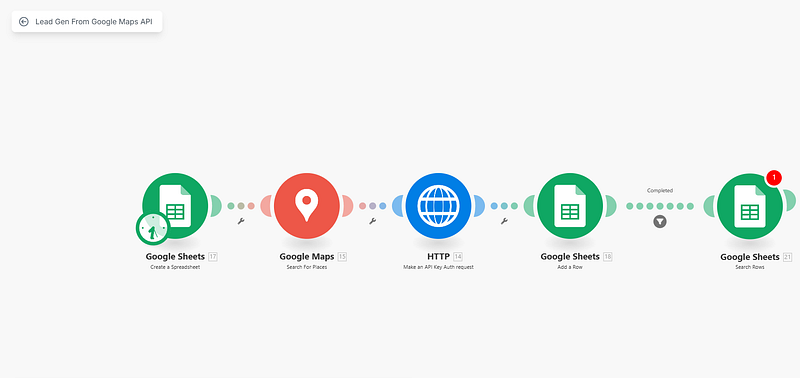
You type in what you’re looking for, like “Dentists in California”.
It searches Google Maps and fetches a list of businesses.
Then it grabs each business’ website link.
It visits each site, digs through the code for email addresses, and logs it all in your sheet.
It’s the data version of a treasure hunt, except the map is automated.
Who This Is For
This setup is for people who want to get things done yesterday.
Freelancers chasing leads.
Agencies scaling fast.
Local businesses doing recon.
Side-hustlers testing ideas.
Serial founders trying not to lose their minds.
Basically, anyone who hates manual data entry.
How to Use It
Download the scenario file from this link.
Import it into your Make.com account.
Add your Google Maps API key.
Set your search term and location.
Then hit play and act like you did something clever. Because you did.
Real World Results
I tested it on “Physical Therapists in Delhi”.
Ten minutes later, I had 40 websites and emails chilling in my sheet like they’d been there all along.
Pre-automation, that would’ve taken me a solid afternoon, two coffees, and a mild existential crisis.
Now I run it Monday. Write cold emails Tuesday. Book calls Thursday.
The system works. And it doesn’t complain.
Things to Watch Out For
Google Maps API has usage limits. Don’t go berserk or you’ll hit a wall.
Some sites don’t list emails. That’s just life.
Also, clean your list before blasting emails unless you like being blocked faster than a cold DM on LinkedIn.
Want More Like This?
This one’s free.
But it won’t always be that way.
If this saved you hours, share it with someone who still does lead gen with copy-paste.
Follow me for more drops like this.
And if something breaks or confuses you, message me.
I’ve broken this scenario in more ways than I care to admit.