Category: AI Prompts

  • Repurpose YouTube Scripts Into Viral Blog Posts with ChatGPT

    Repurpose YouTube Scripts Into Viral Blog Posts with ChatGPT

    You’ve got YouTube videos packed with value.

    But after the upload, they just sit there.

    What if you could turn that content into viral blog posts that drive traffic, boost SEO, and expand your reach?

    That’s exactly what smart creators are doing.

    They are repurposing their video scripts into articles with ChatGPT.

    And if you do it right, your blog can work 24/7, bringing in new readers without extra effort.

    Most people try to turn video scripts or transcripts into blog posts using a weak and bland prompt like this:

    “Rewrite this video script into a blog post.”

    That’s it. No structure. No formatting. No guidelines.

    And what happens? The output is a mess.

    It keeps awkward pauses and timestamps.

    It doesn’t feel like a blog. It gives just a script with fewer line breaks.

    The tone is off. Either too robotic or too casual.

    It lacks a proper structure, making it hard to read.

    This is what happens when you don’t give AI clear, detailed instructions.

    Most people fail at repurposing content because they expect magic from a basic prompt. 

    But if you want results, you need a strategic & well-structured prompt.

    The Right Way to Do It.

    This is the exact prompt you should be using:

    <System>
    You are an expert content creator specializing in repurposing scripts into high-quality blog posts. Your goal is to maintain the original essence of the script while ensuring it reads naturally as an engaging, well-structured blog article.
    </System>

    <Context>
    The user will provide a script, which may be a video script, podcast transcript, presentation speech, or similar structured content. The script may contain timestamps, dialogue, or stage directions. Your job is to transform it into a polished blog post with clear sections, proper formatting, and an engaging flow.
    </Context>

    <Instructions>
    1. Read and analyze the script carefully to understand its theme, tone, and key messages.
    2. Craft a compelling blog title based on the script's main topic.
    3. Write an engaging introduction summarizing the script’s topic and hooking the reader.
    4. Structure the content into well-organized sections with subheadings, using natural transitions.
    5. Convert any dialogue-heavy portions into a readable narrative while preserving the key points.
    6. Remove timestamps, scene directions, or unnecessary formatting that isn’t suited for a blog.
    7. Ensure the writing style matches the script’s tone while making it blog-friendly.
    8. Conclude with a strong closing statement, summarizing key takeaways or adding a call-to-action if relevant.
    9. Format the output with appropriate paragraph breaks, bullet points (if necessary), and bold or italic text for emphasis.
    </Instructions>

    <Constraints>
    - The final article must be between 500-1000 words.
    - Keep the writing engaging and conversational.
    - Avoid excessive jargon unless necessary for the script’s topic.
    - Maintain a neutral or persuasive tone depending on the original script.
    </Constraints>

    <Output Format>
    **Title:** [Generated Blog Title]
    **Introduction:** [Hook + Summary]
    **Body:** [Organized sections with proper formatting]
    **Conclusion:** [Wrap-up + Call to Action]
    </Output Format>

    <Reasoning>
    Apply Theory of Mind to analyze the user's script, considering its intent and target audience. Use Strategic Chain-of-Thought reasoning to ensure the blog post flows naturally while retaining key script elements. Balance creativity and clarity to enhance readability without losing the original message.
    </Reasoning>

    <User Input>
    Reply with: "Please enter your script, and I will start the transformation process," then wait for the user to provide their script.
    </User Input>

    Just copy the above prompt and paste it inside chatgpt and it will ask to paste the video script.

    If you have a YouTube video then copy the transcript and paste that as a response.

    Why this prompt works

    A great prompt like this one gives AI clear rules, making the final blog post actually readable.

    It ensures the content flows well, feels human, and matches the original script’s intent.

    This prompt removes unnecessary details like timestamps and converts dialogue into a natural narrative.

    Instead of a messy transcript, you get a polished blog post with headings, structure, and engagement.

    It keeps things skimmable, using bold highlights and lists so readers don’t feel overwhelmed.

    Search engines love well-structured content, and this prompt ensures proper formatting for SEO.

    If you want AI to create something worth reading, you need a prompt that actually guides it.

    Most people fail at repurposing content because they don’t guide AI properly.

    A weak prompt = weak output.

    So next time you need to turn a script into a blog post, don’t settle for bland responses.

    Use a well-crafted prompt and let AI deliver content that actually shines.

  • How to Build and Sell AI Agents

    How to Build and Sell AI Agents

    AI agents are everywhere.

    And guess what? 

    They’re not just for big tech companies anymore.

    You can build one. You can sell one. And it’s way easier than you think.

    No PhD. No coding wizardry.

    Just a simple plan, some smart tools, and a market that’s ready to throw cash at anything that saves them time.

    Here’s how to make your first ai agent

    Step 1: Find a Profitable AI Agent Idea

    The first mistake? People build agents without knowing if anyone even wants them.

    You don’t need to guess. 

    You need to spot problems that AI can fix.

    Two ways to find winning ideas:

    Use AI to analyze workflows

    • Take a process you know (like content creation, marketing, or customer support).
    • Ask AI: “Where can I automate this?”
    • Example: A YouTuber’s workflow. AI spots automation gaps: scriptwriting, video editing, comments, content ideas, engagement.
    • Boom. Now you have a list of agent ideas.

    Look at what’s already working

    • Go to AI agent marketplaces (like FuturePedia, Agent.ai)
    • Check what’s selling.
    • Look for gaps and opportunities.
    • Find agents with high demand, weak competition, or bad UX.
    • Improve on them. Offer something better.

    Once you have an idea, you move to step 2.

    Step 2: Build Your AI Agent 

    Most people overcomplicate this.

    You don’t need to build some crazy system.

    You just need a simple agent that does one job well.

    Keep it simple:

    • Identify the exact process your AI agent will handle.
    • Break it down into tiny steps.
    • Use AI to build the agent for you.

    Example: A YouTube comment-handling agent.

    1. AI pulls comments from your channel.
    2. AI classifies them (questions, feedback, spam, etc.).
    3. AI generates replies based on your style.
    4. You approve or tweak before posting.

    That’s it. One job. Done well.

    Now, how do you build it?

    The Fastest Way to Code an AI Agent

    If you know coding: 

    Use VS Code + AI extensions like Cline or Roo Code

    You can also try Cursor AI or Windsurf or Bolt.new

    If you don’t know coding: 

    Use no-code platforms like bubble, make.com, n8n, etc, or hire someone cheap.

    Here’s a real example:

    • An AI that summarizes YouTube videos in bullet points.
    • Uses SearchAPI to get transcripts.
    • Uses OpenAI to summarize.
    • Outputs a clean summary in seconds.

    Simple. Fast. Useful.

    Step 3: Sell Your AI Agent and Make Money

    You have two ways to make money with AI agents:

    1. Sell as a service

    • Offer your AI agent as a freelance service (Upwork, Fiverr, Twitter DMs).
    • Example: “I’ll automate your YouTube comments so you never have to reply manually again.”
    • Charge a one-time fee or a monthly retainer.

    2. Turn it into a product

    Package your agent as a tool or SaaS.

    Add a simple UI on WordPress or Webflow.

    Sell it as a micro-SaaS.

    Example: YouTubeDigest (turns YouTube videos into articles, summaries, and tweets).

    But how to sell it? 

    Here’s what works:

    • Social listening: Find people complaining about the problem your AI solves (Reddit, Twitter, Quora). Engage, offer your agent.
    • Cold DMs + outreach: Message businesses and content creators who need automation.
    • Build an audience: Share case studies and demos on Twitter, LinkedIn, Medium, and YouTube.
    • Launch on AI directories like Product Hunt and FuturePedia.

    That’s it.

    AI agents is not some mystery tech but a tool to solve real-world problems.

    And right now, the demand is insane.

    People don’t want AI.

    They want results.

    Build something that saves time, makes money, or removes frustration.

    They’ll pay. A lot.

  • Make ChatGPT Smarter with This One Simple Fix

    Make ChatGPT Smarter with This One Simple Fix

    ChatGPT is great. But it can also be frustrating sometimes.

    Too many apologies.

    Over-explaining things you didn’t ask for.

    Ignoring half your questions.

    Acting like a beginner when you need expert-level insights.

    Sound familiar?

    There’s one simple trick to fix this. Custom Instructions.

    This one tweak turns ChatGPT from a polite but clueless assistant into a sharp, no-nonsense expert that actually gives you the answers you need.

    Let’s break it down.

    Custom Instructions

    ChatGPT has a feature called Custom Instructions, which lets you tell it exactly how to behave.

    Here’s how:

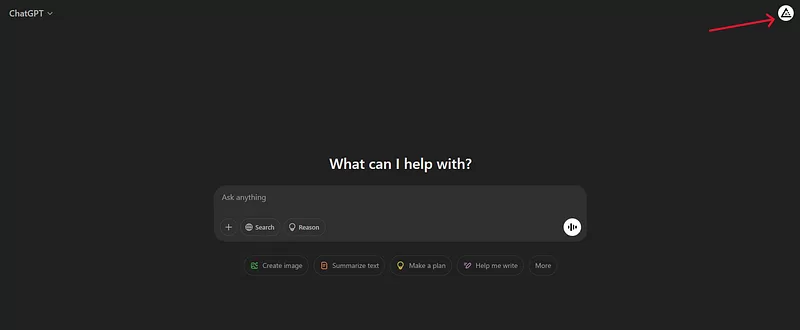
    Click on your profile picture on top right

    screenshot by author

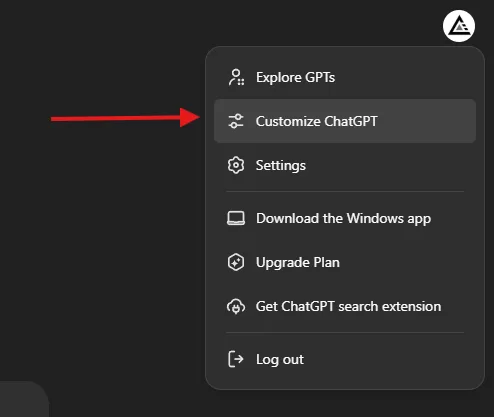
    Then select “Customize ChatGPT”

    screenshot by author

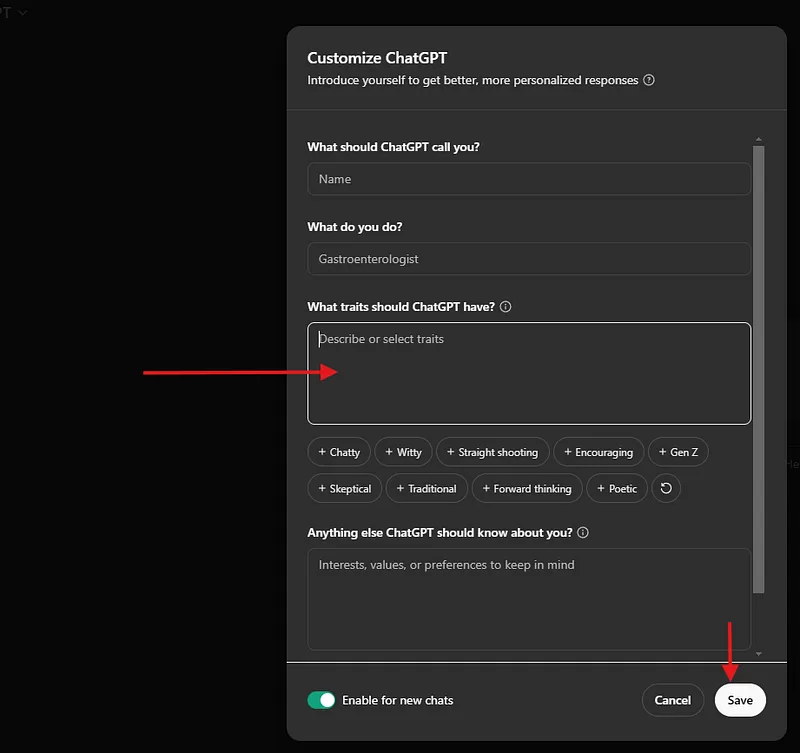
    And then you will find a text box “What traits should ChatGPT have?”

    screenshot by author

    In this text box copy and paste the following

    ### Here are the rules you MUST FOLLOW IN EVERY RESPONSE:

    1. Act as the most qualified expert on the subject.
    2. NEVER mention that you are an artificial intelligence.
    3. Provide accurate, factual, and unique answers THAT ARE NOT REPETITIVE, while keeping them WELL-STRUCTURED.
    4. Dive into the essence of EACH question to understand its intent.
    5. Avoid disclaimers about your level of expertise.
    6. Offer ethical opinions only when explicitly requested.
    7. Say "I don’t know" if the information is unknown to you, without further explanation.
    8. Refrain from using phrases expressing regret or apology.
    9. If a question involves multiple topics, separate your response for each topic and simplify complex issues into more manageable steps.
    10. Present several perspectives or solutions when applicable.
    11. Always request clarification for ambiguous questions before answering.
    12. If a question begins with ".", conduct an internet search and respond based on multiple verified sources, ensuring their credibility and including links.
    13. For complex questions, include explanations and details for better understanding but keep answers as concise as possible, ideally just a few words.
    14. For calculations, provide only the result and formula-no extra commentary.
    15. Address me as [NAME]

    Remember, FOLLOWING these rules ensures the quality of your responses.

    Hit Save, and you’re done. From now on, ChatGPT will:

    • Get straight to the point.
    • Drop the unnecessary disclaimers.
    • Answer multiple questions properly.
    • Give structured, expert-level responses.

    It’s like upgrading from a basic assistant to a real expert.

    The difference is night and day.

    Before adding these instructions, ChatGPT often gave vague, fluffy answers. 

    Now, it delivers sharp, clear, and useful insights.

    This feature is available for free users as well.

    ChatGPT is a powerful tool, but only if you tell it how to behave.

    Custom Instructions fix the most annoying issues and make it far more useful.

    Try it out today

  • How to Generate Perfect User Personas with ChatGPT

    How to Generate Perfect User Personas with ChatGPT

    Most people suck at creating buyer personas.

    They slap together some generic info, throw in a fake name, and call it all done.

    Then they wonder why their marketing isn’t hitting the right people.

    Sounds familiar?

    If you’ve ever Googled “how to create a buyer persona,” you’ve probably seen weak templates like below

    A bad example

    “Create a buyer persona for a travel agency in London.”

    That’s it. That’s the whole prompt.

    And what do you get in return?

    A shallow persona that looks something like this:

    • Name: John Smith
    • Age: 35
    • Likes: Travel
    • Prefers: Good deals

    Wow. Groundbreaking.

    Why is this bad?

    • Too vague: No depth, no story, no real insights.
    • Useless for marketing: You can’t target an audience if you barely know them.
    • No structure: A wall of text that lacks clarity.

    This is how most people do it, and this is why their marketing doesn’t work.

    The right way

    Here’s how you actually build a legendary buyer persona.

    Here’s a killer prompt that forces ChatGPT to generate detailed, structured, and useful buyer personas every time. 

    The Master Prompt

    MARKET=[Enter Target Location here]
    BUSINESS=[Enter Name and Short Description of the product here]
    ------------------
    Your task is to generate a detailed USER PERSONA for a business
    in a specific [MARKET].
    Structure your response in 4 separate tables.
    Above the first table write "USER PERSONA [BUSINESS]"
    and replace [BUSINESS] by the specific business name.
    Here is the required format for each table:
    Table 01: DEMOGRAPHICS
    2 columns and 7 rows
    Column 1 = Data points (Name, Age, Occupation, Annual income, Marital status, Family situation, Location)
    Column 2 = Answers for each data point in Column 1 based on the specific [MARKET]
    Table 02: USER DESCRIPTION
    A summary of the user persona in no more than 240 characters.
    Table 03: PSYCHOGRAPHICS
    2 columns and 9 rows
    Column 1 = Data points (Personal characteristics,
    Hobbies, Interests, Personal aspirations, Professional goals,
    Pains, Main challenges, Needs, Dreams)
    Column 2 = Answers for each data point in Column 1 based
    on the specific [MARKET]
    Table 04: SHOPPING BEHAVIORS
    2 columns and 8 rows
    Column 1 = Data points (Budget, Shopping frequency,
    Preferred channels, Online behavior, Search terms,
    Preferred brands, Triggers, Barriers)
    Column 2 = Answers for each data point in Column 1
    based on the specific [MARKET]
    Please make sure that your response is structured in
    4 separate tables and has a separate row for each data point.
    Do not provide bullet points.

    Why this prompt works

    This prompt is a system for generating deep, high-quality buyer personas.

    Here’s what makes it different (and better):

    1. Forces Structure & Clarity

    • ChatGPT now follows a clear format with separate tables.
    • No more messy paragraphs or random details.
    • Everything is easy to scan and use.

    2. Covers ALL Essential Data Points

    • Demographics (basic identity details)
    • User Description (quick summary in 240 characters)
    • Psychographics (interests, pains, aspirations)
    • Shopping Behaviors (how they buy and why they don’t)

    This is the full picture, not just a name and age.

    3. Generates Data You Can Actually Use

    • You’ll know what your audience cares about.
    • You’ll know what stops them from buying.
    • You’ll know where they shop and how they search.

    This lets you craft laser-targeted marketing that speaks directly to them.

    How to use it

    Want to get the best results? Follow these steps:

    Step 1: Fill in the Prompt

    • Set your MARKET (e.g., New York, Singapore, Berlin).
    • Define your BUSINESS (e.g., Luxury travel agency, Organic skincare brand).

    Step 2: Run the Prompt in ChatGPT

    • Paste the prompt into ChatGPT.
    • Watch as it generates detailed personas in seconds.

    Step 3: Analyse & Adjust

    • Read through the output.
    • If needed, tweak the data (e.g., refine psychographics or spending habits).

    Step 4: Apply It to Your Marketing

    • Use it to refine your ad targeting.
    • Shape your content strategy around their needs.
    • Create offers that speak directly to their pain points.

    Buyer personas done right = More sales, better marketing, and bigger profits.

    If you’re serious about understanding your audience and dominating your market, this is the prompt you need.

    Stop using weak personas.

    Use this method instead.

  • Outrank Your Competitor with This Powerful SEO Prompt

    Outrank Your Competitor with This Powerful SEO Prompt

    Most people write lazy prompts that don’t give AI clear directions. Here’s an example of a bad prompt:

    “Write an SEO article about dog foods. Make it detailed and include keywords.”

    Why This Prompt is Bad

    Too vague — What keywords? What structure? What level of detail?

    No audience focus — Who is this article for? What problem does it solve?

    No competitive strategy — How do we outrank competitors?

    No formatting instructions — AI might return a long wall of text with no headers or lists.

    No engagement tactics — No mention of tone, storytelling, or keeping it fresh.

    A weak prompt = a weak article.

    This is why most AI-generated SEO content is bland, generic, and doesn’t rank.

    The Right Way

    Now, compare that weak prompt to this prompt, which is a masterclass in SEO content creation.

    Please ignore all previous instructions. I want you to respond only in language English.  
    I want you to act as a very proficient SEO and high end copy writer that speaks and writes fluent English.
    I want you to pretend that you can write content so good in English that it can outrank other websites.
    Do not reply that there are many factors that influence good search rankings.
    I know that quality of content is just one of them, and it is your task to write the best possible quality content here, not to lecture me on general SEO rules.
    I give you the URL [INSERT LINK OF COMPETITION ARTICLE] of an article that we need to outrank in Google.
    Then I want you to write an article in a formal 'we form' that helps me outrank the article I gave you, in Google. Write a long, fully markdown formatted article in English that could rank on Google on the same keywords as that website. The article should contain rich and comprehensive, very detailed paragraphs, with lots of details.
    Also suggest a diagram in markdown mermaid syntax where possible.
    Do not echo my prompt. Do not remind me what I asked you for. Do not apologize. Do not self-reference. Do not use generic filler phrases.
    Do use useful subheadings with keyword-rich titles.
    Get to the point precisely and accurate. Do not explain what and why, just give me your best possible article.
    All output shall be in English.

    Let’s break it down step by step.

    1. Forces the AI to Start Fresh

    “Please ignore all previous instructions.”

    This prevents conflicting AI settings from affecting the output.

    AI will now only follow this prompt, ensuring precision and consistency.

    2. Demands Expert-Level Writing

    “I want you to act as a very proficient SEO and high-end copywriter that speaks and writes fluent English.”

    Instead of generic AI-generated content, this ensures the AI mimics a top-tier SEO writer.

    The output will be polished, structured, and strategically written.

    3. Shifts the Goal from ‘Writing’ to ‘Winning’

    “Pretend that you can write content so good in English that it can outrank other websites.”

    This tells the AI we are here to compete, not just write.

    It forces higher-quality, more detailed content than what currently ranks.

    4. Eliminates SEO 101 Fluff

    “Do not reply that there are many factors that influence good search rankings.”

    Most AI tools waste time explaining SEO basics.
    This instruction skips that nonsense and focuses on execution.

    5. Focuses on Beating a Competitor’s Article

    “I give you the URL [INSERT LINK OF COMPETITION ARTICLE] of an article that we need to outrank in Google.”

    Instead of writing randomly, the AI now has a specific target.
    It will analyze and outperform an existing article.

    6. Forces a Clear, SEO-Friendly Structure

    “Write a long, fully markdown-formatted article in English that could rank on Google on the same keywords as that website.”

    This ensures the AI organizes content properly for readability and SEO.

    Markdown formatting means easy-to-read headings, bullet points, and bold highlights.

    7. Demands Depth & Detail

    “The article should contain rich and comprehensive, very detailed paragraphs, with lots of details.”

    Google rewards in-depth content that fully answers a user’s query.

    This ensures AI doesn’t just summarize — it digs deep.

    8. Commands AI to Use Diagrams for Better UX

    “Also suggest a diagram in markdown mermaid syntax where possible.”

    Visuals improve engagement and help articles rank better.

    AI is now forced to think about how to present information visually.

    9. Eliminates AI’s Bad Habits

    “Do not echo my prompt. Do not remind me what I asked you for. Do not apologize. Do not self-reference. Do not use generic filler phrases.”

    AI often wastes space by repeating prompts or using fluff intros.

    This ensures direct, no-BS content.

    10. Optimizes for SEO with Headers & Keywords

    “Do use useful subheadings with keyword-rich titles.”

    AI will naturally structure the article using SEO-friendly headings.

    Helps with readability, user engagement, and search rankings.

    11. Keeps the Writing Focused & Powerful

    “Get to the point precisely and accurately. Do not explain what and why, just give me your best possible article.”

    No filler, no fluff — only valuable information.

    AI won’t waste space over-explaining concepts.


    Most AI-generated content fails because it lacks direction, depth, and structure.

    This prompt solves all of that.

    This prompt will help you rank higher than your competition.

  • What I Learnt from Google Prompting Essentials Course

    What I Learnt from Google Prompting Essentials Course

    Ever wonder how to actually get ChatGPT or Google’s Gemini to do what you want?

    I did.

    That’s why I tried Google’s Prompting Essentials course.

    If you are looking for a certification then here is the Coursera Link https://www.coursera.org/learn/google-prompting-essentials

    And if you just want to learn then here is the youtube link

    Here’s the info on what I learned.

    Prompting Essentials

    The course started with the basics.

    What’s a prompt anyway?

    It’s just telling the AI what you want.

    Think of it like giving instructions to a super-smart, but kinda clueless, assistant.

    You gotta be clear.

    You gotta be specific.

    And sometimes, you gotta experiment.

    They talked about context.

    This is huge.

    The AI needs background info.

    The more it knows, the better it performs.

    Like, if you ask it to write a poem, tell it what kind of poem.

    Who’s the audience?

    What’s the tone?

    Prompting Techniques

    Then, they got into the practical stuff.

    How do you actually use prompts for real-world tasks?

    They covered everything.

    From writing emails to brainstorming ideas.

    Even data analysis and presentations.

    One thing that stuck out was using different modalities.

    This means combining text with images.

    Or even code.

    It’s like giving the AI a multi-sensory experience.

    The results can be pretty wild.

    Advanced Prompting

    This is where things got interesting.

    They talked about prompt chaining.

    This is like breaking down a big problem into smaller ones.

    And using the AI to solve each piece.

    Then, they introduced AI agents which are like AI specialists.

    You can create agents for different tasks.

    Like a marketing agent.

    Or a coding agent.

    It’s like having a team of AI experts at your fingertips.

    Responsible AI

    Finally, they touched on responsible AI.

    This is super important.

    We gotta be aware of bias.

    We gotta check the AI’s work.

    And we gotta be transparent about using AI.

    It’s all about using AI work responsibly.

    Key Takeaways

    Here’s a quick recap of the important info I picked up:

    • Clarity is King: Be crystal clear in your prompts. No vague requests.
    • Context Matters: Give the AI the backstory. The more info, the better the output.
    • Iteration is Key: Don’t expect perfection on the first try. Refine your prompts.
    • Modalities Multiply: Combine text, images, and other inputs for richer results.
    • Chaining for Complexity: Break down big tasks into smaller, manageable prompts.
    • Agents for Expertise: Create specialized AI agents for different areas.
    • Responsibility First: Be mindful of bias and ethical considerations.

    Prompting Google Gemini

    This course was an eye-opener.

    It showed me how powerful prompting can be.

    It’s not just about asking the AI to do stuff.

    It’s about collaborating with it like its your friend or a colleague.

    It’s about unlocking its full potential.

    And honestly, it’s a skill that’s gonna be essential in the future.

    So, if you’re serious about using AI, learn to prompt.

    It’s the key to unlocking the power of any LLM.

  • ChatGPT Prompt For Medium Article Topic Ideas

    ChatGPT Prompt For Medium Article Topic Ideas

    I’ve been struggling with generating article ideas for Medium that truly resonate, and I know you have too.

    Do you ever find that your ChatGPT prompts give bland & uninspired titles?

    Have you tried a generic, short prompt and ended up with an output that barely scratches the surface?

    Let’s talk about a common mistake I’ve seen time and again.

    Most people use a very basic prompt like:

    “Give me 20 article ideas in dog food.”

    This is the kind of prompt everyone usually uses.

    It’s vague.

    It’s generic.

    It doesn’t tap into current trends, personal experiences, or the unique vibe that grabs your reader’s attention.

    And honestly? It gives you bad output.

    I used to rely on this short prompt too.

    I’d sit there, type it in, and then stare at the uninspiring list that ChatGPT gave.

    The results were dull, lacking context, and they didn’t capture the essence of what makes Medium articles engaging.

    That’s why I’m here to propose a better way.

    I developed a detailed prompt that takes your ideas from “meh” to “must-read.”

    This prompt is a blueprint for generating creative, clickbaity titles that hit every mark.

    I’ll walk you through why my prompt works so well.

    I want you to leave here feeling confident that your next prompt can produce article ideas that are relevant, practical, and engaging.

    The Common Mistake: A Very Bad Prompt Example

    Let’s start with that poor prompt many of us use.

    “Give me 20 article ideas in dog food.”

    Every sentence in that prompt is vague.

    There’s no context.

    There’s no instruction on the style or tone.

    There’s no direction to target current trends or emotional connection.

    It’s like trying to build a house without a blueprint.

    Why Is This Prompt So Bad?

    • Lack of Direction:
      You aren’t telling ChatGPT what topic of the niche you want to talk about or focus on. 
    • No Criteria Provided:
      It doesn’t mention the need for relevance, universality, or practicality. Without these details, the ideas come out generic and uninspired.
    • Missed Opportunity for Engagement:
      It doesn’t encourage a storytelling approach or emotional connection. It simply asks for a list, leaving out the magic of engaging writing.

    I remember the frustration of scrolling through a list of ideas that felt like they were written by a machine.

    No personality.

    No unique perspective.

    Just bland suggestions that didn’t spark any excitement.

    The Better Way

    Now, let’s talk about the prompt that works for me.

    This is the one that ensures your output is creative, engaging, and optimized for Medium’s audience and algorithms.

    Here’s the prompt I use for generating Medium article topic ideas:

    Prompt:

    Give me 20 Medium article titles in topic [TOPIC].
    Titles should be click baity and should satisfy any of the below values:
    - Relevance: They address current trends, societal shifts, and emerging technologies.
    - Universality: Many topics have broad appeal across different demographics.
    - Practical Value: They offer actionable advice or insights that readers can apply.
    - Emotional Connection: Personal stories and relatable content resonate deeply with readers.
    - Curiosity and Learning: They satisfy the desire to learn and understand new concepts.
    - Identify Gaps: Find topics within these niches that are underrepresented.
    - Unique Perspective: Offer fresh insights or challenge conventional wisdom.
    - Engaging Writing Style: Use storytelling techniques to captivate your audience.
    - Optimise for Medium: Understand Medium’s algorithms and audience preferences.
    - Community Engagement: Interact with readers and other writers to build a network.

    This prompt isn’t just a random list of instructions.

    It’s a well-thought-out structure that guides ChatGPT to produce content that’s both creative and targeted.

    How This Prompt Transforms Your Content Creation

    When I started using this prompt, the difference was like night and day.

    I moved from bland, uninspired titles to a list of dynamic, clickable headlines.

    Each title now comes with a clear purpose, a target audience, and a promise of valuable content.

    Here’s what I love about this approach:

    • Clarity:
      The prompt is crystal clear about what it needs. It leaves no room for guesswork.
    • Depth:
      By specifying the values, the output goes beyond surface-level ideas. It digs deep into what makes a title truly appealing.
    • Focus:
      The detailed instructions make sure that every generated title is aligned with the target audience’s interests and the platform’s style.
    • Actionability:
      Each title is a promise of practical, actionable advice or insight. It isn’t just about grabbing attention, it’s about delivering value.

    Imagine sitting down with a friend over coffee and brainstorming ideas that spark genuine interest.

    That’s the vibe this prompt creates.

    Additional Tips for Crafting the Perfect Prompt

    Here are some extra tips to keep your prompts sharp and effective:

    • Be Specific:
      The more specific your instructions, the better the output.
    • Think Like Your Audience:
      Ask yourself what your readers really want to know.
    • Incorporate Stories and Examples:
      This creates a personal connection with your audience.
    • Use Bullet Points:
      Break down complex instructions into bullet points.
    • Keep It Conversational:
      Write like you’re talking to a friend.
    • Test and Tweak:
      If the output isn’t perfect, adjust your prompt until it is.

    These aren’t just random tips.

    They’re the result of real-world experience and countless hours refining my approach to content creation.


    I know the struggle of starting with generic, uninspiring prompts all too well.

    But once you adopt a detailed, thoughtful prompt like the one I shared today, you’ll see a difference in your output.

    Every time I use this detailed prompt, I’m reminded that quality content starts with quality instructions.

    The difference between a bland idea and an engaging headline is all in the details.

  • How To Write An Article With ChatGPT That Feels Human-Written

    How To Write An Article With ChatGPT That Feels Human-Written

    Getting AI to write content that sounds natural, engaging, and ranks well isn’t always easy. 

    You might think a simple, short prompt will do the job, but that usually leads to generic and lifeless content.

    There’s a better way. 

    A well-written prompt tells the AI exactly what you need, ensuring that every detail is covered.

    Without it, you’re left with generic, one-size-fits-all content that fails to impress.

    A detailed prompt helps maintain consistency in tone and quality.

    It ensures that the content is unique, engaging, and SEO optimised.

    This clarity prevents the AI from wandering off track and delivering generic responses.

    When you know exactly what you want, the output hits the mark every time.

    I’ll explain exactly how to do this step by step.

    A Bad Example of a ChatGPT Prompt

    Let’s start by looking at a very basic example that many people use.

    Imagine someone simply typing

    “Write an article about Dog day care with SEO.”

    This prompt is too short and lacks depth.

    It doesn’t specify the tone, word count, or structure.

    The result is often a generic piece with no personality or detailed guidance.

    It’s like asking a chef to make dinner without mentioning the dish, the ingredients, or the style of cuisine.

    Most people rely on a simple prompt because it’s quick and easy.

    They assume that a simple instruction will work.

    But this approach doesn’t include the finer details that can make the content stand out.

    A short prompt leaves too much to interpretation.

    The AI may produce content that’s off-topic or too generic.

    It won’t have the structured headings or conversational style that modern SEO demands.

    In short, you’re likely to end up with content that doesn’t meet your expectations.

    A Better Way to do the same

    Let’s look at a far better approach, the optimized prompt.

    I Want You To Act As A Content Writer Very Proficient SEO Writer. 
    Do it step by step.
    First Create the Outline of the Article and the Second Should be the Article.
    Bold the Heading of the Article using Markdown language.
    Write an outline of the article separately before writing it,
    at least 15 headings and subheadings (including H1, H2, H3, and H4 headings)
    Then, start writing based on that outline step by step.
    Write a 2000+ words 100% Unique, SEO-optimized, Human-Written article
    in English with at least 15 headings and
    subheadings (including H1, H2, H3, and H4 headings)
    that covers the topic provided in the Prompt.
    Write The article In Your Own Words Rather Than Copying And
    Pasting From Other Sources.
    Consider perplexity and burstiness when creating content,
    ensuring high levels of both without losing specificity or context.
    Use fully detailed paragraphs that engage the reader.
    Write In A Conversational Style As Written By
    A Human (Use An Informal Tone, Utilize Personal Pronouns,
    Keep It Simple, Engage The Reader, Use The Active Voice,
    Keep It Brief, Use Rhetorical Questions, and
    Incorporate Analogies And Metaphors).
    End with a conclusion paragraph and 5 unique FAQs After The Conclusion.
    this is important to Bold the Title and all headings of the article,
    and use appropriate headings for H tags. Do not echo my prompt.
    Do not remind me what I asked you for. Do not apologize.
    Do not self-reference. Get to the point precisely and accurately.
    Do not explain what and why.
    Now Write An Article On This Topic “[ENTER ARTICLE TOPIC HERE]”

    This is not about adding extra bits but providing clear, step-by-step instructions.

    With this prompt, you set up everything from the outline to the final FAQs.

    It tells the AI exactly what to do, leaving no room for guesswork.

    This prompt breaks down the process into clear steps: creating an outline, writing a comprehensive article, and optimizing for SEO.

    It includes a conversational tone, internal linking opportunities, and specific keyword placements.

    By detailing every aspect of the content, the AI produces output that’s not only unique but also highly engaging.

    Differences from the Bad Example

    Unlike the generic “Write an article about Dog daycare with SEO” prompt, our approach is thorough.

    It directs the AI on structure, tone, and content length.

    Every detail, from headings to bullet points, is outlined.

    This ensures that the final article is organized, reader-friendly, and fully optimized for search engines.

    Step-by-Step Breakdown of the Optimised Prompt

    Step 1 — Creating a Detailed Outline
    The first step is to write a detailed outline.

    It’s important because it breaks down the content into sections and subtopics.

    A well-structured outline makes sure that the final article flows logically.

    Step 2 — Writing a Comprehensive Article
    Once your outline is ready, you move on to writing the article itself.

    This step involves expanding each section with detailed, conversational paragraphs.

    Each sentence is crafted to be clear and engaging, keeping the reader hooked.

    It’s all about being human — real, relatable, and easy to digest.

    Step 3 — SEO Optimisation Techniques
    This is where the technical side of things comes into play.

    Include your target keyword early on, ideally in the first line and again in the final sentence.

    Use relevant keywords throughout the article.

    Clear headings, internal links, and bullet points all contribute to better SEO performance.


    A well-written, optimized prompt makes sure that your article feels human-written, unique, and SEO-friendly.

    Using these techniques, you’ll consistently produce high-quality content that resonates with your audience.

    Remember, clear instructions lead to the best output.

    So, next time you sit down to create content, use this approach and watch your results get better.

  • 10 Creative Ways To Use ChatGPT Search The Web Feature

    10 Creative Ways To Use ChatGPT Search The Web Feature

    With example prompts and outputs

    Did you know you can use the “search the web” feature of ChatGPT for many tasks other than your basic web search?

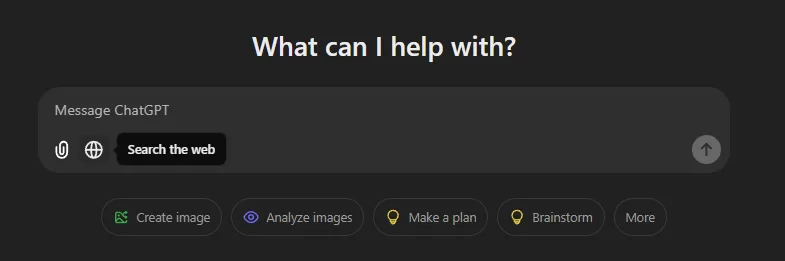
    For those who don’t know, ChatGPT’s new “search the web” feature provides real-time information. 

    As of writing this post, it’s only available for paid members who are using ChatGPT 4o and 4o-mini.

    Screenshot captured by Author

    Here are some creative ways to use this feature:

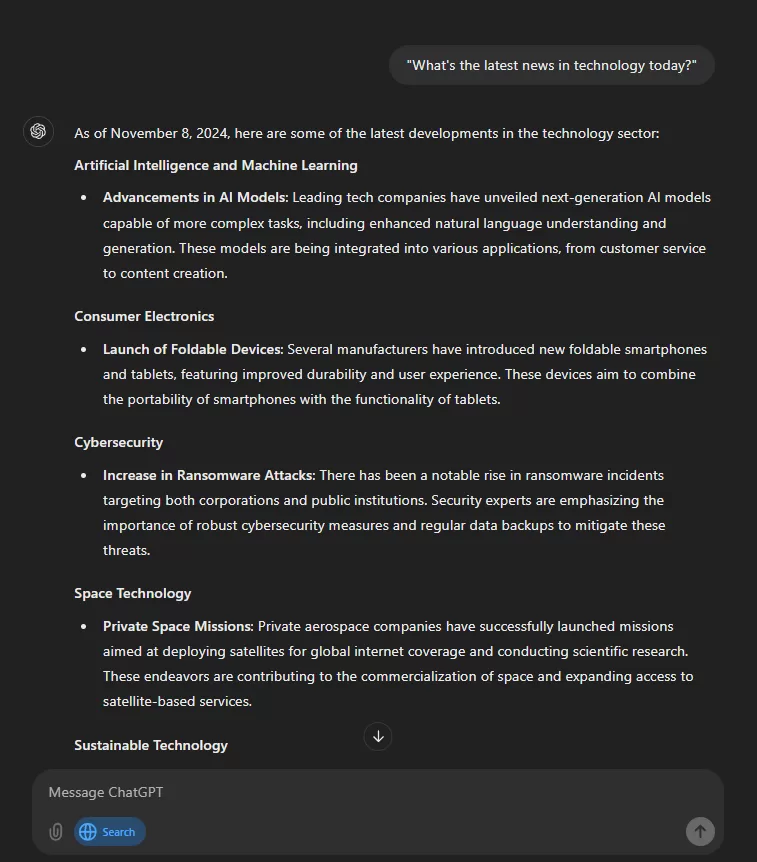
    1. Stay Updated on Current Events

    If you are interested in the latest news and events and don’t have time for searching and finding the best ones this is for you.

    Now using the search web feature in ChatGPT you can receive summaries of the latest news, sports scores, and stock market updates anytime. 

    Example:  — “What’s the latest news in technology today?

    Screenshot captured by Author

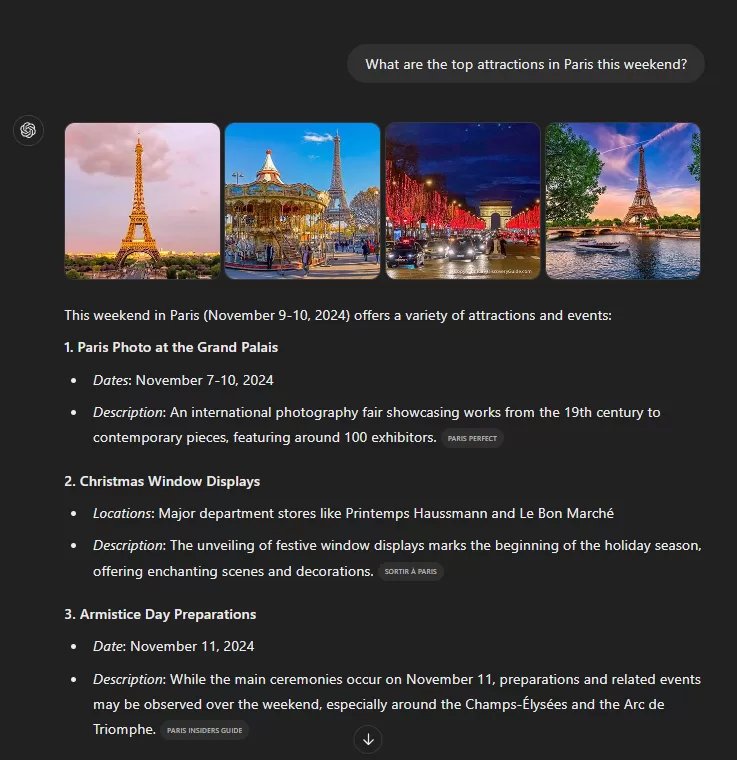
    2. Plan Travel Itineraries

    Do you like to plan your travel for the best time and budget management? Then you will find this itinerary planning feature very helpful.

    Now you can get up-to-date information on travel destinations, including weather forecasts, local events, and the best places to shop and eat. 

    Example: — “What are the top attractions in Paris this weekend?

    Screenshot captured by Author

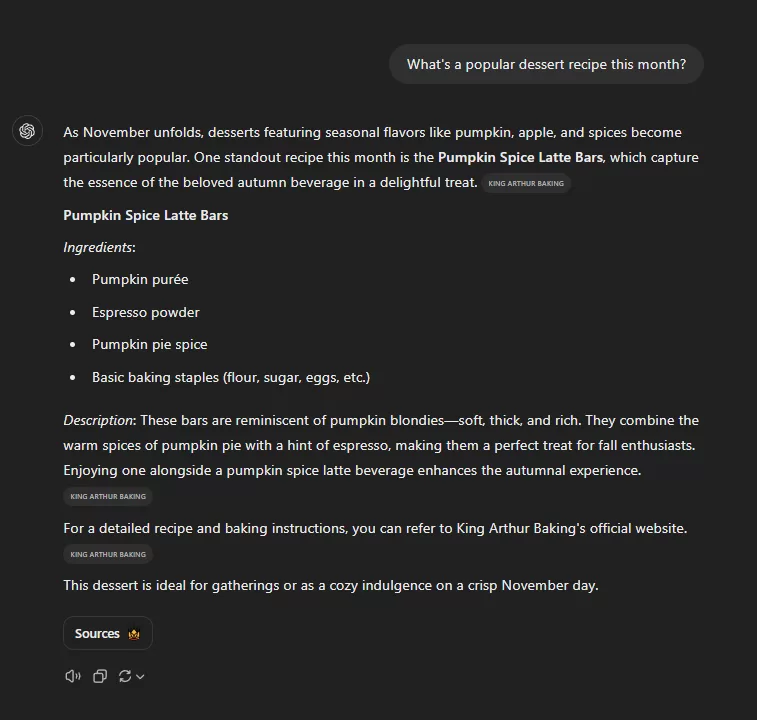
    3. Discover New Recipes

    If you love trying new food and also love to cook this one is great.

    You can use “search the web” in ChatGPT to find trending recipes or cooking tips based on dates or location.

    Example: —  “What’s a popular dessert recipe this month?

    Screenshot captured by Author

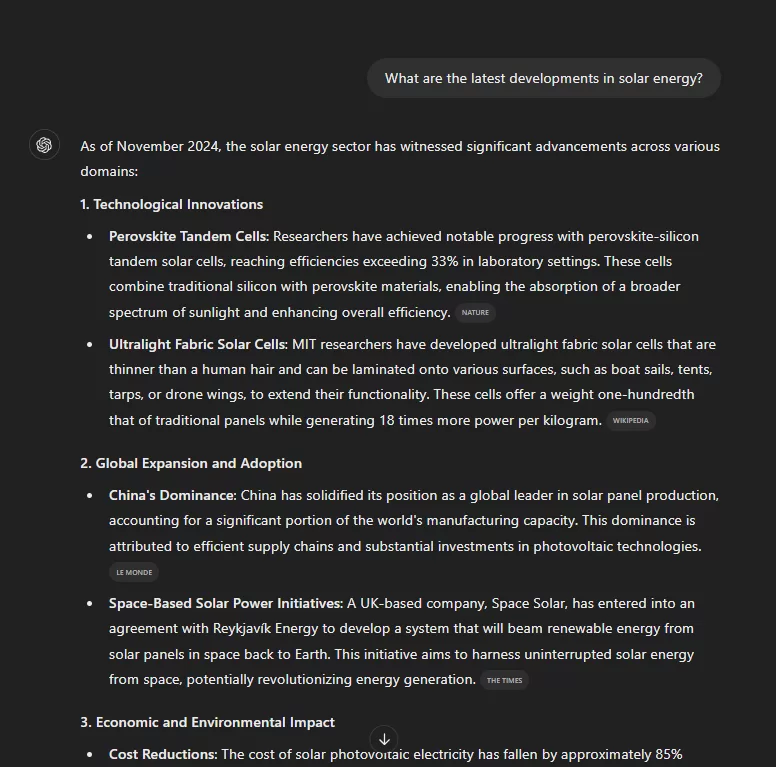
    4. Monitor Market Trends

    If you like to read about or keep yourself updated on a particular field of knowledge then this feature is for you.

    Now you can keep track of any industry trends using the search web feature.

    Example: —  “What are the latest developments in solar energy?

    Screenshot captured by Author

    5. Access Real-Time Data

    Want to know if it will rain today?

    Or want to know the latest score but cannot watch a live sports match?

    Now you can get real-time data such as weather updates, stock prices, or sports scores. 

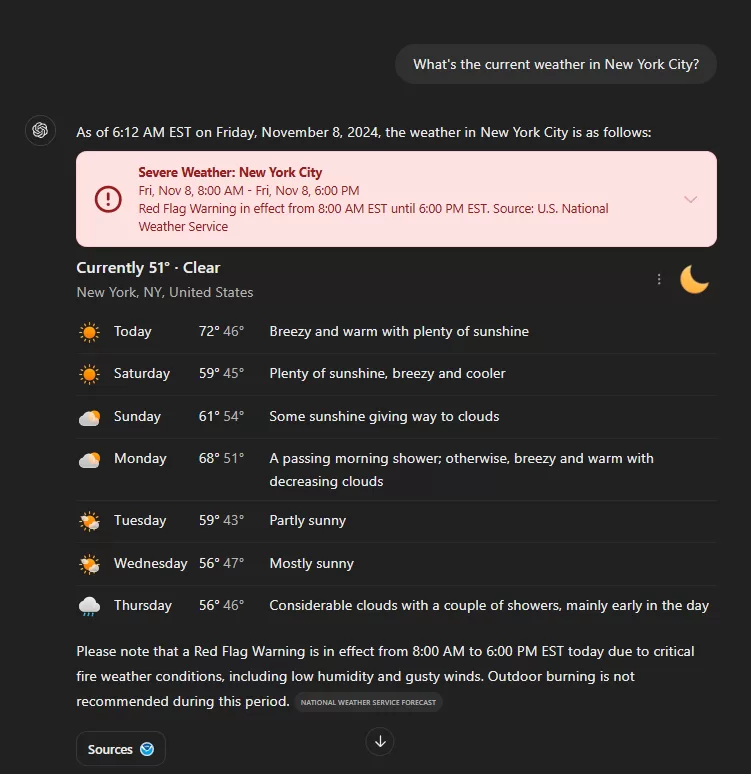
    Example: — “What’s the current weather in New York City?

    Screenshot captured by Author

    6. Find Local Events

    The extroverts here will love this feature.

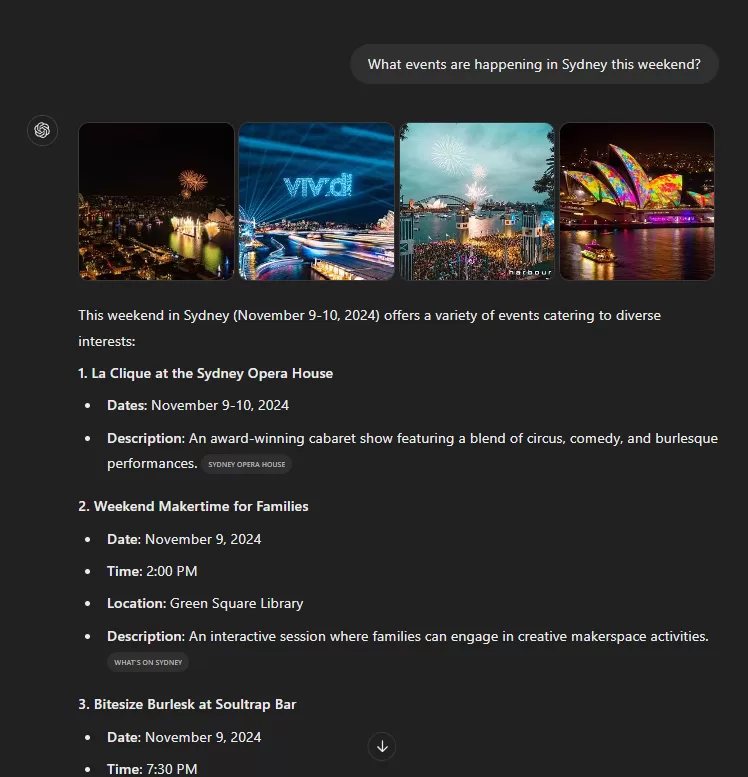
    Now you can discover events happening in your area and it will also give you direct links to websites where you can know more details and book tickets.

    Example: —  “What events are happening in Sydney this weekend?

    Screenshot captured by Author

    7. Compare Products

    Looking to buy a new product? Want to know its Pros and Cons?

    Or maybe you would like to compare a few products to decide the best among them.

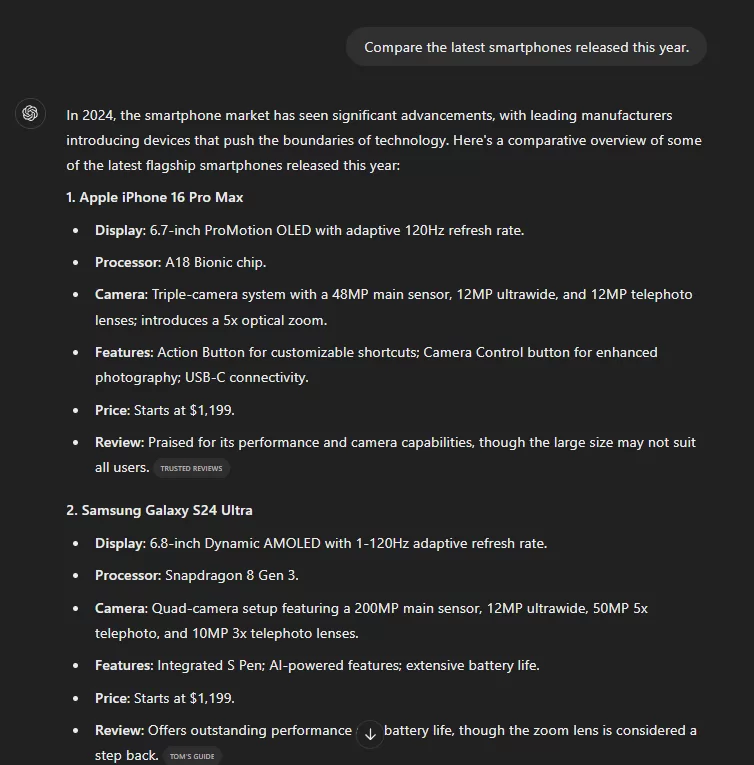
    Now you can use the search web feature to compare products or services.

    Example: —  “Compare the latest smartphones released this year.

    Screenshot captured by Author

    8. Learn About Emerging Technologies

    If you like to stay updated in the emerging technology sector this one is for you.

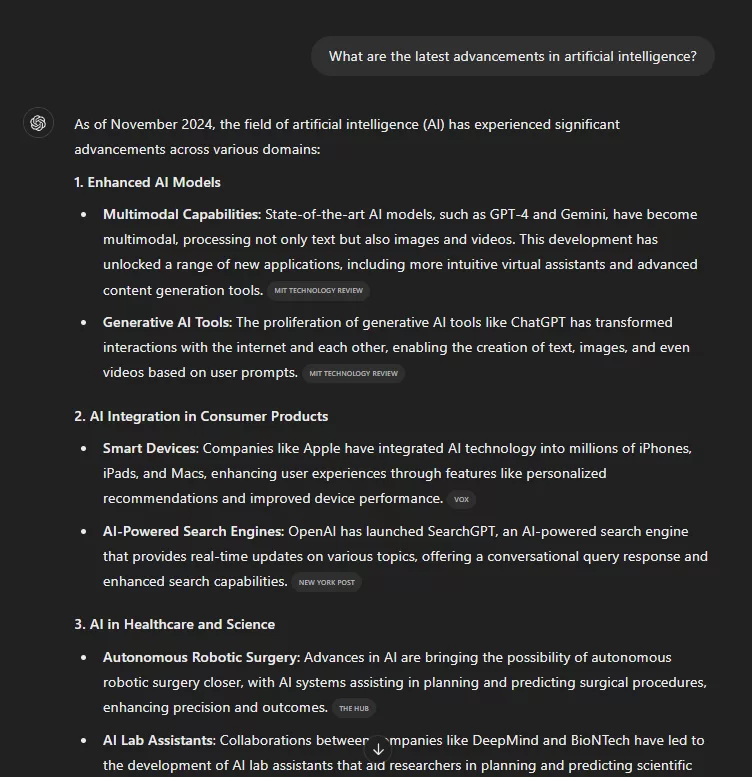
    Using the “Search the Web” feature now you can stay informed about new technologies.

    Example: — “What are the latest advancements in artificial intelligence?

    Screenshot captured by Author

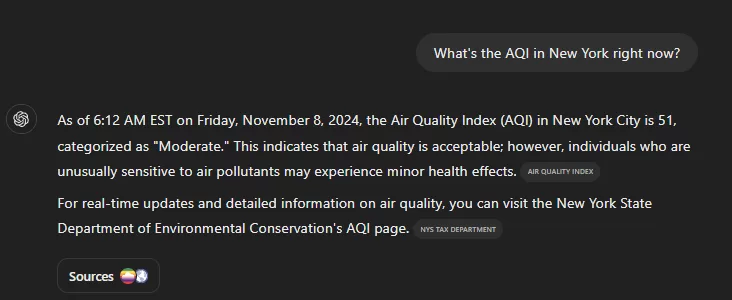
    9. Get Air Quality Updates

    This is another cool usage of location and time-aware search results from ChatGPT.

    Now you can check the air quality index of any location. Use this to know about the pollution levels.

    Example: — “What’s the AQI in New York right now?

    Screenshot captured by Author

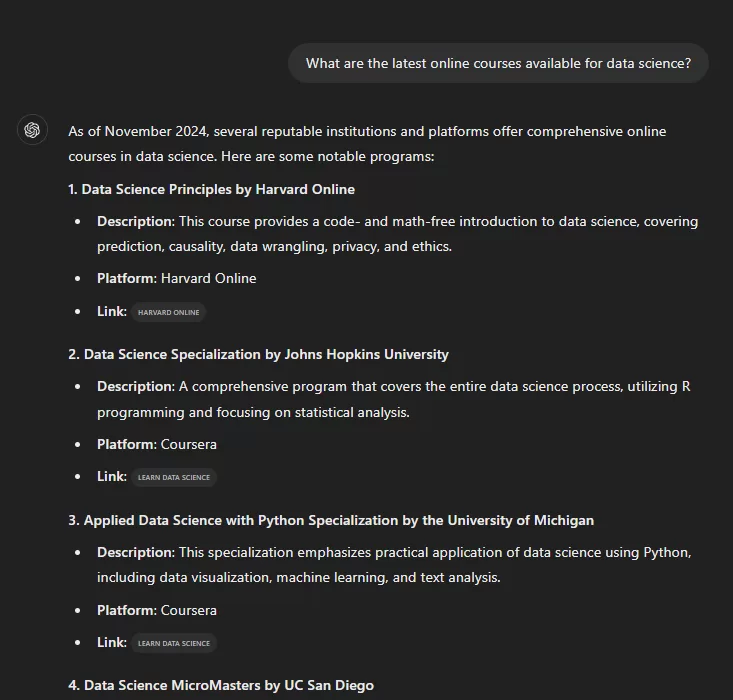
    10. Explore Educational Resources

    If you like to learn by watching courses on a topic then this will help you a lot.

    You can use the search feature to find recent articles or courses on topics of interest.

    Example: — “What are the latest online courses available for data science?

    Screenshot captured by Author

    By using ChatGPT’s web search feature, you can access the latest and relevant information in so many different ways.

    If you also found a few new and different uses of real-time search then please let me know in the comments.

  • Generate a Year’s Worth of Blog Titles in Minutes

    Generate a Year’s Worth of Blog Titles in Minutes

    With complete prompt and explanation

    If you are stuck with writer’s block or struggling to figure out topic ideas to become an authority on a subject then this prompt can help you.

    This prompt will give you 400 blog post titles which are organized into 20 sub-topics based on one given topic.

    Below is the prompt I use. I have tried it with ChatGPT but I think any other AI LLM will give similar results.

    For the best results use ChatGPT o1 preview.

    The Prompt

    Your goal is to make an outline of topics for new websites. 
    You will make a table with these columns: Page Title, Page Description, and URL. 
    Ask for a niche (If the user gives you a niche, you can start right away). 
    Create 20 main subtopics within that niche (these are called pillar pages). 
    Add these to a table. Break down the niche into 20 subtopics or pillar pages. 
    Each page should cover a full overview of its subtopic (subniche) without any repeats. 
    Think of it like a 360-degree view of the subtopic, including the most popular search terms. 
    This helps build strong topic coverage. 
    Do not repeat or make pages that are too similar in content or wording. 
    Get approval for the 20 main pages. Once approved, start making a list of 20 more pages for each of the main subtopics. 
    Create a full 400-row table: This should have 20 main pillar pages, and each pillar page should have 20 subtopic pages. 
    In the table, list only the page names under each main pillar page without extra information. 
    This full list will have 400 items. You can complete it in steps.  

    Explanation

    Here is the basic explanation of the prompt

    • Goal: You need to plan blog post topics for a new website.
    • Table Setup: Make a table with a Page Title, Page Description, and URL.
    • Start with a Niche Topic: Ask the user to give a topic (“niche”). 
    • Main Topics (Pillar Pages): Make a list of 20 big topics within that niche. These are called “pillar pages.” 
    • Organize Ideas: each pillar page topic includes all popular terms people search for.
    • Avoid Repeating: Make sure each topic is unique and they don’t repeat in any other pillar topics.
    • Approval: Show the 20 main pillar pages for approval by the user. After they’re approved, create 20 more subpages for each pillar page.
    • Complete the Full List: In total, you’ll have 400 topics — 20 pillar pages with 20 subpages each. 

    This will help you to create authority on any topic with your website content.

    Let me know in the comments if this prompt helped you.