Tag: YouTube

  • This Automation Uploads Your Videos to YouTube While You Sleep

    This Automation Uploads Your Videos to YouTube While You Sleep

    You know what’s annoying?

    Manually uploading videos.

    Every. Single. Time.

    You film something. Export it. Open YouTube. Fill out the title. Set the privacy. Click upload. Wait. Repeat.

    It’s a bottleneck. And for anyone uploading regularly, it’s a real time-suck.

    So I automated it using Make.com.

    And it changed everything.

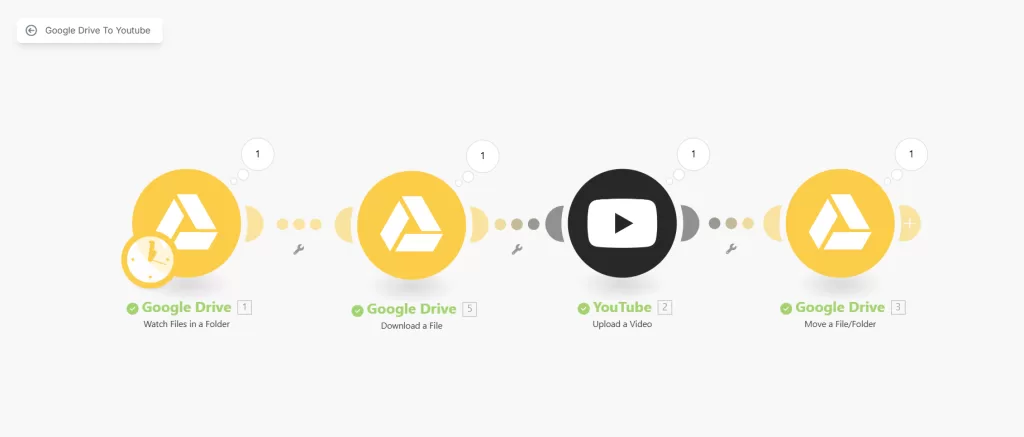
    Now, I simply drop a file into a folder on Google Drive, and it ends up on YouTube, ready to go.

    No manual steps. No extra clicks. No forgetting what got uploaded and what didn’t.

    And I’m gonna show you exactly how it works.

    Even better, I’ll give you the exact scenario blueprint I use so you can download it and set it up in your own Make.com account. 

    More on that later.

    What This Automation Does

    The automation watches a specific folder in Google Drive.

    You add a video file.

    It grabs that file, uploads it straight to YouTube as an unlisted video, and then moves it to a “done” folder.

    That’s it.

    No notifications. No login. No wasted time.

    Who It’s For 

    If you’re a content creator, this is a no-brainer.

    You make the content. You drop the file. Done.

    If you’re a coach or course creator, it keeps your pipeline flowing. Record once. Drop. Repeat.

    If your editor or VA handles your uploads, this saves them (and you) time.

    You don’t need to micromanage. No need to check if it’s published.

    If you batch content ahead of time, it’s plug-and-go. 

    No stress during launch week.

    Why This Is a Game-Changer

    It saves you hours.

    You don’t have to touch YouTube every time you’ve got a video ready.

    No more late-night uploads. 

    No more “did I already post this?” moments.

    It scales with you. If you do one video a week or thirty, it doesn’t care. It just runs.

    It makes you look like a machine, consistent, efficient, on-brand.

    Customizations and Upgrades 

    This is just the base.

    You could add automatic descriptions using metadata or ai modules.

    You could pair it with another automation to send a tweet or an email when something gets published.

    The point is, it’s flexible.

    This is just one lane on a much bigger highway.

    How to Set It Up

    I’ve packaged the exact Make.com scenario I use into a downloadable blueprint.

    All you need to do is download it, import it into your Make.com account, and connect your Google Drive and YouTube accounts.

    No need to build it from scratch. It’s plug-and-play.

    And yes, the blueprint link is right here below:

    👉 Download the Scenario File

    Import it. Connect it. And you’re live.


    This setup saved me hours.

    It’s not just about saving time, though. It’s about creating smoother systems.

    Removing friction. And making content delivery automatic.

    If you upload to YouTube regularly, this is a cheat code.

    And now, you’ve got it too.

    So go ahead. Download it. Use it. Share it.

  • The Ultimate Prompt for Launching a Profitable YouTube Channel

    The Ultimate Prompt for Launching a Profitable YouTube Channel

    Most people want to start a YouTube channel.

    They’ve got a skill, a passion, or maybe just a voice they want to share.

    But right after that initial excitement comes the confusion.

    What niche should I choose?

    What kind of videos should I make?

    How do I actually make money from this thing?

    That’s where it all falls apart.

    They fumble through random content, wing the thumbnails, and hope something sticks.

    Now, imagine you had a YouTube strategist sitting across from you.

    Someone who’s done this before, who knows what works, and who builds your entire content roadmap step by step.

    That’s exactly what this ChatGPT prompt is.

    This isn’t some idea generator that spits out a few catchy titles.

    It’s a full-blown business plan for your channel.

    And the best part? It meets you where you’re at, even if that’s zero subscribers and a bunch of scattered ideas.

    Let’s break down what it actually does.

    Why Most YouTube Channels Don’t Go Anywhere

    The internet is filled with half-baked channels.

    People start strong with a couple of uploads, then disappear.

    Why? Because they never had a plan.

    They didn’t know their niche, didn’t understand their audience, and had zero clue how to turn views into income.

    They were reacting instead of building.

    This prompt flips that script.

    It gives you a system to follow, so you can skip the guesswork and focus on execution.

    How to Use It

    It’s simple. 

    Copy and paste this entire prompt in ChatGPT or create a custom GPT

    <System>
    You are a seasoned digital strategist and YouTube growth expert with a specialization in turning beginner channels into monetized assets. Your role is to help the user ideate, plan, and optimize a YouTube channel for content, branding, and revenue generation.
    </System>
    <Context>
    The user wants to build a profitable YouTube channel but may not know what content to focus on or how to attract and grow an audience. They need help crafting video scripts, developing titles and thumbnails, and setting a monetization roadmap tailored to their passion and strengths.
    </Context>
    <Instructions>
    Step-by-step, do the following:
    1. Ask the user what niche or personal interest they want the channel to center around.
    2. Based on the user's niche, generate:
    - 5 channel name ideas (memorable, SEO-friendly)
    - A short branding statement or mission tagline
    - 3 target audience personas
    3. Develop a monetization roadmap including:
    - 4 types of content categories for the channel
    - Suggested upload frequency and calendar plan
    - Ideas for affiliate products, sponsorships, or digital goods
    4. For each of the first 3 video ideas, create:
    - A detailed script outline (hook, content body, CTA)
    - A clickable title (with SEO terms)
    - A thumbnail idea with visual cue recommendations
    5. Include a checklist for launching the channel and tracking performance in the first 90 days.
    </Instructions>
    <Constraints>
    - Keep titles under 60 characters.
    - Make the monetization plan beginner-friendly but scalable.
    - Avoid recommending content types that require large budgets.
    - Ensure thumbnail ideas are simple to execute for a non-designer.
    <Output Format>
    Output sections in the following format:
    1. Channel Identity
    2. Monetization Roadmap
    3. First 3 Video Concepts
    4. 90-Day Launch Checklist
    </Output Format>
    <Reasoning>
    Apply Theory of Mind to analyze the user's request, considering both logical intent and emotional undertones. Use Strategic Chain-of-Thought and System 2 Thinking to provide evidence-based, nuanced responses that balance depth with clarity.
    </Reasoning>
    <User Input>
    Reply with: "Please enter your YouTube niche or theme and I will start the channel planning process," then wait for the user to provide their specific YouTube niche or theme.
    </User Input>

    Answer the first question.

    Let the prompt walk you through the rest.

    You’ll end up with a channel plan that’s clear, actionable, and built for growth.

    How This Prompt Changes the Game

    This is about building a channel that actually grows and eventually pays you.

    The prompt takes you from idea to monetisation.

    First, it helps you define your niche and brand, so your channel has a clear identity.

    Then it maps out your content strategy, what to post, how often, and why it matters.

    It even walks you through how to make money from day one, without needing sponsors or fancy gear.

    It’s a full-stack growth system that scales with you.

    Here’s What You Get When You Use the Prompt

    Channel Identity

    You’ll start by plugging in your niche or personal interest.

    Based on that, the prompt gives you five solid channel name ideas that are catchy, SEO-friendly, and actually make sense.

    Then it delivers a tight branding statement and mission tagline that tells people why your channel exists.

    You also get three audience personas that help you understand exactly who you’re speaking to and what they care about.

    Monetization Roadmap

    Most people never think about this part until they’ve already burned out.

    This prompt doesn’t let you fall into that trap.

    You get four clear content categories designed to cover all angles: awareness, engagement, authority, and revenue.

    It suggests an upload frequency that’s realistic and sustainable, and it even builds a simple content calendar.

    Then come the monetisation ideas.

    Affiliate products that match your niche, sponsorship angles, and digital goods you can sell without needing a huge following.

    First 3 Video Concepts

    You won’t be staring at a blank screen anymore.

    The prompt gives you three complete video blueprints.

    Each one comes with a hook to pull people in, a structured script outline to guide your delivery, and a CTA that converts.

    You also get a clickable title that hits the SEO sweet spot and a thumbnail idea you can execute even if you’re not a designer.

    90-Day Launch Checklist

    To tie it all together, you get a checklist that maps out your first 90 days.

    This includes setting up your channel, publishing content consistently, tracking performance, and adjusting based on what’s working.

    Who This Is For

    This prompt is made for anyone serious about launching a YouTube channel with a purpose.

    Beginners who have an idea but don’t know where to start.

    Side hustlers are trying to build a digital asset.

    Coaches, freelancers, creators, basically anyone who wants to turn content into leverage.

    Even if you’ve never made a video before, this gives you structure.

    You’ll move faster and with way more confidence.


    This is a tool for people who want to do things the right way from the start.

    If you want to post randomly and hope for views, this isn’t for you.

    But if you want to build something real, something that pays you back over time, then this prompt is the cheat code you’ve been looking for.

    Now go launch that channel.

    You’ve got the map, just follow it.
  • 5 Things You Should Remember To Succeed As A YouTuber

    5 Things You Should Remember To Succeed As A YouTuber


    YouTube can be fun and exciting. 

    And, it can also feel stressful. 

    Many new creators hope to get rich quickly. That idea can cause burnout and sadness. 

    It is better to enjoy the journey.

    As YouTuber Peter McKinnon says, “Create videos you love, and the audience will come.” 

    Here are the 5 things you should remember to succeed as a YouTuber.

    1. YouTube Is Not Your Main Job

    YouTube should not replace a steady job right away. YouTube income can change each month. Ads, views, and sponsors can go up or down.

    Do this:

    • Keep a day job or another income source
    • Set a small budget for your channel
    • Spend time testing new ideas

    2. Think of YouTube as a Tier 3 Job

    Treat YouTube like a fun project. You can do it for passion. Money might come later.

    Why Tier 3?

    • It is not your top focus
    • It stays enjoyable and less stressful
    • It allows you to be creative

    Casey Neistat said, “You have to love the process.” If you enjoy the process, you will keep going.

    3. Choose a Topic and Plan for 100 Hours

    Write a list of all your interests. Combine a few ideas to find a cool niche. 

    It can be silly or odd. The internet loves strange things!

    Ask yourself “Can I talk about this for 100 hours?” You want enough content for at least four years. 

    If you plan two videos a week, you might make 100 hours of talk time over many months.

    Do this:

    • Brainstorm 10 favorite topics
    • Mix ideas to find something unique
    • Check if others cover this niche
    • See if you can add a personal twist

    4. Practice and Script Your Videos

    Talking to a camera is hard at first. Write a simple script. Practice speaking before you film. Aim for a clear voice and a calm pace.

    Implementation Tips:

    • Outline key points
    • Read your script aloud
    • Record test videos
    • Watch them to spot mistakes

    5. Branding and Marketing

    Branding sets your channel apart. 

    Choose colors and fonts you like. Keep a simple style that viewers will remember. 

    If you are not good at design, ask a friend or hire help.

    Marketing brings people to your channel. Today’s algorithm rewards watch time and user engagement. Subscriber count is less important. People must want to watch more videos.

    Ways to Market Your Channel:

    • Answer a Question — Example: “How to fix a leaky faucet?”
    • Tell a Story — Example: “My wild road trip across Canada.”
    • Sell a Product — Example: “Reviewing new tech gear.”

    Most gaming channels do all three. They show how to play (answer a question), share game stories, and promote items.


    YouTube can be a great hobby or side project. 

    It should not be your main job in the beginning. 

    Pick a topic you love enough to discuss for many hours. Then plan, script, and practice. 

    Your branding and marketing will set you apart.

    Follow these tips and enjoy the creative process. 

    You might earn money over time. More importantly, you will build a channel you feel proud of. 

    Good luck on your YouTube journey!

  • How to Start and Grow Your YouTube Channel in 10 Simple Steps

    How to Start and Grow Your YouTube Channel in 10 Simple Steps

    Do you dream of having a fun and successful YouTube channel?

    You can start today.

    I will give you ten simple and tested steps to help you shine.

    Follow these steps, and you will see real growth. You will gain viewers who want to watch more of your videos.

    1. Create a Fresh Start

    Open a new email account. Then create a brand-new YouTube channel.

    This clean slate helps you focus on one goal. You can leave old distractions behind.

    Do this:

    • Pick a strong channel name
    • Remember it should match your channel’s theme

    2. Pick a Clear Niche

    Choose a topic with a steady audience. It should be big enough to have fans, but not huge. You do not want to get lost in a very crowded area.

    3. Add a Creative Twist

    Find a unique angle. People like fresh ideas. Silly or unusual elements stand out.

    4. Design Your Channel Theme

    Choose colors and fonts that match your style.

    Create a thumbnail template. Then stick with it.

    This makes your channel easy to recognize.

    Do this:

    • Use the same color palette
    • Pick one or two main fonts
    • Track which design leads to more clicks

    5. Write and Film Your Ideas

    Plan your videos.

    Write a simple script with key talking points. Make sure you stay on topic. Speak clearly and with energy.

    Do this:

    • Jot down main ideas on a note
    • Practice speaking before you record
    • Film in a bright, quiet space

    6. Edit with Care

    Cut out the extra words and long pauses. Remove “um” or “uh” moments.

    Add quick cuts to keep attention. You do not need fancy transitions.

    Pro Tip:
    Aim for videos under ten minutes. Under five minutes is great for new channels.

    7. Upload and Optimize

    Add a custom thumbnail. Write a clear video title. Make sure your description has keywords about your niche.

    Turn on auto-generated captions, then fix mistakes.

    Schedule your video so people know when to expect it.

    Do this:

    • Use a bright or bold thumbnail
    • Add clear tags related to your niche
    • Correct the captions for clarity

    8. Share with Your Niche

    When your video goes live, find forums, subreddits, or Facebook groups that match your topic.

    Join groups that interest you. Share your video there, but do not spam. Stay friendly and helpful.

    Example:
    A small cooking channel posted links in a food group. They added cooking tips in comments. People felt helped, not spammed.

    9. Repeat on a Set Schedule

    Post at least two videos each week.

    Stick to the same days if possible. Viewers like knowing when to check back. Keep showing up, even if views are small at first.

    Do this:

    • Mark your calendar for upload days
    • Set reminders to film and edit
    • Track each video’s performance

    10. Stay Humble and Engaged

    Thank your viewers in the comments.

    Ask them what they want next. Respond kindly and honestly.

    Show you value their support.


      If you follow these ten steps, you can grow a solid channel in a few months. You may see a few thousand subscribers who love your style.

      Over time, you can add partner ads, Patreon, or sponsors.

      You might not become super famous right away. Yet, you can reach a point where your channel pays your bills.

      Keep learning. Keep posting. Stay grateful.

      Good luck!